Nano Banana 2.1 vs GPT Image 2.5 sounds like a contest over which model makes prettier pictures. But the problems that actually cost you time are smaller. Will it spell the ticket price right? Will it leave the empty space you asked for, for your headline? Will a third round of edits quietly change the product? And when you pick “4K,” how big is the file you get?
We put those questions to both models on JXP on October 23, 2026. Both spelled every requested word correctly on a 1-credit poster, and both kept a mug’s printed text intact through three rounds of edits. The real differences showed up in three places: how literally each model followed the brief, how it handled layout, and how many pixels you get when you pick “4K.” That last one was the biggest surprise: the same label gave us files of very different sizes, as you’ll see in Test 4.
Both models are on the same site, so we paid for them from the same credit balance. We repeated the two baseline generation prompts three times per model, tested a three-step editing chain, and checked the downloaded files. We recorded completion times where available; one Nano Banana run was not timed.
Here’s the short version.
What we checked | Nano Banana 2.1 | GPT Image 2.5 (Flare) |
|---|---|---|
Poster text, 3 tries at 1 credit | 3 of 3 correct | 3 of 3 correct |
Followed “saxophone silhouette” literally | 3 of 3 | 2 of 3 (one added a player) |
“Right third” placement | Bottle extended left of the right-third boundary in all 3 runs | Whole bottle inside the right third in all 4 (incl. High) |
Three chained edits | Held the mug and its text; nothing extra added | Held the mug and its text; added a heart nobody asked for |
“4K” output size | 3712 × 4608 (17.1 MP) for 4 credits | 2576 × 3216 (8.3 MP) for 3 credits (Medium) |
Median time, 1K text-to-image | 47.6 seconds (5 timed runs) | 36.5 seconds (6 runs, Medium) |
How We Tested Nano Banana 2.1 vs GPT Image 2.5
Everything ran on JXP on October 23, 2026, in a regular browser. We used the same prompt text for both models and kept settings as close as the two tools allow.
Nano Banana 2.1: Text to Image and Image to Image, PNG, search options off.
GPT Image 2.5: the Flare variant, which is JXP’s default, PNG. We didn’t test Sunburst.
Test size: We generated 23 test outputs: 12 baseline images, two additional 1K High images, six chained edits, and three 4K images, excluding the Seedream source image. We judged every baseline result, not just the best one.
Edits: To keep things fair, the starting photo came from a third model, Seedream 5.0, so neither model was editing its own work.
Timing: We measured from clicking Generate to the moment the result appeared on the page.
Credits: The figures below are the costs JXP displayed before each run.
What “passed” means: For each result, we checked: every quoted word spelled exactly, the layout we asked for, no extra wording, and no unrequested subjects or decorations that materially changed the brief. Ordinary scene details, such as shadows or background scenery, didn’t count against a result. A pass means the image met that checklist when we inspected it at full size. It doesn’t mean every pixel was perfect or that the file was ready for print.
Two caveats before the results. Three runs per prompt shows a tendency, not a benchmark. And generation times depend on server load, so treat our seconds as a snapshot from a single morning.
Test 1: Poster Text Accuracy for 1 Credit Each
Short text on a poster is the first thing many people check, so we started there: a headline and two lines of small print.
A minimalist event poster for a fictional jazz night. Large headline at the top: “HARBOR LIGHT JAZZ”. Below it, a simple illustration of a saxophone silhouette against a deep navy harbor at night with warm yellow lights. At the bottom, two lines of small text: “Friday, November 14 · 8:00 PM” and “Pier 9 Warehouse · Tickets $25”. Flat vector style, cream and navy palette, no other text.
Both models ran at 4:5 and 1K, for 1 credit per image (GPT Image 2.5 on Medium). We also ran GPT Image 2.5 once on High, which costs 3 credits.
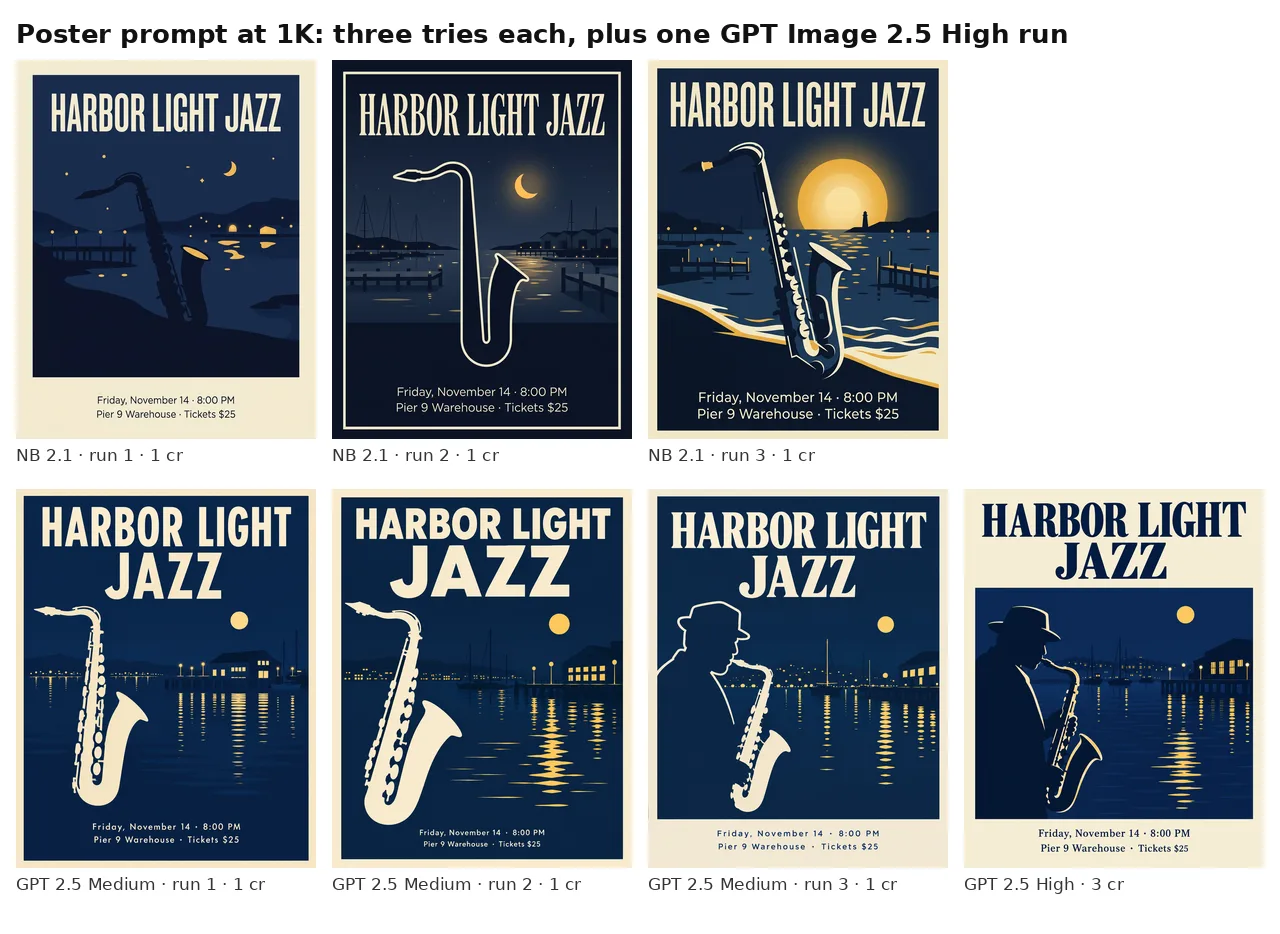
Text: a tie. We zoomed into every image. All seven posters had the headline and both small lines exactly right, including the middle dots, “8:00 PM,” and “$25.” No extra words appeared in any of them.
Following the brief: this is where they split. Nano Banana 2.1 drew a saxophone in all three runs, as asked. GPT Image 2.5 drew one in runs 1 and 2, but run 3 and the High run added a man in a hat playing the instrument. It looks good, but it’s a person the prompt never mentioned.
Layout: At 1K, GPT Image 2.5 broke the headline into two lines every time (“HARBOR LIGHT / JAZZ”). Nano Banana 2.1 kept it on one line every time. The prompt didn’t specify either way, so neither is wrong. But if your design needs one or the other, say so in the prompt.
Test 2: A Product Shot With Placement Rules
Next, a product photo with layout instructions a designer would actually give.
A product photo of a matte sage-green insulated water bottle with a bamboo cap, standing on a light oak table. The bottle has a small white printed label that reads “TIDE 750 ML”. Soft morning window light from the left, gentle shadow to the right, plain warm-white wall. Place the bottle in the right third of the frame and leave the left half empty for headline copy. Photorealistic, no other text.
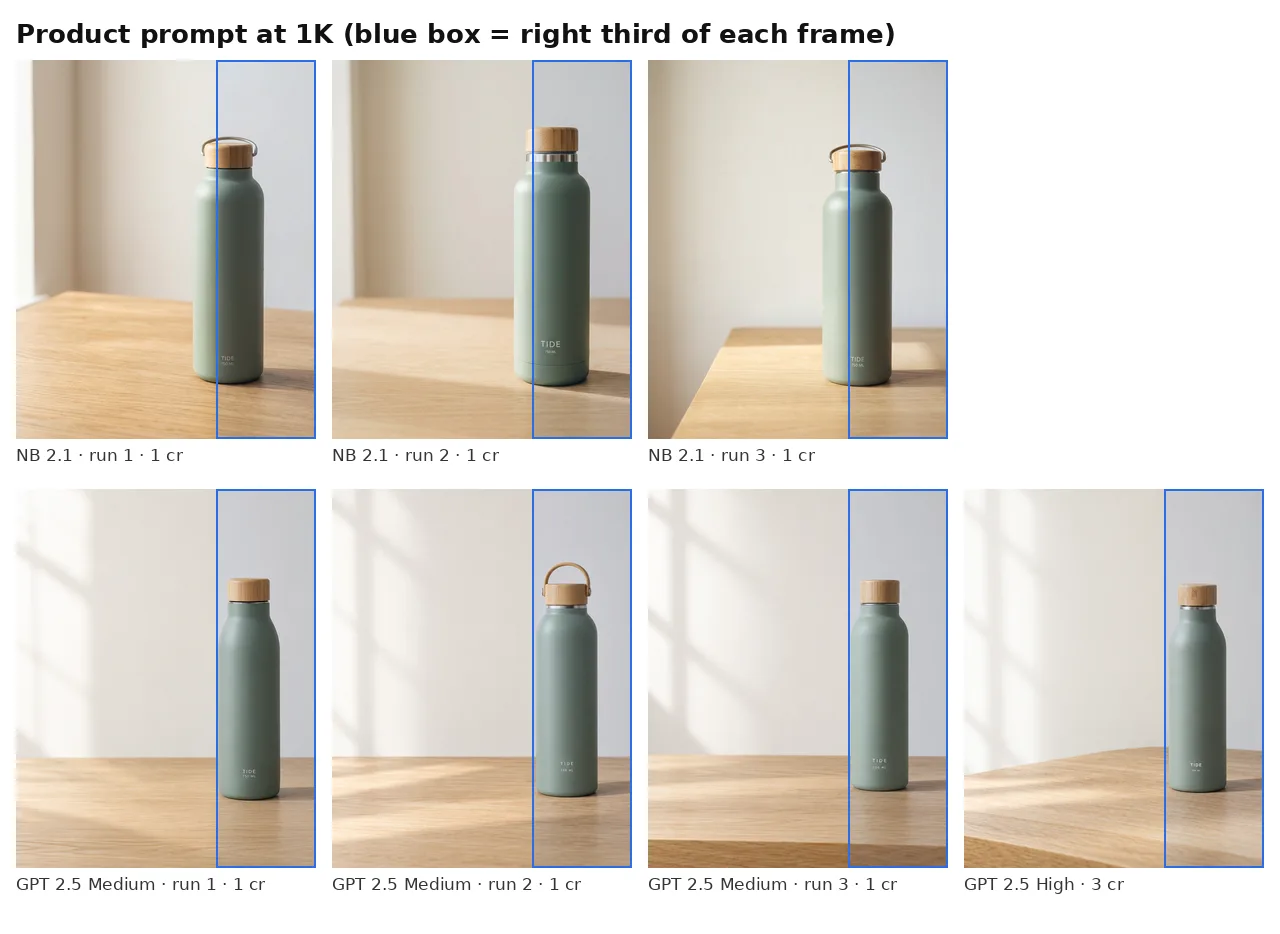
Placement: The blue box in each image marks the right third. GPT Image 2.5 placed the entire bottle within the right third in all four of its images, just inside the line. Nano Banana 2.1 placed it across the boundary in all three, with part of the bottle in the middle third. Both kept the requested left half empty. “Place the bottle in the right third” can also mean only the bottle’s center should land there, so we’d call this a visible difference in interpretation rather than a clear fail. If you need the whole object inside a zone, say so in the prompt.
Light: Both lit the bottle from the left. GPT Image 2.5 added window-frame shadows on the wall in all four images, which made the “morning window light” more obvious.
The label: Here, both models read our prompt the same way, and not the way we meant it.
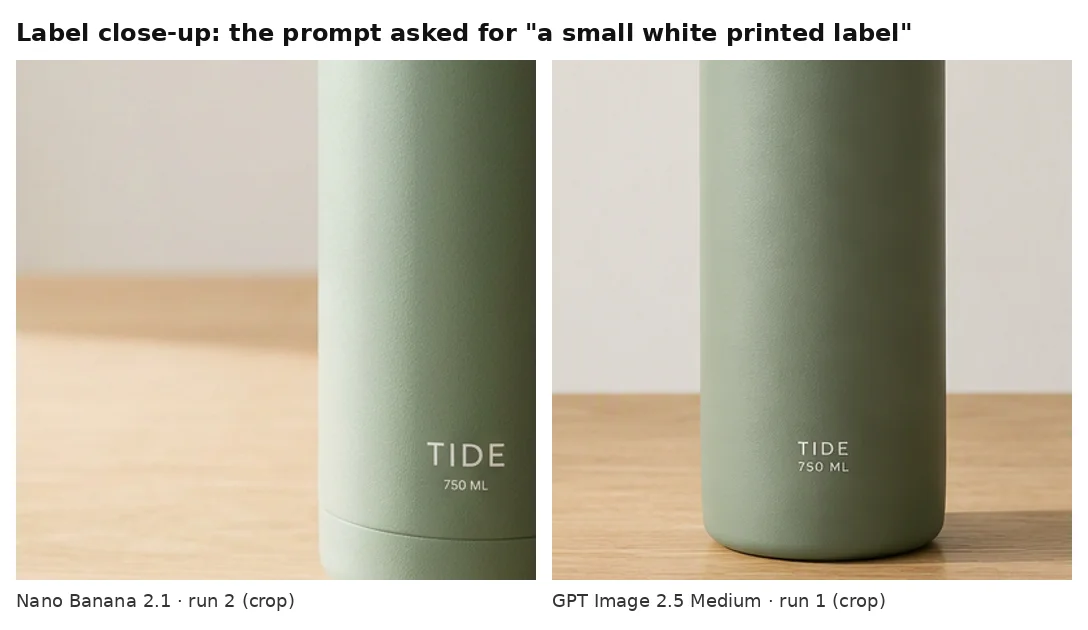
Neither model added a separate white label in any of the seven images. Both printed “TIDE” and “750 ML” in white, straight onto the bottle, spelled correctly every time. Since both models did the same thing, we’d treat this as an ambiguous prompt rather than a model failure. If you want a sticker-style label, describe it as one, for example “a white rectangular sticker label.”
Same Credits: Three Tries or One High-Quality Image?
This is the comparison JXP makes easy, because both tools draw from one credit balance.
Model and setting | Credits per 1K image |
|---|---|
Nano Banana 2.1 | 1 |
GPT Image 2.5 Flare, Low or Medium | 1 |
GPT Image 2.5 Flare, High | 3 |
GPT Image 2.5 Flare, Extra high | 5 |
GPT Image 2.5 Flare, Max | 9 |
So 3 credits buys either three Nano Banana 2.1 images, three GPT Image 2.5 Medium images, or one GPT Image 2.5 High image.
Our single High run per prompt showed no clear advantage on these two briefs. The High poster still added the saxophone player, and the High product shot handled placement and the label the same way the Medium runs did. Here, three Medium tries simply gave us more options to pick from.
One extra run per prompt is far too few to judge High in general. It may matter more for fine textures or dense detail. Our practical suggestion: draft on Medium, and try High once you have a prompt that already works.
Test 3: Three Edits in a Row
A single successful edit does not show how well an image will survive several revisions. The harder question is what happens after several rounds, when each new edit starts from the last result and small changes can pile up.
We started from the same Seedream 5.0 photo: a mug printed with “MORNING RITUAL” next to a croissant on a café counter. Then we ran three rounds on each model, uploading each result as the reference for the next round:
“Change the background to a sunny outdoor picnic table in a park. Keep the mug, its printed text, the croissant, the plate, and the camera angle the same.”
“Replace the croissant with a small plate of three fresh strawberries. Keep everything else the same.”
“Add a small handwritten paper tag leaning against the mug that reads ‘Have a good day’. Keep everything else the same.”
Settings were 1:1 and 1K with one reference image, and JXP showed 1 credit per round on both models. GPT Image 2.5 ran on Medium.
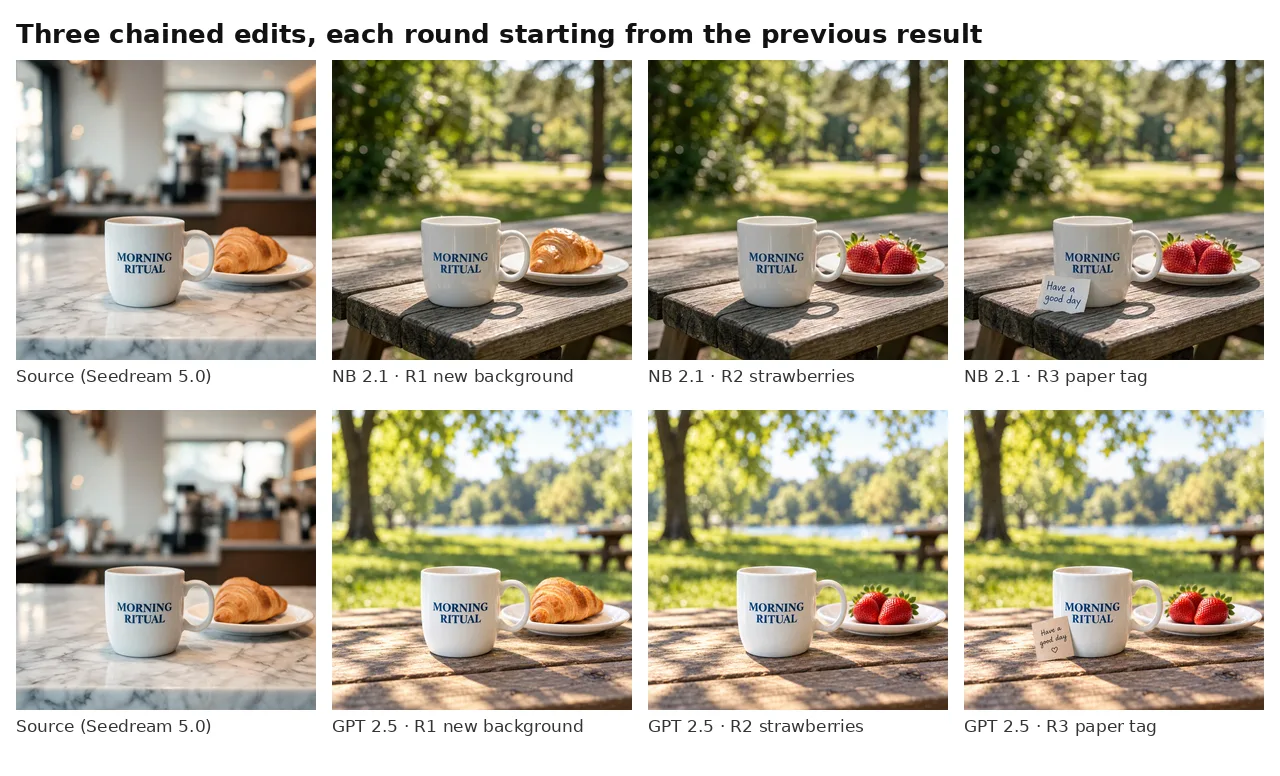
Both models handled this better than we expected.
The mug: After three rounds, “MORNING RITUAL” was still spelled correctly on both. The mug shape and handle position looked the same as in the source.
The swap: Both replaced the croissant with three strawberries, as asked.
The tag: Both wrote “Have a good day” correctly. GPT Image 2.5 also drew a small heart under the words, which we didn’t ask for.
The background: In round 1, Nano Banana 2.1 kept a tighter, closer framing. GPT Image 2.5 opened the scene up with a lake and extra picnic tables. Both stayed stable in rounds 2 and 3.
The pattern matches the poster test. Nano Banana 2.1 tended to do exactly what we wrote. GPT Image 2.5 sometimes added an unrequested subject or decoration, like the saxophone player and the heart. Its wider park scene in round 1 is different: that’s background scenery, a style choice rather than a change to the brief. Whether the extras are a plus depends on the job: a mood board can use them, but a product listing usually can’t.
Test 4: What “4K” Really Means on Each Model
Both tools offer a 4K option, so we ran the poster prompt at 4:5 and 4K on each, then checked the downloaded files.
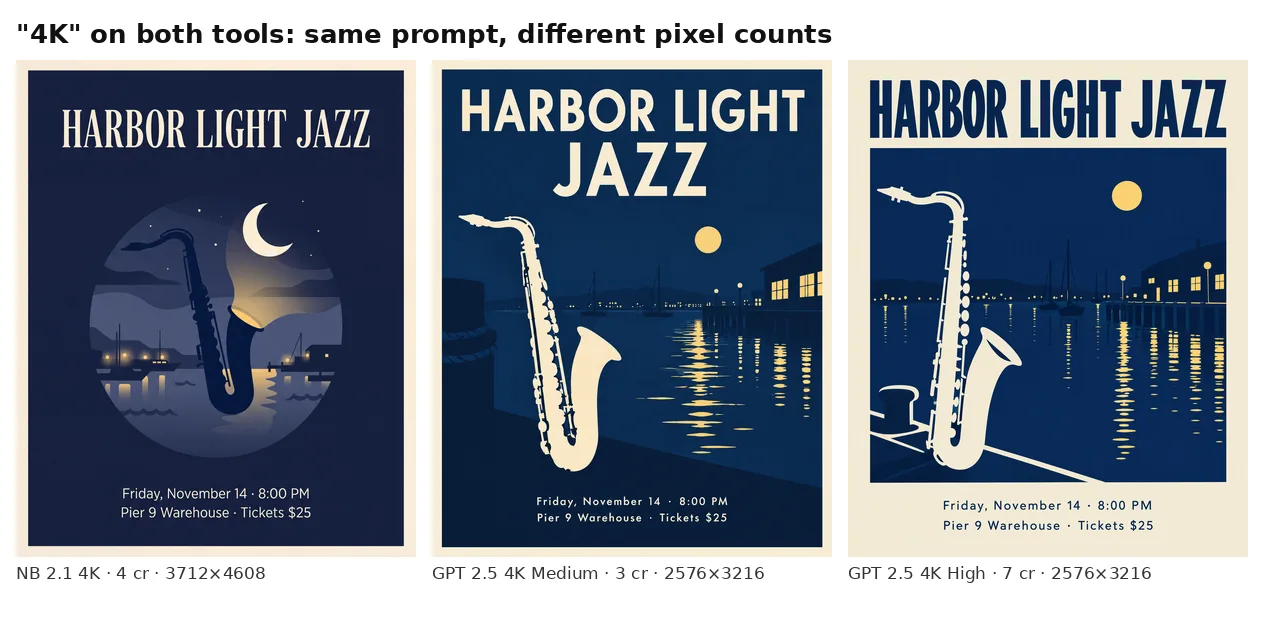
Run | Credits shown | Downloaded size | Megapixels | File size |
|---|---|---|---|---|
Nano Banana 2.1, 4K | 4 | 3712 × 4608 | 17.1 | 15.7 MB |
GPT Image 2.5 Flare, 4K Medium | 3 | 2576 × 3216 | 8.3 | 5.1 MB |
GPT Image 2.5 Flare, 4K High | 7 | 2576 × 3216 | 8.3 | 3.4 MB |
On JXP, the same “4K” label produced very different files. Nano Banana 2.1’s 4K output had about twice as many pixels as GPT Image 2.5’s, for 4 credits instead of 3 (Medium) or 7 (High). Raising GPT Image 2.5 from Medium to High didn’t change the pixel size at all.
The larger file provides more pixels for resizing and cropping, but pixel count alone does not establish better resolved detail or print quality. To check, we cropped the same horizontal span of each poster around the small text and viewed it at actual pixels.
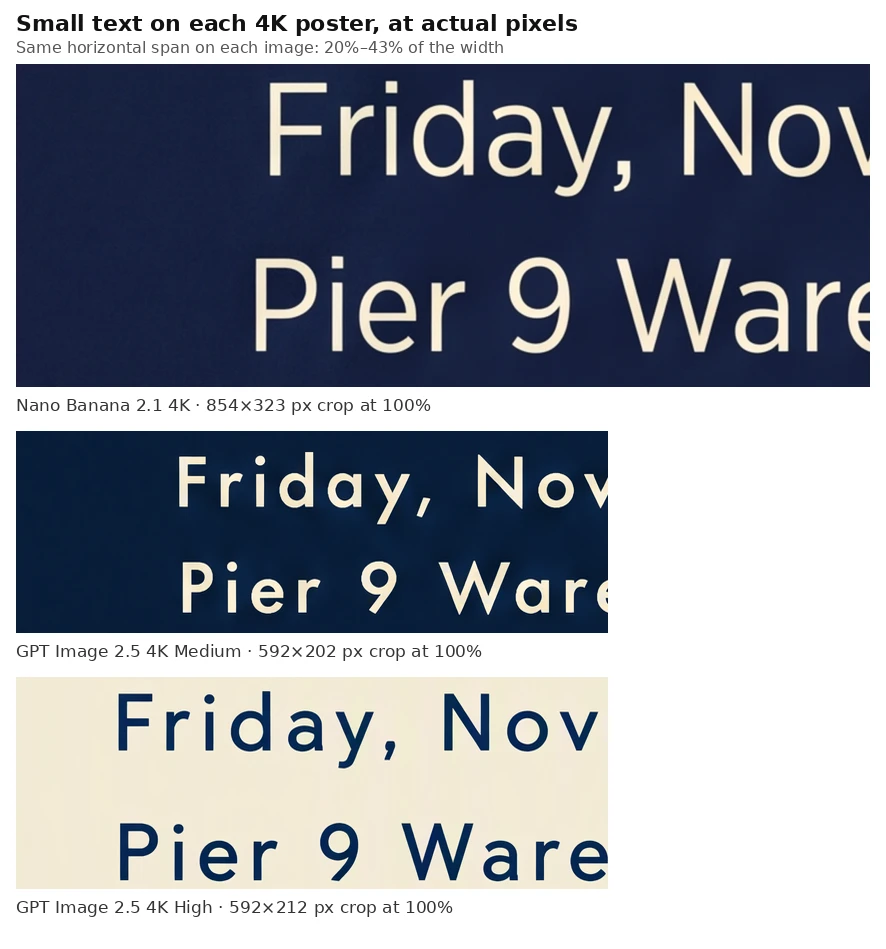
In all three crops, the letters had clean edges and were easy to read. The Nano Banana 2.1 crop simply shows the same kind of lettering with more pixels; on this flat poster, we didn’t see extra detail beyond that. We also didn’t make test prints. If you only need a sharp image on screen, all three were enough.
One more file detail: neither model hit 4:5 exactly at 1K. Nano Banana 2.1 gave us 928 × 1152, and GPT Image 2.5 gave us 912 × 1152. Both are close, but check the file before dropping it into a fixed-size layout.
Speed: How Long Each Run Took
Runs (1K text-to-image) | Fastest | Slowest | Median |
|---|---|---|---|
Nano Banana 2.1, 5 timed runs | 27.4 s | 83.6 s | 47.6 s |
GPT Image 2.5 Medium, 6 runs | 22.1 s | 54.4 s | 36.5 s |
GPT Image 2.5 High, 2 runs | 30.1 s | 42.2 s | n/a |
GPT Image 2.5 on Medium was faster in this batch. For edits, Nano Banana 2.1 was steadier (36.8, 36.8, and 39.8 seconds), while GPT Image 2.5 ranged from 25.0 to 56.5 seconds. At 4K, Nano Banana 2.1 took 54.8 seconds, GPT Image 2.5 Medium took 32.8 seconds, and High took 51.8 seconds.
The spread within each model, from 27 to 84 seconds for Nano Banana 2.1, was bigger than the gap between the two models. We wouldn’t choose a model on speed from numbers like these.
Nano Banana 2.1 vs GPT Image 2.5: Which Should You Use?
Based on what we saw, here’s how we’d split the work.
Pick Nano Banana 2.1 when:
You want the result to match your words closely. In our tests, it didn’t add people or decorations we hadn’t asked for.
You want the larger output size. Its 4K file was 3712 × 4608 for 4 credits, though our crop check didn’t show extra detail on a flat poster.
Pick GPT Image 2.5 when:
You want objects kept tightly inside a zone. In our product test, it put the whole bottle inside the right third every time.
You’d like the model to add some atmosphere of its own, such as window shadows or a wider scene.
You want to choose the quality level. Medium was enough for our prompts, but the slider is there when you need it.
Use either one for: short text on posters, multi-round edits that need to keep a product’s printed name, and cheap 1K drafts. Both got the poster text right, and both preserved the product name through the editing chain, although GPT Image 2.5 added an unrequested heart. Both cost 1 credit per 1K image (GPT Image 2.5 on Medium).
For a deeper look at Google’s model alone, see our Nano Banana 2.1 review. For how it compares with Google’s higher-end model, see Nano Banana 2.1 vs Nano Banana Pro.
Nano Banana 2.1 vs GPT Image 2.5 FAQ
Is Nano Banana 2.1 better than GPT Image 2.5?
Not across the board. In our tests, they tied on poster text accuracy, and both kept the mug’s printed text through three chained edits. Nano Banana 2.1 followed the brief more literally and produced larger 4K files. GPT Image 2.5 kept the whole product inside the zone we named.
Which model renders text better?
On our poster prompt, neither made a mistake. All seven images had the headline and both small lines exactly right. Text that’s longer or denser than our two short lines could give different results, so check every word in your own images.
How much do Nano Banana 2.1 and GPT Image 2.5 cost on JXP?
At 1K, both start at 1 credit per image. Nano Banana 2.1 costs 1, 2, or 4 credits for 1K, 2K, or 4K. GPT Image 2.5 Flare ranges from 1 credit (1K Low or Medium) to 25 credits (4K Max), depending on resolution and quality.
Is GPT Image 2.5 High worth the extra credits?
We can’t say from our tests. Our single High run per prompt (3 credits at 1K) showed no clear advantage over Medium on these two briefs, but one run is not enough to judge. Draft on Medium, then try High on a prompt that already works.
Does “4K” mean the same thing on both models?
No. On JXP, Nano Banana 2.1’s 4K poster was 3712 × 4608 pixels, while GPT Image 2.5’s was 2576 × 3216, at both Medium and High quality. More pixels don’t automatically mean more detail, so check the downloaded file at 100% before you decide.
Start With the Job: Run Your Own Comparison
After four tests, the most useful thing we can say about Nano Banana 2.1 vs GPT Image 2.5 is that neither one simply wins. Nano Banana 2.1 did what we wrote, and gave us bigger files when we asked for 4K. GPT Image 2.5 kept the product fully inside the zone we named, but it sometimes added extras.
So the best way to choose is to test your own brief. Here’s the method we used, cut down to five steps:
Pick one real job. Use a poster, product shot, or edit you actually need, not a test prompt that tries to check everything at once.
Write your checklist first. List the exact words, where things should go, what must stay the same, and what must not appear.
Match the settings. Use the same prompt, ratio, resolution, and format on both models. On GPT Image 2.5, pick your variant (we used Flare) and start at Medium, so both cost 1 credit at 1K.
Run it more than once. Two or three tries show whether a good result is a pattern or a lucky draw.
Check the downloaded file. Zoom to 100%, reread every word, count the objects, and check the pixel size if you plan to print or crop.
The number that matters isn’t the price of one image. It’s how many credits it takes to get an image that passes your checklist.