This Nano Banana 2.1 review covers nine test categories and 13 generations on JXP, run on October 9, 2026, three days after Google released the model. We also ran two matching prompts on Nano Banana 2, bringing the full comparison to 15 outputs. For every run we logged the time and the displayed credit cost, checked the output dimensions, and read every word of rendered text.
The short version: Nano Banana 2.1 spelled every requested word correctly, drew an accurate chart, and returned a true 4096 × 4096 file at 4K. It also put a bottle in the wrong hand, obeyed one edit rule so literally that the text became hard to read, and invented three facts about itself with Web Search off.
Nano Banana 2.1 Review: Quick Verdict
Text rendering: every requested word, number, and symbol was spelled correctly across two posters, an infographic, and a chart. Two poster lines changed from mixed case to capitals.
Counts and charts: object counts were exact, and three bars matched their values.
Resolution: 4K returned a 4096 × 4096 PNG, and 2K at 4:1 returned 4128 × 1024.
Editing: two edits changed only what we asked, but one left dark type on a dark background.
References: face and outfit carried over, but the model ignored which hand we asked for.
Web Search: the same prompt went from 0 of 3 correct facts to 3 of 3 with the option on.
Speed and cost: 15.7 to 64.5 seconds per image, and a displayed cost of 19 credits for the 13 Nano Banana 2.1 generations.
What Is Nano Banana 2.1?
Nano Banana 2.1 is Google’s Flash-tier model for image generation and conversational editing. Google’s model page describes it as an update to Nano Banana 2 (Gemini 3.1 Flash Image) and as the more efficient counterpart to Nano Banana Pro.
Nano Banana 2.1 Release Date and Model ID
The Gemini API changelog lists the release on October 6, 2026, under the model ID gemini-nano-banana-2.1. The same entry marks gemini-3.1-flash-image, the model behind Nano Banana 2, as deprecated with no shutdown date announced.
Key Specs
Spec | Documented value |
|---|---|
Model ID |
|
Inputs | Text, image, video, PDF |
Output resolutions | 1K (default), 2K, 4K |
Reference images | Up to 14 (up to 4 characters and 10 objects) |
Grounding | Google Web Search and Image Search |
Thinking levels | Minimal, medium (default), high |
Google also lists better visual quality, prompt adherence, and text rendering, plus a fix for tiling artifacts on very wide images. Those are Google’s claims. The rest of this Nano Banana 2.1 review covers what we could check ourselves.
How We Tested for This Nano Banana 2.1 Review
Where and when: the Nano Banana 2.1 workspace on JXP, on a paid account, on October 9, 2026.
What: nine test categories covering 13 first-run generations, ten text-to-image and three image-to-image, all saved as PNG, plus two comparison runs on Nano Banana 2.
Timing: seconds from clicking Generate to the image appearing. Four runs were noted to the nearest second and are marked “about”.
Cost and size: the credit cost displayed on the Generate button, and pixel dimensions read from the returned file. For 11 of the 13 runs we also checked the account’s points log or balance, and each deduction matched the displayed cost.
Each test was a single first attempt, so the results are a snapshot, not a success rate. We did not test Image Search, more than two references, multi-turn edit chains, or thinking levels.
Test Results at a Glance
# | Test | Settings | Credits | Time | Result |
|---|---|---|---|---|---|
1 | Three-line coffee poster | 9:16, 1K | 1 | About 35 s | All three lines exact |
2 | Six-string infographic | 3:4, 1K | 1 | 47.5 s | All six strings exact |
3 | Object counts and positions | 1:1, 1K | 1 | About 45 s | Counts correct; one placement loose |
4 | Three-bar chart | 16:9, 1K | 1 | About 46 s | Labels, values, and heights correct |
5 | Product photo with a label | 1:1, 4K | 4 | 64.5 s | 4096 × 4096, label correct |
6 | Panoramic landscape | 4:1, 2K | 2 | 27.2 s | 4128 × 1024, no visible seams |
7 | Background-only poster edit | 1 reference, 1K | 1 | About 51 s | Edit scope respected; contrast poor |
8 | Two-reference composite | 2 references, 1K | 2 | 24.8 s | Identity kept; wrong hand |
9 | Fact card, Web Search on vs off | 1:1, 1K, two runs | 2 and 1 | 17.6 s and 41.2 s | 3 of 3 facts with search, 0 of 3 without |
Three more generations (a second poster, a portrait reference, and a product background swap) displayed 1 credit each and are described inside the tests. Four tests below include the full prompt, which you can paste straight into the workspace.
Nano Banana 2.1 Text Rendering Test
Text is a common failure point for image models, so we started there.
Test 1: Three-Line Coffee Poster
Create a minimalist vertical specialty coffee poster on warm cream paper. Center a matte black coffee cup on a small walnut table, with soft morning window light and subtle film grain. Add exactly these three lines of text and no other words: “BREW BOLD” at the top in large black sans-serif capitals, “MORNING STARTS HERE” directly below in smaller rust-orange capitals, and “CEDAR & CO.” at the bottom. Keep every letter fully readable and spelled exactly. Premium editorial advertising, clean grid, generous negative space.
All three lines came back exactly as written, with no extra copy, at 768 × 1376 pixels. The hierarchy matched too: a large black headline, a smaller rust subheading, and the brand line at the bottom.
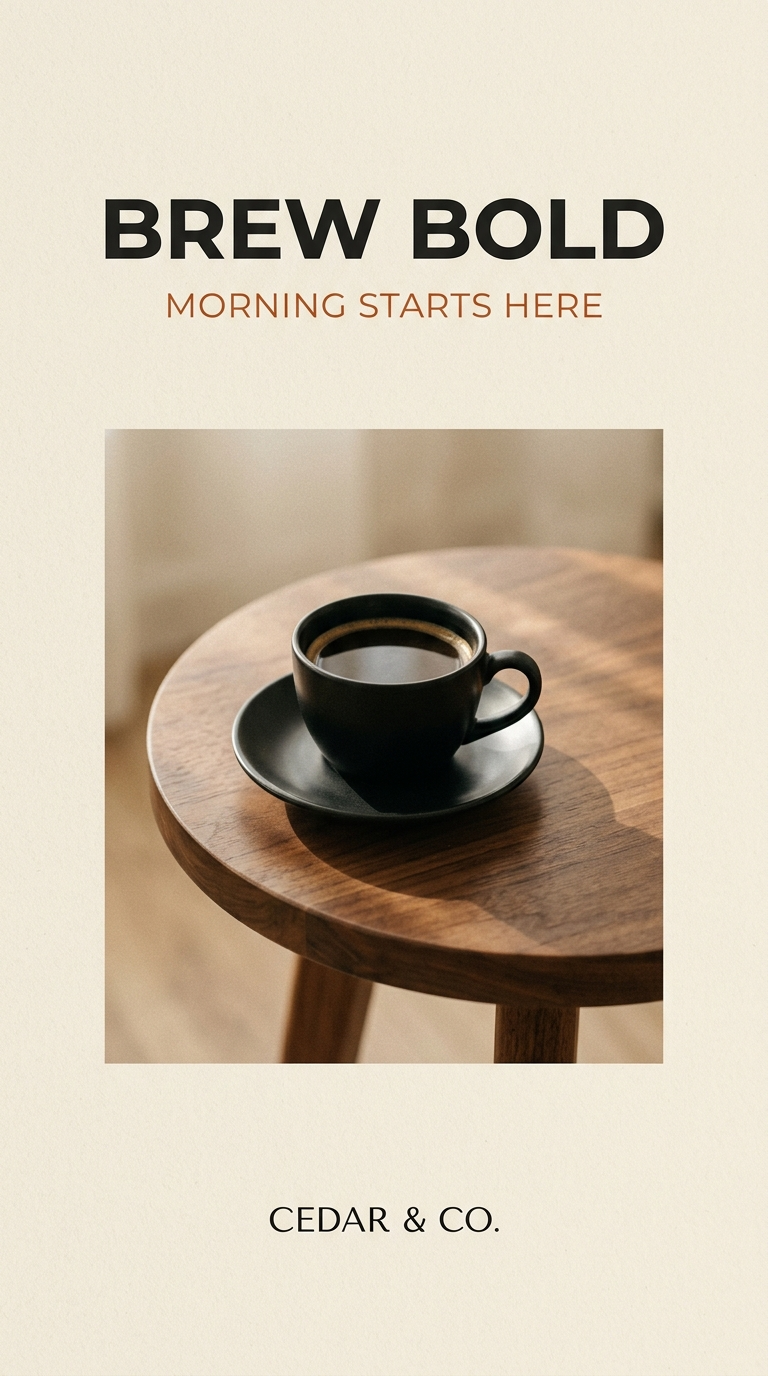
A second poster with a line of small print (“Doors open 7:30 PM · Saturday, November 14 · Tickets $25”) was also spelled correctly, in 31.9 seconds. One deviation there: the model set two lines in capitals that we had written in mixed case.
Test 2: Six-String Infographic
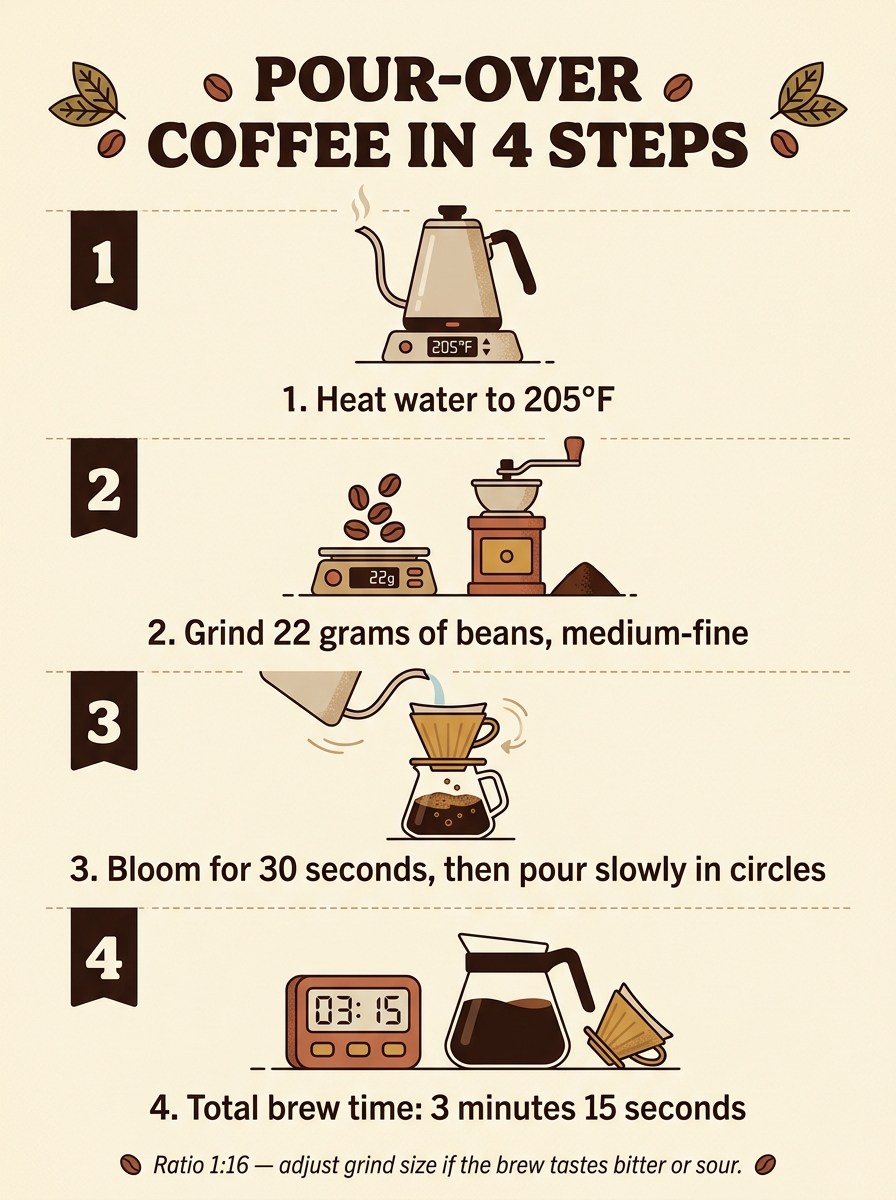
This was the hardest text test: a title, four numbered captions such as “Bloom for 30 seconds, then pour slowly in circles”, and a small-print footnote, with a degree symbol, a ratio, and an em dash.
All six strings matched the prompt character for character, down to “205°F” and “Ratio 1:16 — adjust grind size if the brew tastes bitter or sour.” Nano Banana 2.1 also carried the numbers into the icons without being asked: the kettle display reads 205°F, the scale reads 22g, and the timer reads 03:15.
Nano Banana 2.1 Prompt Adherence: Counts, Positions, and Charts
An image can look convincing while ignoring how many objects you asked for or where they belong.
Test 3: Object Counts and Positions
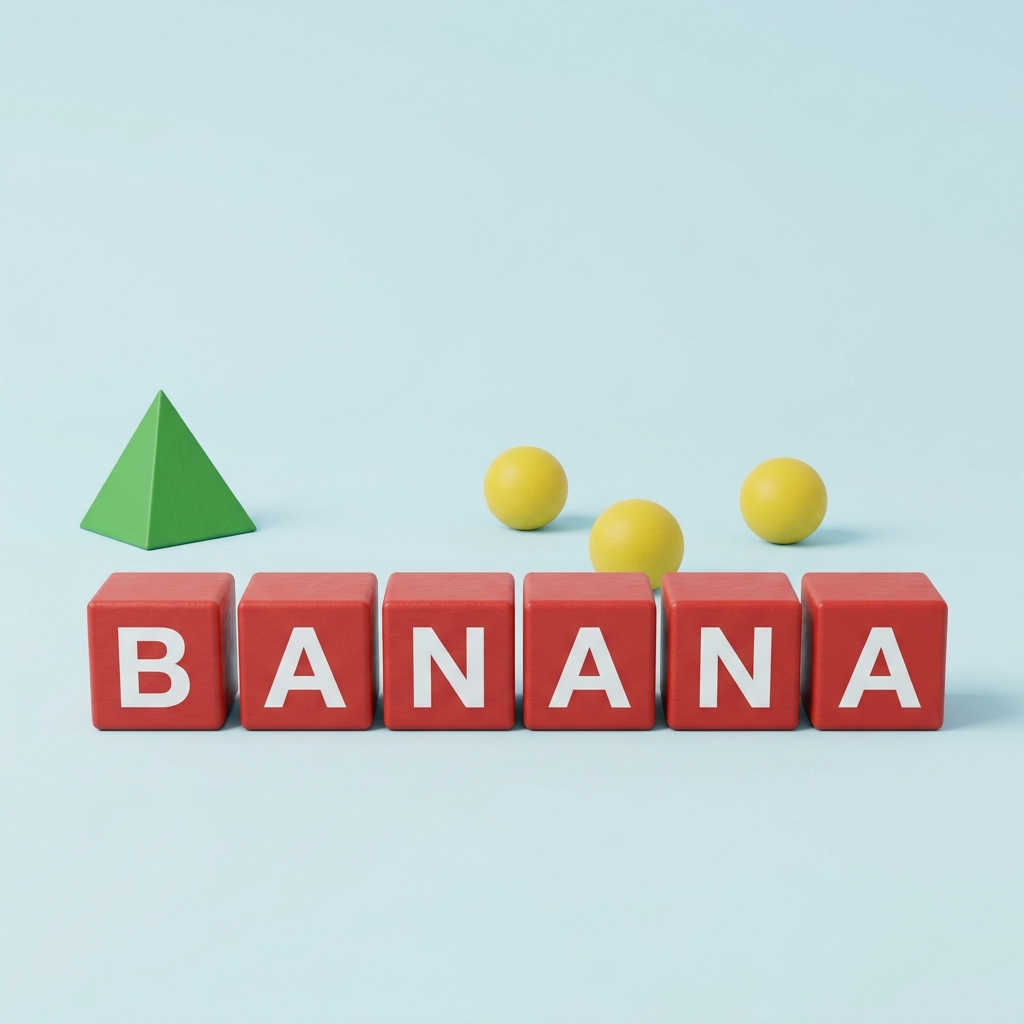
Create a square studio product photograph on a seamless pale-blue background. In the front row, place exactly six separate matte red wooden cubes in a straight horizontal line. Put one large white capital letter on each cube so the cubes spell “BANANA” from left to right, one letter per cube. Behind that row, place exactly three small yellow spheres. Place exactly one green pyramid to the left of the cubes. Do not add any other objects, letters, numbers, decorations, reflections, or text. Soft overhead light, realistic materials, centered camera, everything fully visible.
Nano Banana 2.1 got the counts right: six red cubes, three yellow spheres, one green pyramid, and nothing extra. The letters read B-A-N-A-N-A from left to right.
The placement was looser. The pyramid sits at the left end of the scene, but behind the first cube instead of clear of the row. That is the left side, not strictly “to the left of the cubes.”
Test 4: Three-Bar Chart
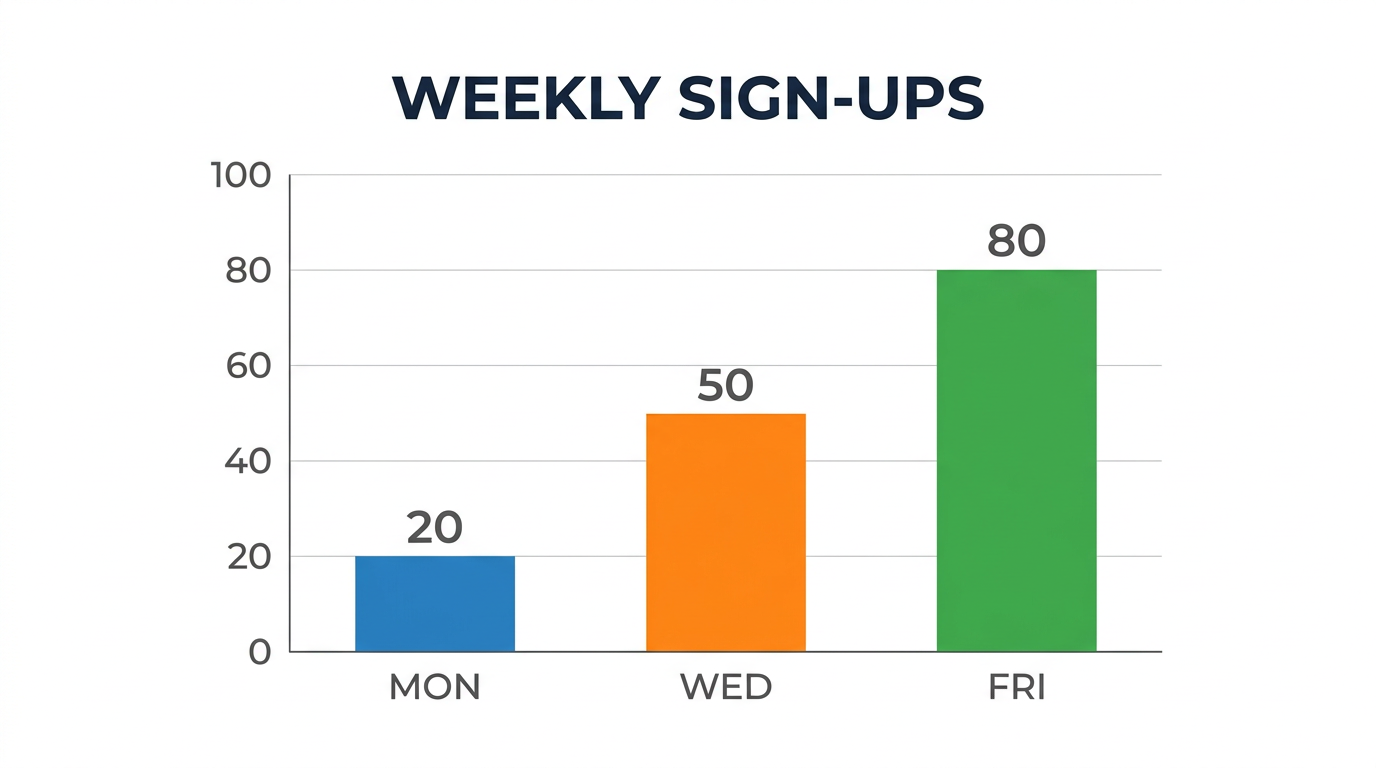
Create a clean horizontal 16:9 business infographic titled exactly “WEEKLY SIGN-UPS”. Show one simple vertical bar chart with exactly three bars on a shared baseline. Label the bars exactly “MON”, “WED”, and “FRI” from left to right. The values must be exactly 20, 50, and 80 respectively, with each number printed clearly above its bar. The 50 bar must be exactly 2.5 times the height of the 20 bar, and the 80 bar must be exactly 4 times the height of the 20 bar. Use blue for MON, orange for WED, and green for FRI. Add a y-axis from 0 to 100 with tick marks at 0, 20, 40, 60, 80, and 100. White background, flat vector design, no legend, no icons, no extra text.
A chart can spell every label correctly and still show false data if the geometry is off. This one held up. The title, day labels, values, and colors were all correct, and each bar topped out on the gridline for its value.
We supplied every number, which made this easy to verify. For a chart that matters, build it from real data and use the image model for styling.
Nano Banana 2.1 4K Image Quality and Wide Formats
Test 5: 4K Product Photo
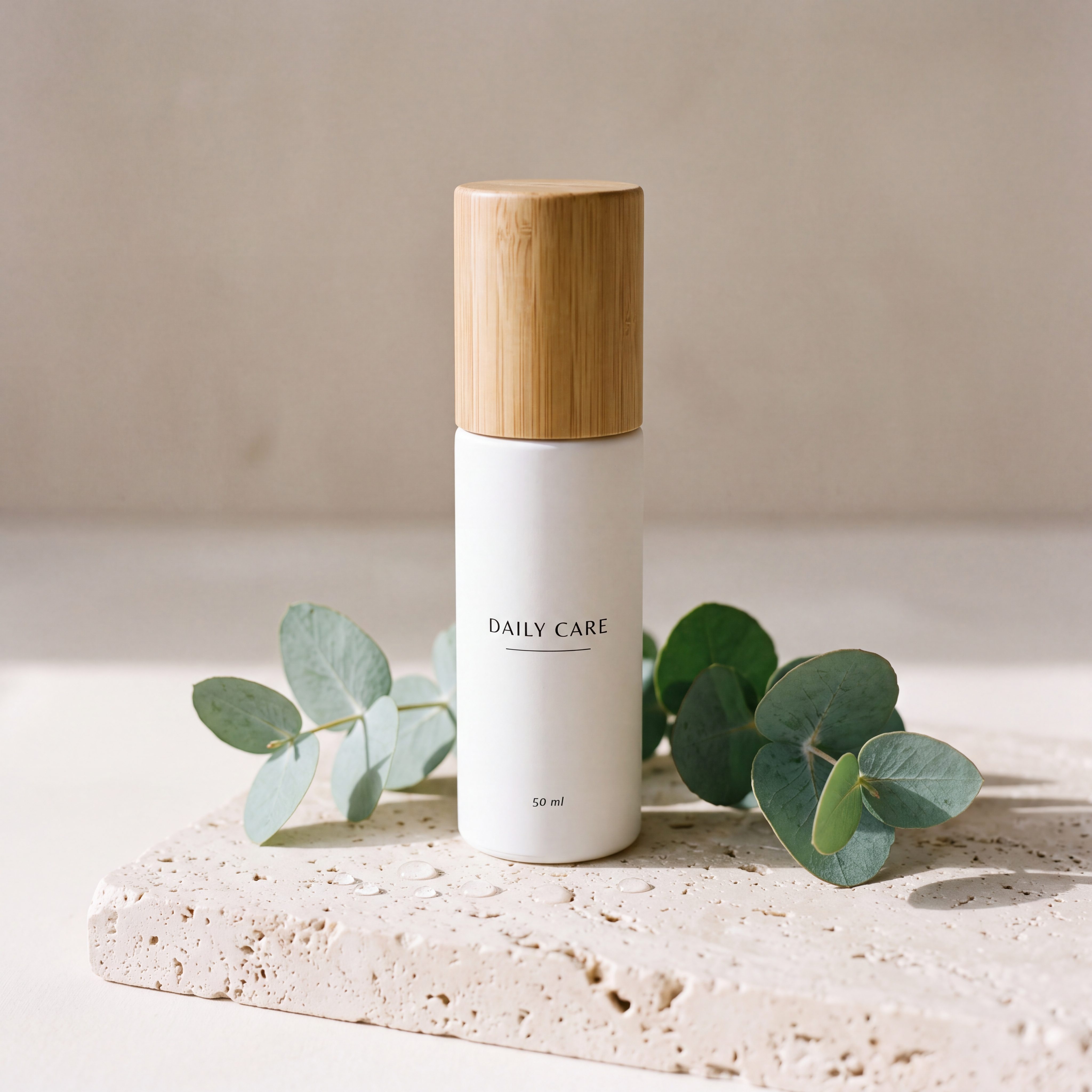
We asked for a matte white skincare bottle with a bamboo cap on travertine, lit from the left, with a label reading “DAILY CARE” and “50 ml” beneath it.
The file came back at 4096 × 4096 pixels. Viewed at full size, the label lettering is clean, the travertine shows individual pores, and the shadows fall to the right, matching the lighting we requested. The model placed “50 ml” near the base of the bottle instead of directly under the brand name.
This was the slowest run at 64.5 seconds and the most expensive at 4 credits.
Test 6: 4:1 Panorama at 2K
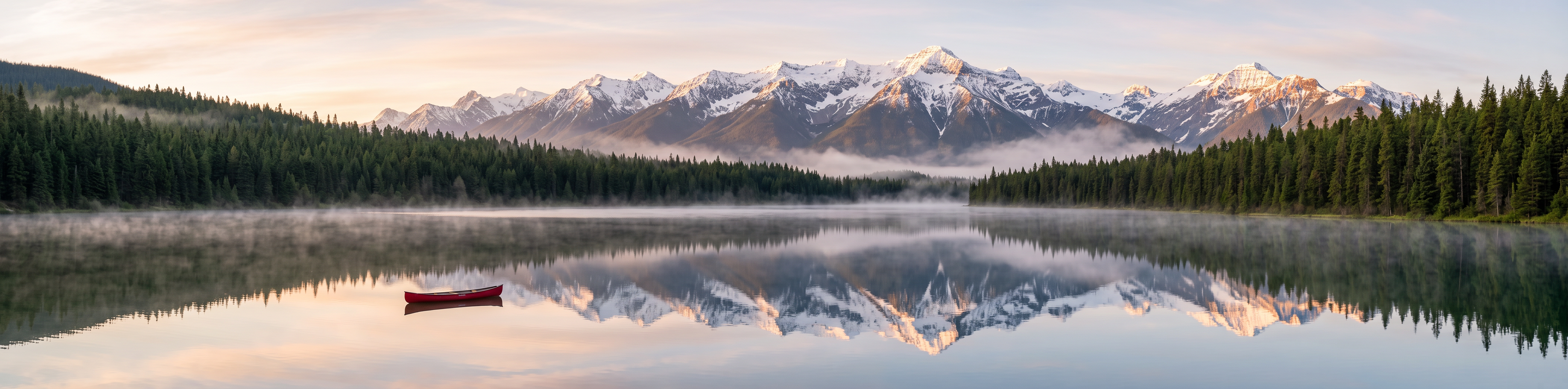
Google says the update fixes tiling artifacts on very wide ratios, so we generated a 4:1 alpine lake at sunrise with a red canoe in the left third. The 2K setting returned 4128 × 1024 pixels.
We enlarged each half of the image and found no seams, repeated mountain shapes, or breaks in the shoreline. One panorama cannot prove the fix across the board, but this one was clean.
Nano Banana 2.1 Image Editing and Reference Images
Test 7: Background-Only Poster Edit
We uploaded the coffee poster from test 1 and set a trap on purpose: change the background to dark navy, but keep the black and rust text colors.
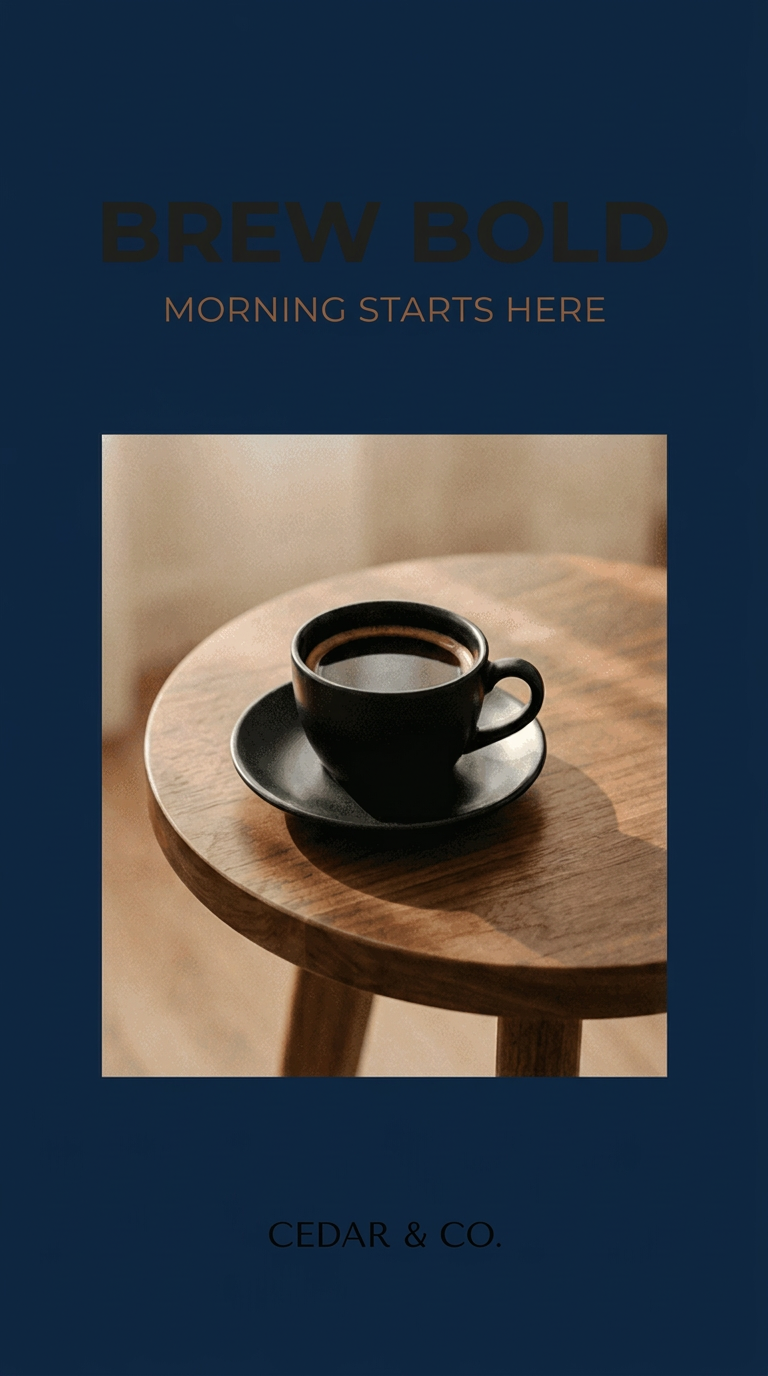
Edit the uploaded poster. Change only the outer cream paper background to a solid deep navy-blue background (#0B1F3A). Preserve the exact words, spelling, capitalization, font style, font size, color, alignment, and position of “BREW BOLD”, “MORNING STARTS HERE”, and “CEDAR & CO.” Preserve the coffee photograph, black cup, saucer, walnut table, crop, margins, aspect ratio, and every other element exactly. Do not add, remove, move, restyle, or recolor anything except the outer cream background.
The scope of the edit was respected. The background turned navy, and the wording, layout, and photograph were preserved.
The result is not usable, though. The black headline and brand line nearly disappear against the navy, and only the rust subheading stays easy to read. Nano Banana 2.1 followed the rule more literally than a designer would.
A follow-up we would try next, which we did not run for this review:
Keep the navy background and everything else. Change only the headline and brand-line colors to warm white for readable contrast.
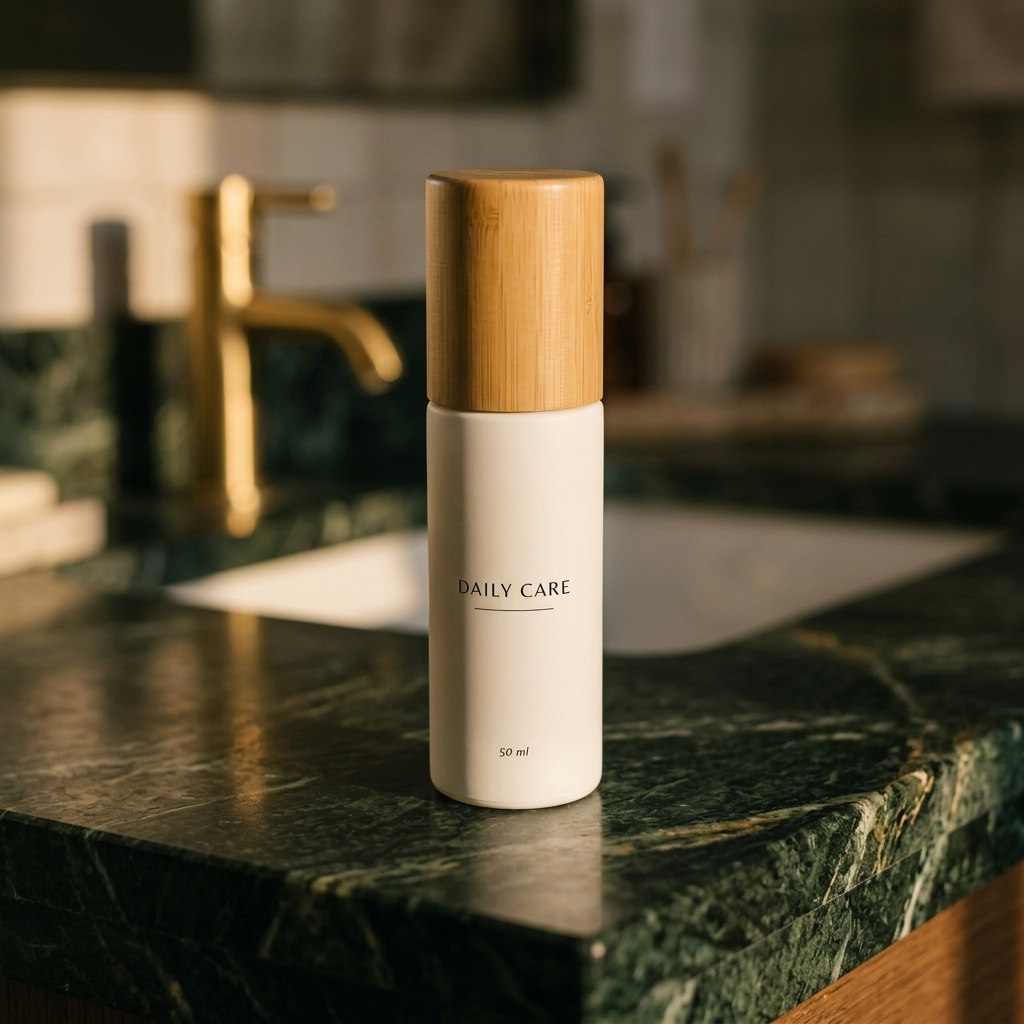
A second edit went better. We moved the bottle from test 5 onto a dark green marble counter and asked for the eucalyptus and travertine to be removed. The bottle shape, bamboo grain, “DAILY CARE”, and “50 ml” all stayed in place, and both props were gone. At 62.5 seconds, it was the slowest of our eleven 1K runs.
Test 8: Two-Reference Composite
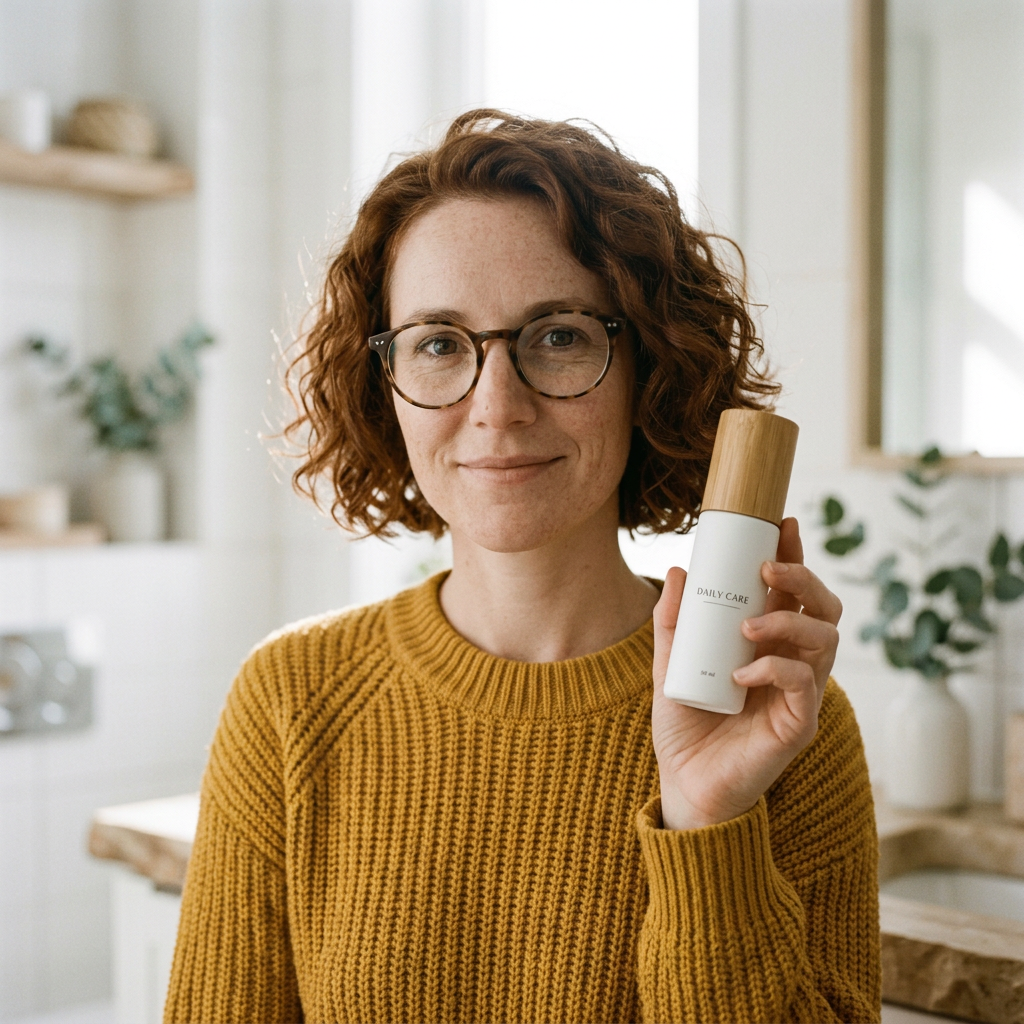
For the second reference, we first generated a portrait: a woman with curly auburn hair, freckles, round tortoiseshell glasses, and a mustard knit sweater. All of those traits appeared, in 15.7 seconds, our fastest run.
Then we uploaded that portrait and the product photo from test 5 together. We asked for her holding the bottle “in her right hand at chest height” in a bright bathroom, with her face, hair, glasses, sweater, and the bottle’s label kept the same.
What held: the face, hair, glasses, and sweater are recognizably the same. The bottle keeps its shape and cap, and “DAILY CARE” is readable. The hand looks natural.
What missed: the bottle is in her left hand, not her right. At 1K the “50 ml” line is too small to read.
The workspace displayed 2 credits: 1 for the 1K image and 1 for the second reference.
Nano Banana 2.1 Web Search Test
Test 9: Fact Card With Web Search On and Off
This was the most useful result of the day. We ran one prompt twice, asking for a fact card about Nano Banana 2.1 itself: its release date, model ID, and maximum number of reference images. The prompt told the model to use current information from Google’s documentation.
Fact requested | Web Search off (1 credit) | Web Search on (2 credits) | Google’s documentation |
|---|---|---|---|
Release date | December 6, 2023 | October 6, 2026 | October 6, 2026 |
Model ID | gemini-nano | gemini-nano-banana-2.1 | gemini-nano-banana-2.1 |
Max reference images | Not supported | 14 | 14 |
Both cards look equally polished, and that is the risk. With the option off, Nano Banana 2.1 printed three wrong answers in confident, well-set type. With it on, all three matched Google’s documentation.
If an image contains recent names, dates, prices, or specs, the extra credit is cheap insurance. Search corrected all three facts in this paired test, but generated facts still need verification against their sources.
Nano Banana 2.1 Speed
Across its 13 generations, Nano Banana 2.1 took between 15.7 and 64.5 seconds.
1K text to image (8 runs): 15.7 to 47.5 seconds.
1K image to image (3 runs): 24.8 to 62.5 seconds.
2K (1 run): 27.2 seconds.
4K (1 run): 64.5 seconds.
The 2K panorama finished faster than six of the eight 1K text-to-image runs, but the prompts differed, so these runs cannot isolate the effect of resolution. Across the eleven 1K runs in this session, the median completion time was 41.2 seconds.
Nano Banana 2.1 vs Nano Banana 2
We reran two prompts on the JXP Nano Banana 2 page on the same afternoon.
Nano Banana 2.1 | Nano Banana 2 | |
|---|---|---|
Gemini API status on October 9, 2026 | Stable | Deprecated, no shutdown date |
API price per 1K / 2K / 4K image | $0.0336 / $0.0504 / $0.113 | $0.067 / $0.101 / $0.151 |
API input price per 1M tokens | $1.50 | $0.50 |
JXP credits at 1K / 2K / 4K | 1 / 2 / 4 | 2 / 2 / 4 |
Aspect ratios in the JXP workspace | Auto plus 14, including 1:4, 4:1, 1:8, 8:1 | 10, up to 21:9 |
Search options in the JXP workspace | Web Search, Image Search | None |
Infographic test | All text exact, 47.5 s, 1 credit | All text exact, 19.5 s, 2 credits |
Two-reference test | Identity kept, wrong hand, 24.8 s, 2 credits | Identity kept, correct hand, 83.3 s, 2 credits |
The results are closer than a version bump suggests. Nano Banana 2 also spelled all six infographic strings correctly, and it followed the “right hand” instruction that the newer model missed. The newer model’s icons carried more detail, and its 1K infographic cost half the credits. The two-reference composite cost 2 credits on both models, so the saving does not apply to every workflow.
Two runs cannot settle Nano Banana 2.1 vs Nano Banana 2 on quality. The differences on JXP are clearer: lower base 1K pricing, wider aspect ratios, and search options in the workspace. The missing search toggle is a difference between the two JXP pages, not proof that the older model lacks search grounding. Google’s image generation guide also recommends the newer model for new projects. For how the budget tier fits in, see our Nano Banana 2 Lite vs Nano Banana 2 comparison.
Nano Banana 2.1 Pricing
For developers, the Gemini API pricing page lists $0.0336, $0.0504, and $0.113 per image at 1K, 2K, and 4K, with no free tier. Those figures cover the output image only. Input tokens, text or thinking output, and search grounding are billed on top, and input tokens cost three times what they do on Nano Banana 2, so reference-heavy workloads narrow the gap.
In the JXP workspace, Nano Banana 2.1 costs 1 credit at 1K, 2 at 2K, and 4 at 4K. Each search option and each reference image after the first adds 1 credit.
The 13 generations for this Nano Banana 2.1 review displayed a combined cost of 19 credits. The two Nano Banana 2 runs added 4, for 23 credits across all 15 outputs. On the $10 Starter pack of 100 credits, that is about $0.10 per 1K image and $1.90 for the Nano Banana 2.1 runs. Current plans are on the JXP pricing page.
How to Get Better Nano Banana 2.1 Results
Each tip comes from something we saw in the tests.
Quote exact text. Put required copy in quotation marks, say where it goes, and add “no other words” when stray copy would be a failure.
State the casing. Nano Banana 2.1 capitalized two lines we wrote in mixed case.
For edits, say what changes, what stays, and what may adapt. A strict “preserve the color” rule gave us dark text on a dark background.
Check positions first. Counts were reliable in our runs, and left-or-right placement was not. Fix placement in a follow-up edit.
Turn on Web Search for recent facts, and supply your own data for charts. Search took our fact card from 0 of 3 correct to 3 of 3. We supplied every number in the chart prompt, then checked the labels, scale, and bar heights against those values.
Give small text more room. The “50 ml” line was crisp on the 4K product shot and unreadable on the 1K composite, where the bottle was also much smaller in frame. Make the labeled object larger, raise the resolution, or both.
Nano Banana 2.1 FAQ
Is Nano Banana 2.1 better than Nano Banana 2?
In two same-prompt runs, both models rendered text correctly and kept a face consistent. The newer model cost half as much for a 1K text-to-image run on JXP, while Nano Banana 2 followed one spatial instruction better. Google lists the older model as deprecated.
How fast is Nano Banana 2.1?
The 13 generations took 15.7 to 64.5 seconds. Most 1K images arrived in 16 to 51 seconds, and the single 4K image took 64.5 seconds.
How much does Nano Banana 2.1 cost?
On JXP it costs 1, 2, or 4 credits at 1K, 2K, or 4K, plus 1 credit per search option and per extra reference image. Google’s API price for the output image alone is $0.0336, $0.0504, or $0.113 at those sizes.
Can Nano Banana 2.1 render text accurately?
In our tests, yes. Every requested string was spelled correctly across two posters, an infographic, and a chart. It did change the casing of two lines.
Is Nano Banana 2.1 free?
Google lists no free API tier for it. On JXP, the workspace FAQ says free accounts with vouchers can run a 1K text-to-image generation without search or references. We tested on a paid account and did not verify the voucher flow.
When was Nano Banana 2.1 released?
Google’s Gemini API changelog lists the release on October 6, 2026.
Is Nano Banana 2.1 Worth It?
For most everyday image work, yes. In this Nano Banana 2.1 review, the wording was spelled correctly, the counts were right, and the 4K file was real. It is a good fit if you make:
Posters, labels, and infographics with short, exact text
Simple charts from numbers you supply
Product scenes that need the same item in a new setting
Wide banners in ratios up to 8:1 (we tested 4:1)
The wrong hand, the unreadable navy poster, and the three invented facts are the other half of the story. The model does what the words say, not what you meant, so check placement, turn on Web Search when facts matter, and verify the result before you publish. If you are weighing the premium tier, test the same brief on Nano Banana Pro first.