LTX 2.5 AI Video Generatorfor Controlled 4K Video

Create high-fidelity video with cleaner motion, connected shots, precise prompt control, and native 4K HDR output. LTX 2.5 gives creators, developers, and production teams an open model they can run, adapt, and bring into their own workflows.

Duration6s
6s10s

A multishot LTX 2.5 sequence that maintains the subject, environment, lighting, and voice across connected scenes.

Overview

What Is LTX 2.5?

LTX 2.5 is an open-weight video generation model that creates and edits production-ready footage from creative instructions and visual inputs. It is designed for people who need more than a one-off clip: they need control over motion, connected shots, output quality, deployment, and customization.

Read more

As an LTX 2.5 AI Video Generator, the model turns detailed prompts into moving scenes while keeping the creative direction readable across the result. Its updated rendering process builds scenes from adaptive high-fidelity keyframes. That approach is designed to preserve detail while producing smoother, more natural movement with fewer visible artifacts.

LTX 2.5 also supports workflows that go beyond a single prompt. You can create connected shots, guide duration, edit footage, and fit the model into a local or private pipeline. Open weights let technical teams run LTX 2.5 on their own infrastructure and fine-tune it on their own data.

Capabilities

LTX 2.5 Features Built for Real Production

The main LTX 2.5 improvements focus on footage you can direct, review, and continue working with. Each capability supports a practical production decision, from protecting image detail to controlling how one shot leads into the next.

Preserve detail with fidelity-first rendering

LTX 2.5 uses Diffusion Fidelity Rendering to build each scene from adaptive high-fidelity keyframes. This gives the LTX 2.5 AI Video Generator a stronger foundation for detailed output that can hold up on a large screen and remain useful later in the finishing process.

Generate cleaner, more natural motion

Cleaner motion reduces the distracting artifacts that can make generated footage difficult to use. LTX 2.5 is built to produce smoother movement, giving creators a clearer result to evaluate before they commit time to editing, color, or sound.

Connect shots with native multishot continuity

Native multishot generation helps LTX 2.5 carry a character, environment, lighting setup, and voice across connected shots. Instead of treating every shot as an isolated prompt, you can shape a sequence with more continuity from one moment to the next.

Follow complex prompts with precise control

LTX 2.5 is designed to follow detailed prompts, generate the requested duration, and support precise footage edits. This makes it useful when camera intent, scene structure, pacing, and timing matter as much as the initial visual idea.

Produce native 4K HDR footage

The 4K AI video generator produces native 4K HDR footage for professional RAW and color pipelines. LTX 2.5 can therefore sit earlier in a production workflow, where editors and colorists still need room to shape the final image.

Run and adapt an open model

LTX 2.5 provides publicly available weights and code. You can run the open source AI video generator on your own hardware, fine-tune it with private data, and connect it to tools such as ComfyUI. The official license allows free use for organizations below the stated annual revenue threshold; review the current license before commercial deployment.

Showcase

See LTX 2.5 in Action

Review LTX 2.5 examples for motion quality, fine detail, connected-shot continuity, prompt adherence, and 4K HDR finishing potential. Use real generated footage here so visitors can judge the same qualities described on the page.

Workflow

How to Use LTX 2.5 in Three Steps

The exact setup depends on whether you use a hosted interface or your own hardware. The core LTX 2.5 workflow moves from a clear brief to generation, review, and finishing.

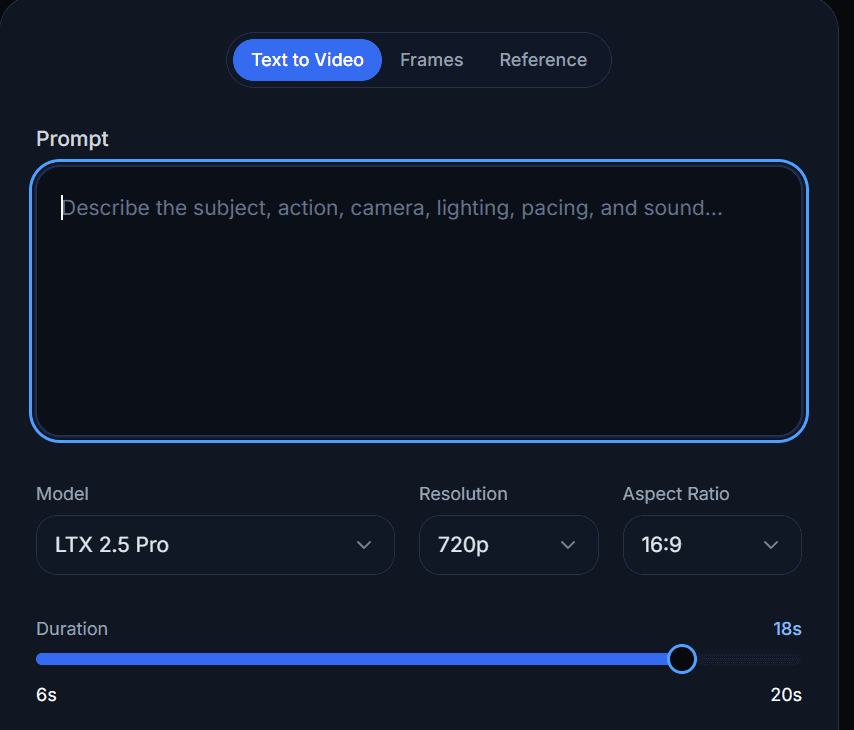
LTX 2.5 prompt, model, resolution, aspect ratio, and duration settings

1.Define the scene and its motion

Write a prompt that names the subject, action, environment, lighting, camera behavior, pacing, and sound intent. A structured brief helps LTX 2.5 understand both what should appear and how the shot should develop over time.

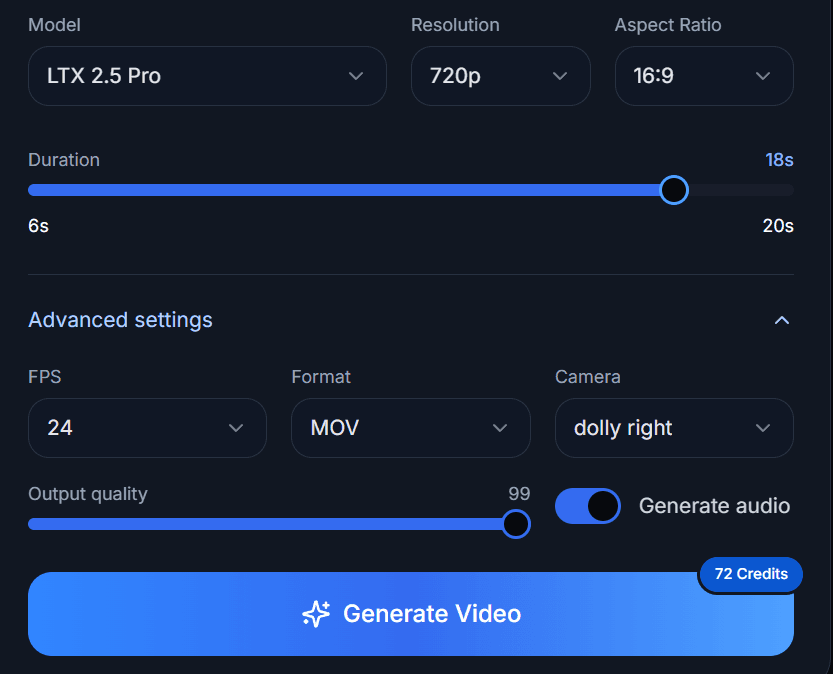
LTX 2.5 advanced settings and Generate Video button

2.Add guidance and generate the footage

Use supported image, video, audio, depth, or keyframe inputs when you need stronger control than text alone provides. For an image-to-video workflow, start with a source frame and describe the motion you want rather than repeating only what is already visible. Run the LTX 2.5 AI Video Generator in the interface or pipeline you selected to create the first take.

Generated LTX 2.5 video with download and sharing actions

3.Review, refine, and finish

Review subject detail, motion, continuity, timing, and prompt adherence. Change one important variable at a time, then use LTX 2.5 controls to generate a stronger take. Move the selected output into your editing and color workflow, or keep it inside a custom pipeline for automated processing and delivery.

Use cases

LTX 2.5 Use Cases

LTX 2.5 serves creative and technical teams that need controllable visual generation, an open deployment path, or both. These use cases reflect the production, real-time, and physical-AI work highlighted for the model.

For filmmakers building previs and connected scenes

Filmmakers can use LTX 2.5 text-to-video generation to explore framing, motion, lighting, and shot order before a full shoot. Native multishot continuity makes the model relevant for sequences where the same character and environment need to carry across multiple views.

For studios developing production pipelines

Creative studios can connect LTX 2.5 to existing generation, review, editing, and finishing systems. Native 4K HDR output, precise controls, and open weights give a pipeline team more choices about where footage is generated and how it moves toward delivery.

For developers building responsive video products

Developers can run and tune LTX 2.5 for products that generate or respond with video. Because the model can be deployed on owned infrastructure, teams can shape performance, integration, and data handling around the needs of the product.

For research, simulation, and physical AI

Robotics and simulation teams can adapt LTX 2.5 to data and environments that represent the physical world. Local execution and private fine-tuning support experiments where model ownership and domain-specific behavior are essential.

Compare

LTX 2.5 vs Closed Cloud AI Video Generators

The right AI video generator depends on whether you prioritize open deployment, a managed creative app, model choice, or a tightly integrated cloud ecosystem. This comparison focuses on verified product models rather than claiming one tool wins every project.

DecisionLTX 2.5Typical closed cloud generator
Model accessOpen weights and code are availableModel weights are usually not downloadable
DeploymentCan run on your own hardware and private infrastructureGeneration normally runs through the provider's app or API
CustomizationSupports fine-tuning and workflow-level adaptationCustomization is limited to the controls exposed by the service
Output pipelineNative 4K HDR is designed for professional RAW and color workflowsResolution and finishing options vary by product and plan
Multishot workNative multishot holds character, environment, lighting, and voiceSome services offer scene extension, references, or storyboard tools
SetupLocal use requires compatible hardware and technical setupHosted tools reduce setup and manage infrastructure for you

Choose LTX 2.5 when open weights, local execution, private tuning, and pipeline control are central requirements. Choose a managed cloud tool when you want the provider to handle infrastructure and prefer an all-in-one interface over model ownership.

Why LTX 2.5

Why Choose the LTX 2.5 AI Video Generator?

LTX 2.5 combines visual quality, direction, and ownership in one model. Its strongest value is not a single headline feature, but the ability to carry generated footage into a workflow you control.

Keep control after generation

With LTX 2.5, the model can run where your work already lives. You are not limited to a single hosted interface, and private fine-tuning can remain on infrastructure selected by your team.

Direct sequences, not only isolated clips

Native multishot generation gives LTX 2.5 a clear role in story-led work. Holding character, environment, lighting, and voice across shots helps creators think in sequences instead of restarting the visual language for every clip.

Generate for a professional finish

Native 4K HDR and fidelity-focused rendering give the LTX 2.5 AI Video Generator an output path aimed at cinema screens, RAW processing, and color pipelines. That makes the generated clip a production input rather than only a disposable preview.

Build on an open foundation

Public weights and code let developers inspect, integrate, and extend LTX 2.5. Teams can adapt the model to their data, identities, infrastructure, and product requirements instead of waiting for a closed service to expose the needed option.

Official cases

Built With Production Teams and Open-Model Developers

Official LTX 2.5 case studies show the model being used across robotics, real-time avatars, and creative production. Markov Robotics describes local execution and fine-tuning as important for its robotics work. Reactor highlights the ability to tune the model for live, responsive avatars. ComfyUI describes native LTX 2.5 workflows that can move from an idea to a working pipeline and then into production on owned hardware.

Markov Robotics

Local execution and fine-tuning for robotics work.

Reactor

Model tuning for live, responsive avatars.

ComfyUI

Native workflows from an idea to production on owned hardware.

FAQ

LTX 2.5 FAQ

Answers about generation, native 4K video, local deployment, private fine-tuning, ComfyUI, licensing, and managed alternatives.

Is LTX 2.5 an AI video generator?

Yes. LTX 2.5 is an open-weight AI video generation model for creating and editing high-fidelity footage. The LTX 2.5 AI Video Generator supports controlled production workflows rather than limiting users to isolated experimental clips.

Does LTX 2.5 generate native 4K video?

Yes. LTX 2.5 generates native 4K HDR footage designed for professional RAW and color pipelines. Final results still depend on your prompt, inputs, settings, workflow, and available hardware.

Can I run LTX 2.5 locally?

Yes. The LTX 2.5 open weights and code are publicly available, so compatible configurations can run on local or private infrastructure. Hardware needs depend on the selected model configuration and generation settings.

Is LTX 2.5 open source?

LTX 2.5 provides open weights and code for download, local execution, integration, and fine-tuning. Check the current license terms before deploying the model, especially when an organization approaches or exceeds the stated revenue threshold.

Does LTX 2.5 support image-to-video generation?

The LTX model family supports image-conditioned video workflows, and LTX 2.5 is presented with precise generation and editing controls. Use the current official workflow or integration documentation to confirm the exact inputs available in your chosen configuration.

How does LTX 2.5 create connected shots?

LTX 2.5 includes native multishot generation. It is designed to hold the character, environment, lighting, and voice across connected shots, giving creators a more coherent starting point for sequence-based work.

Can I fine-tune LTX 2.5 on private data?

Yes. LTX 2.5 can be fine-tuned on your own data and run on infrastructure you control. This makes it relevant to teams adapting the model to specific visual identities, worlds, products, or simulation needs.

Does LTX 2.5 work with ComfyUI?

Yes. Official LTX materials identify native ComfyUI workflows for LTX 2.5. This gives node-based creators and developers a practical route for building custom generation and post-processing pipelines.

Is LTX 2.5 free to use?

The official site states that the model is free to build on for organizations under a specified annual recurring revenue threshold. Model access does not remove hardware, hosting, storage, or third-party service costs, and you should review the current license for your use case.

Is LTX 2.5 better than Veo, Runway, or Firefly?

It depends on the job. LTX 2.5 is a strong fit when you need open weights, local deployment, private fine-tuning, native multishot generation, and pipeline control. Managed tools may be a better fit when you prefer hosted infrastructure, a polished all-in-one editor, or access to several models in one service.

Start Creating With LTX 2.5

Use LTX 2.5 to generate detailed, controllable footage while keeping a path to local execution, private customization, and professional finishing.