Nano Banana 2.1 vs Nano Banana Pro comes down to one trade-off: Google’s newer model built for Flash-level speed and cost, or the premium model it is meant to complement. On October 13, 2026, we ran nine matched prompt pairs, 18 generations in total, grouped into six test categories covering text, layout, counts, charts, product shots, and image edits.
The short answer: Nano Banana 2.1 was the better default in our runs. It followed more of the small instructions, finished faster in seven of eight 1K pairs, and displayed a quarter of the credit cost at 1K. Nano Banana Pro still produced polished images, with better hand-lettering in the menu test and closer relative object scale in one counting test, but it changed a requested detail more often.
Nano Banana 2.1 vs Nano Banana Pro: Quick Verdict
Test | Nano Banana 2.1 | Nano Banana Pro | Edge |
|---|---|---|---|
1. Poster text rendering | Text correct, table kept | Text correct, table replaced | 2.1 |
2. Menu text and alignment | Text correct, prices aligned right | Text correct, prices not aligned | 2.1 on layout, Pro on lettering |
3. Bar chart accuracy | Data and title correct | Data correct, quotes added to title | 2.1 |
4. Object counting and placement | Counts correct, one scale miss | Counts correct, placement miss, scale closer | Split |
5. Product photography | Label and props correct | Label correct, extra leaf | 2.1 |
6. Edit + two-reference composite | Identity preserved; correct hand in composite | Identity preserved; wrong hand in composite | 2.1 |
Displayed JXP cost at 1K | 1 credit | 4 credits | 2.1 |
What Is the Difference Between Nano Banana 2.1 and Nano Banana Pro?
Google’s Nano Banana 2.1 model page describes it as a high-efficiency model for image generation and conversational editing, and as the more efficient counterpart to Nano Banana Pro. Google’s Nano Banana Pro model page lists Pro as Gemini 3 Pro Image (gemini-3-pro-image), a reasoning-driven model aimed at complex graphic design, high-fidelity product mockups, and data visualizations.
In practice, the two differ most in price and in what each JXP workspace offers. These are the settings we saw on October 13, 2026:
JXP workspace | Nano Banana 2.1 | Nano Banana Pro |
|---|---|---|
Displayed cost at 1K / 2K / 4K | 1 / 2 / 4 credits | 4 / 4 / 5 credits |
Extra reference images | +1 credit each after the first | No extra cost shown with two references |
Reference image limit | Up to 14 | Up to 10 |
Search options | Web Search and Image Search, +1 credit each | None |
Aspect ratios | Auto plus 14, including 1:4, 4:1, 1:8, and 8:1 | 10, up to 21:9 |
These details can change, so check the total on the Generate button before each run. For a deeper look at the newer model on its own, read our Nano Banana 2.1 review.
How We Tested
Every pair used the same prompt, the same aspect ratio, PNG output, and 1K resolution unless noted. Test 5 also includes one 4K pair. We judged each image on what the prompt asked for: exact text, counts, positions, props, and preserved details, not on which picture looked more expensive.
Runs: nine matched prompt pairs, 18 first-attempt generations in total, grouped into six test categories.
Timing: seconds from clicking Generate to the image appearing in the workspace.
Cost: the credit total displayed on the Generate button before each run.
Each pair is a single run per model, so the results show tendencies, not success rates.
Test 1: Text Rendering in a Poster Layout
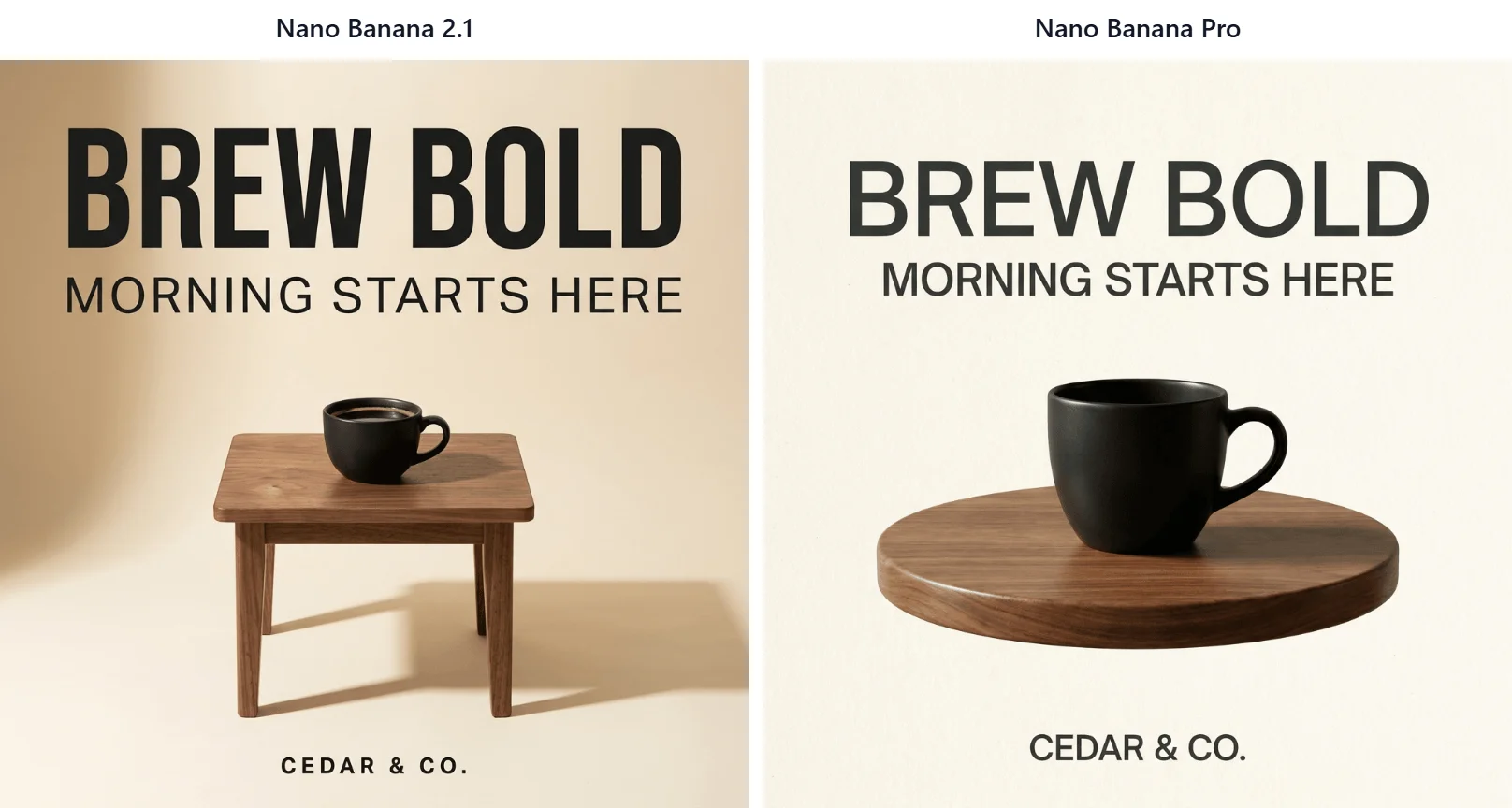
Create a square editorial coffee poster on a warm cream background. Center a matte black coffee cup on a small walnut table. Add exactly these three text lines, preserving spelling, capitalization, and punctuation: top headline: “BREW BOLD”; subheadline: “MORNING STARTS HERE”; footer: “CEDAR & CO.” Use clean Swiss typography, generous spacing, soft directional studio light, and no other visible words.
Both models rendered all three lines correctly with no extra words. The difference was the table. The 2.1 image has a small walnut table with four legs. Pro replaced it with a round platform that has no legs, a small but clear departure from the brief.
2.1: 51.8 seconds, 1 credit. Pro: 55.9 seconds, 4 credits.
Test 2: Menu Board Text and Alignment
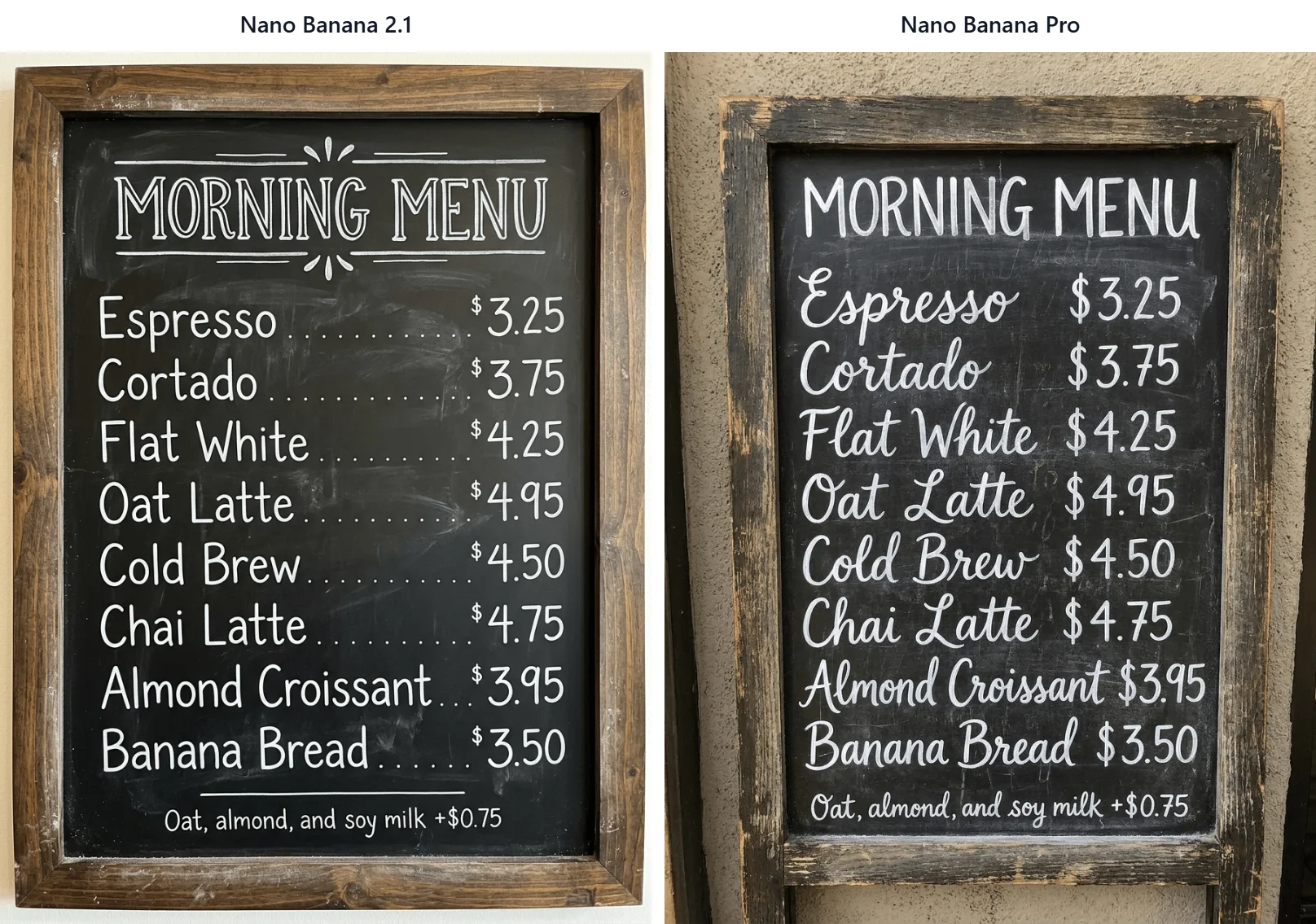
A chalkboard cafe menu board titled “MORNING MENU”. List exactly eight items with prices, each on its own line, with the item name on the left and the price on the right: “Espresso $3.25”, “Cortado $3.75”, “Flat White $4.25”, “Oat Latte $4.95”, “Cold Brew $4.50”, “Chai Latte $4.75”, “Almond Croissant $3.95”, “Banana Bread $3.50”. At the bottom in small print: “Oat, almond, and soy milk +$0.75”. White hand-lettered chalk style, wooden frame, no other text.
This was the densest text test: a title, eight names, eight prices, and a footnote. Both models spelled every word and price correctly.
Layout separated them. The 2.1 board put the names on the left and the prices in a right-aligned column, as asked, and added dot leaders on its own. Pro placed each price right after its item, so the prices form a ragged column. Pro’s script lettering looks more like real chalk, which matters if style is the priority.
2.1: 35.4 seconds, 1 credit. Pro: 43.4 seconds, 4 credits.
Test 3: Bar Chart Accuracy
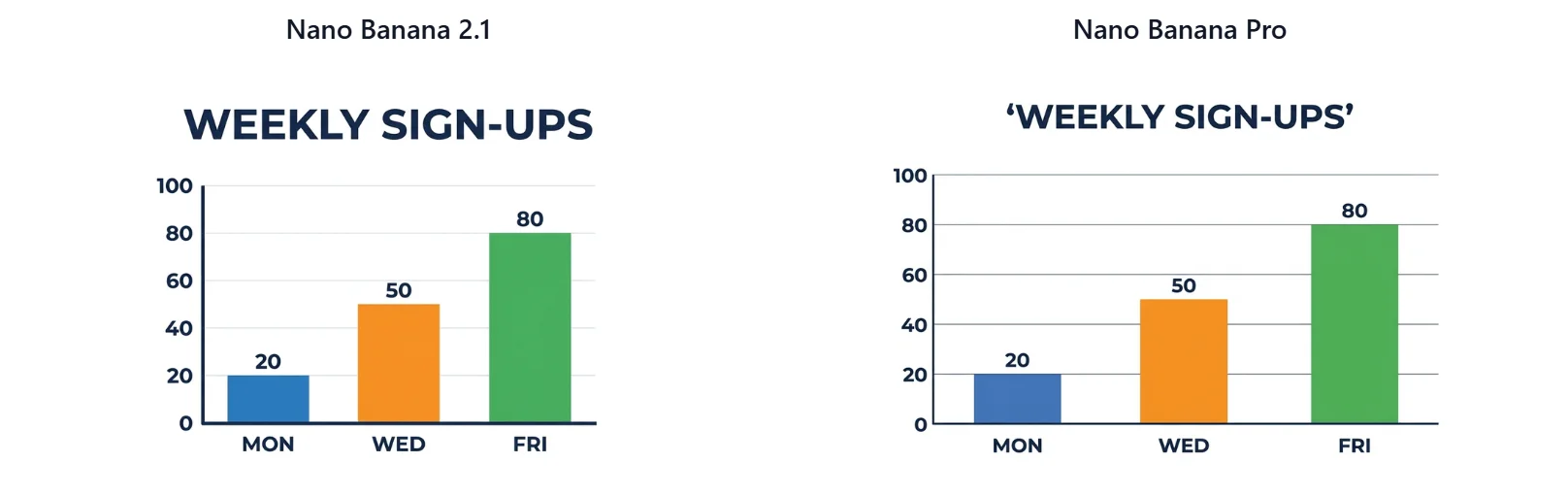
Design a clean 16:9 business infographic titled ‘WEEKLY SIGN-UPS’. Draw a vertical bar chart with exactly three bars: MON = 20 in blue, WED = 50 in orange, FRI = 80 in green. The y-axis must run from 0 to 100 with labeled ticks at 0, 20, 40, 60, 80, and 100. Put each value directly above its bar. White background, dark navy labels, flat vector style, no legend, no extra text, and bar heights must match the numbers.
Both charts got the data right: labels, values, colors, ticks, and bar heights all matched. Nano Banana Pro printed curly quotation marks around the title; Nano Banana 2.1 did not.
To be fair to Pro, our prompt itself wrapped the title in quotation marks, so this is partly an ambiguous instruction. If exact typography matters, leave quotation marks out of the title in your prompt.
2.1: 53.8 seconds, 1 credit. Pro: 56.1 seconds, 4 credits.
Test 4: Object Counting and Placement
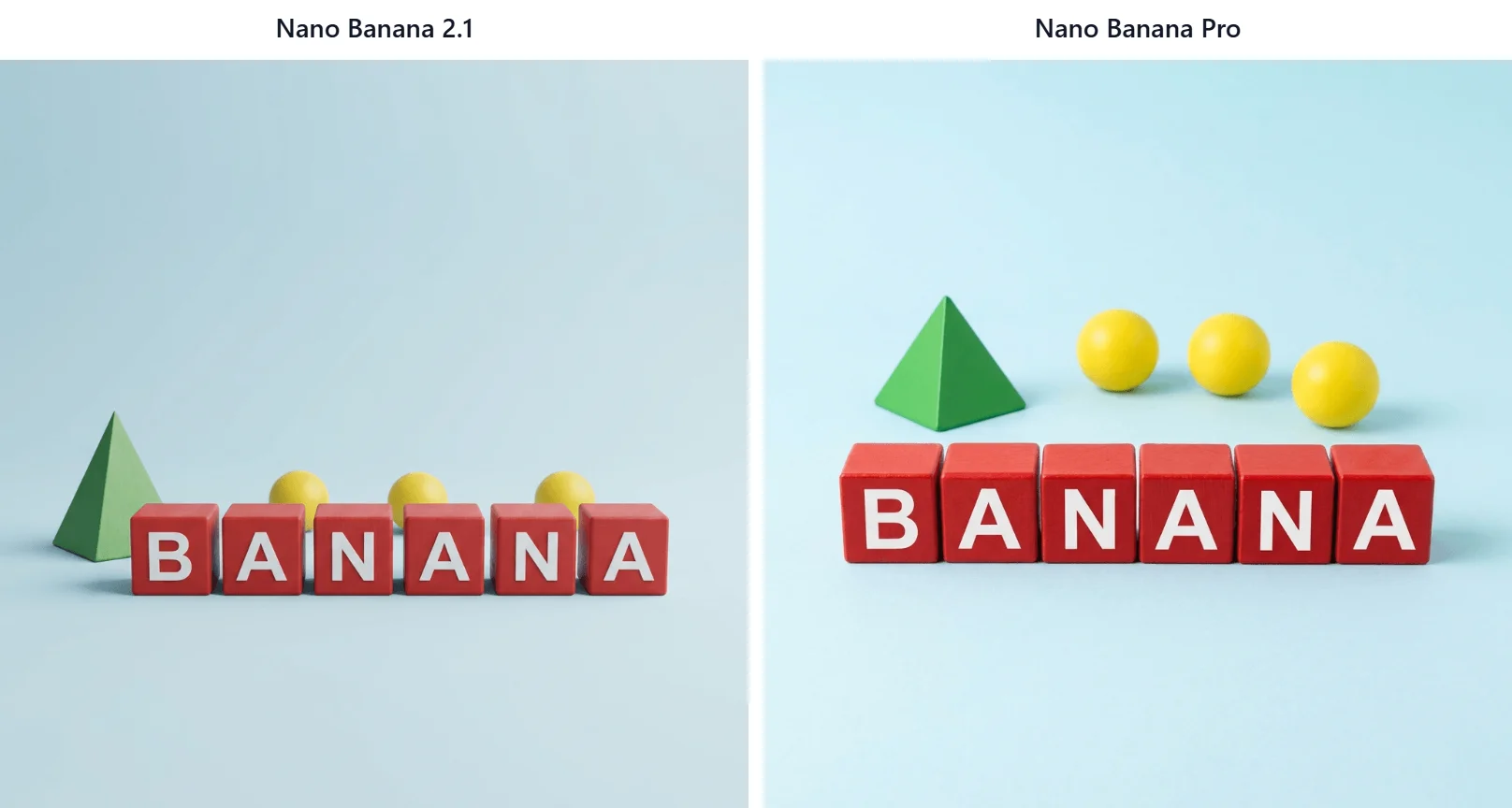
Create a square studio product photograph on a seamless pale-blue background. In the front row, place exactly six separate matte red wooden cubes in a straight horizontal line. Put one large white capital letter on each cube so the cubes spell “BANANA” from left to right, one letter per cube. Behind that row, place exactly three small yellow spheres. Place exactly one green pyramid to the left of the cubes. Do not add any other objects, letters, numbers, decorations, reflections, or text. Soft overhead light, realistic materials, centered camera, everything fully visible.
Both models got the counts and the spelling right: six cubes reading B-A-N-A-N-A, three spheres, and one pyramid. The 2.1 image put the pyramid at the left end of the row. Pro placed it behind the row, above the first two cubes, which is on the left but not “to the left of the cubes.”
2.1: 25.4 seconds, 1 credit. Pro: 40.7 seconds, 4 credits.
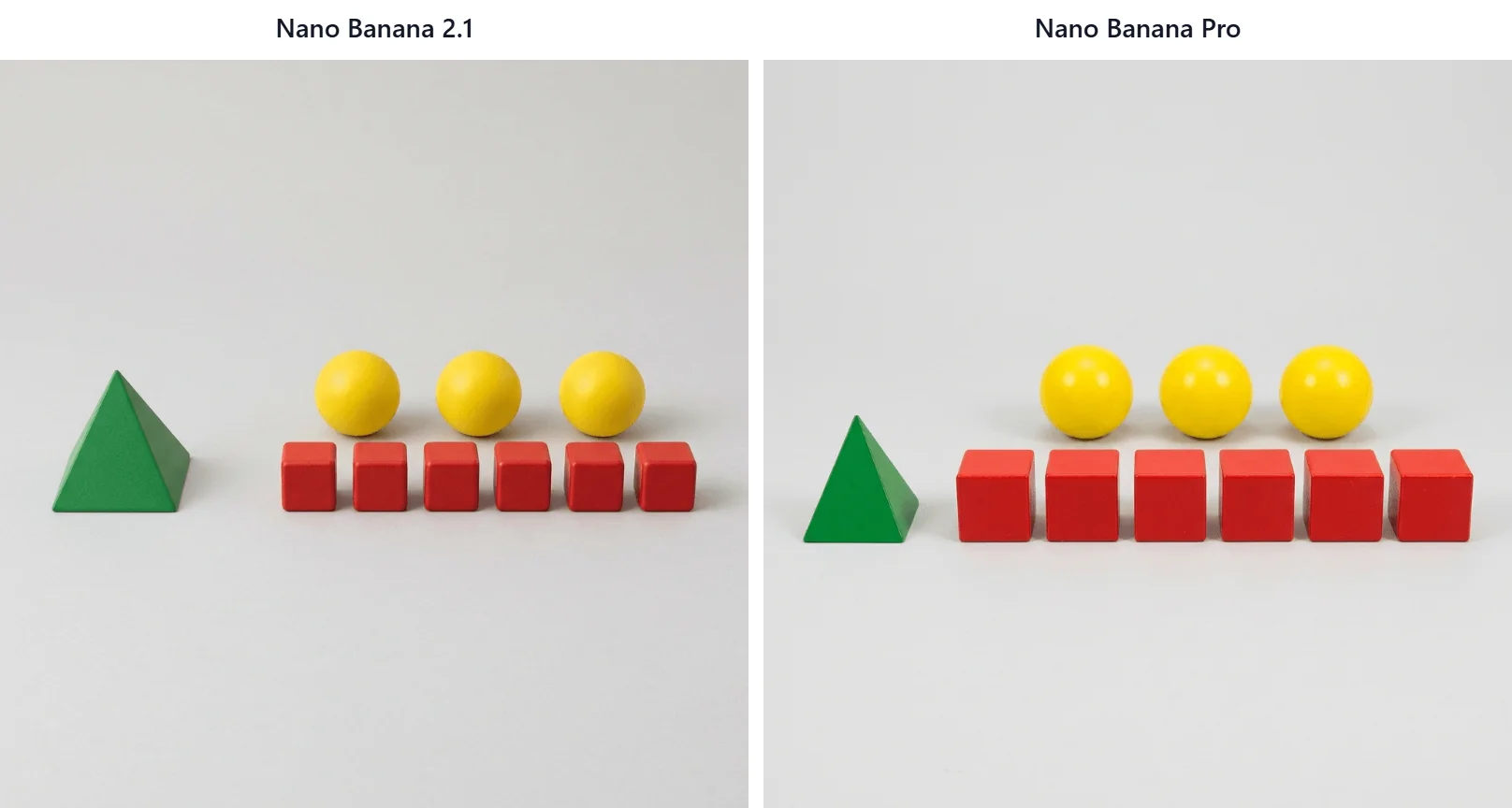
A second counting prompt moved the scene to a light gray background and added a scale requirement.
Create a clean studio still life on a light gray background. Arrange exactly six red cubes in one straight front row. Place exactly three yellow spheres in one straight row behind the cubes. Put exactly one green pyramid on the far left, clearly separated from every other object. All ten objects must be fully visible, non-overlapping, and equal in visual scale. No text, no extra objects.
Both models passed the counts and placement here. The Nano Banana 2.1 pyramid was noticeably larger than the cubes, while Pro’s was closer in size, though still not equal.
2.1: 53.4 seconds, 1 credit. Pro: 55.2 seconds, 4 credits.
Test 5: Product Photography at 1K and 4K
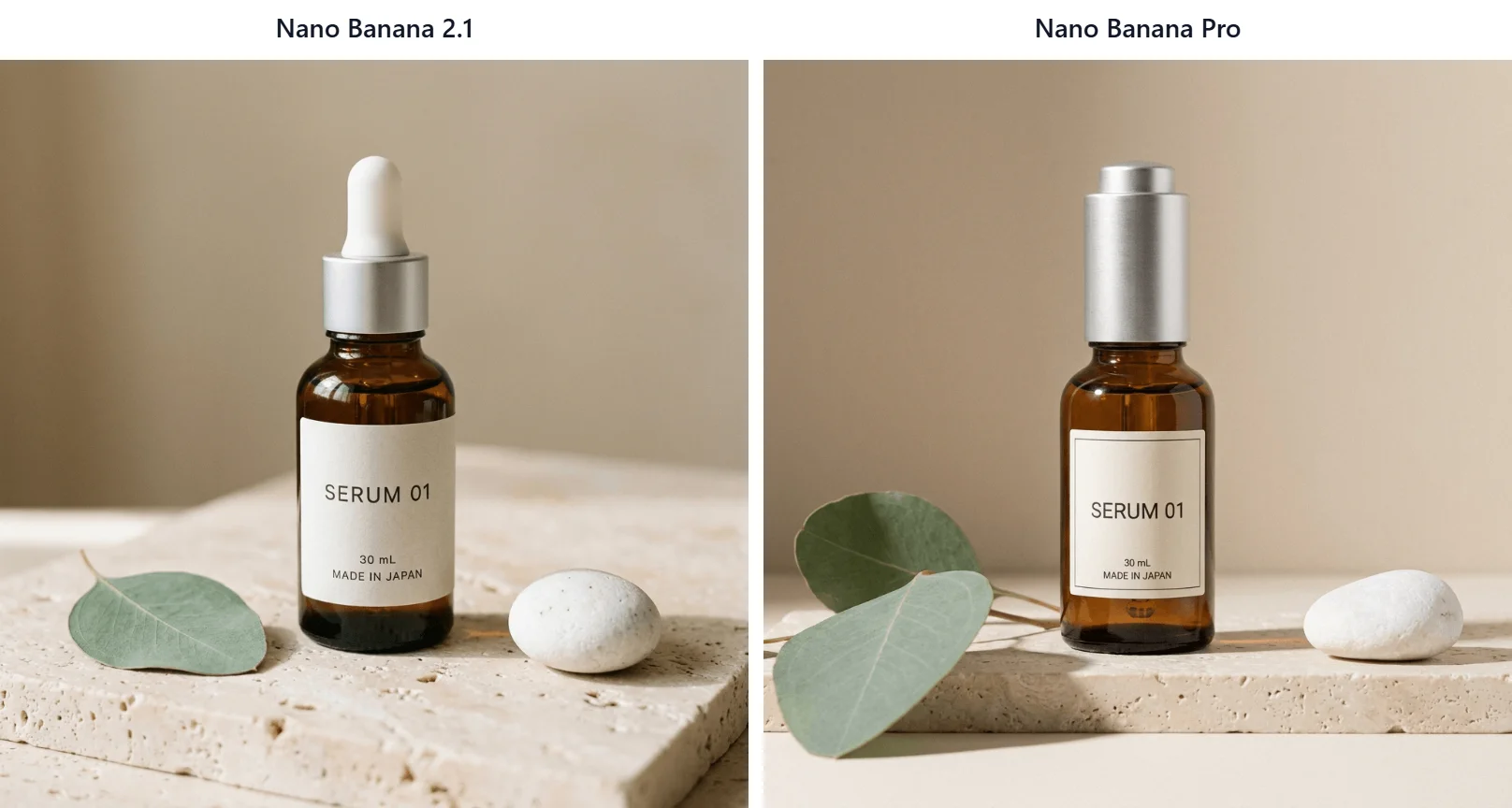
Create a square premium skincare product photograph. Center one amber glass dropper bottle with a brushed silver cap on pale travertine. The bottle label must contain exactly three lines and no other text: “SERUM 01” on line one, “30 mL” on line two, and “MADE IN JAPAN” on line three. Place exactly one eucalyptus leaf to the left and exactly one small white stone to the right. Soft side lighting, realistic glass reflections, sharp label, neutral beige background, no extra products, no hands.
Both models printed the three label lines correctly. The 2.1 shot has exactly one leaf and one stone. Pro added a second eucalyptus leaf.
2.1: 54.3 seconds, 1 credit. Pro: 56.3 seconds, 4 credits.
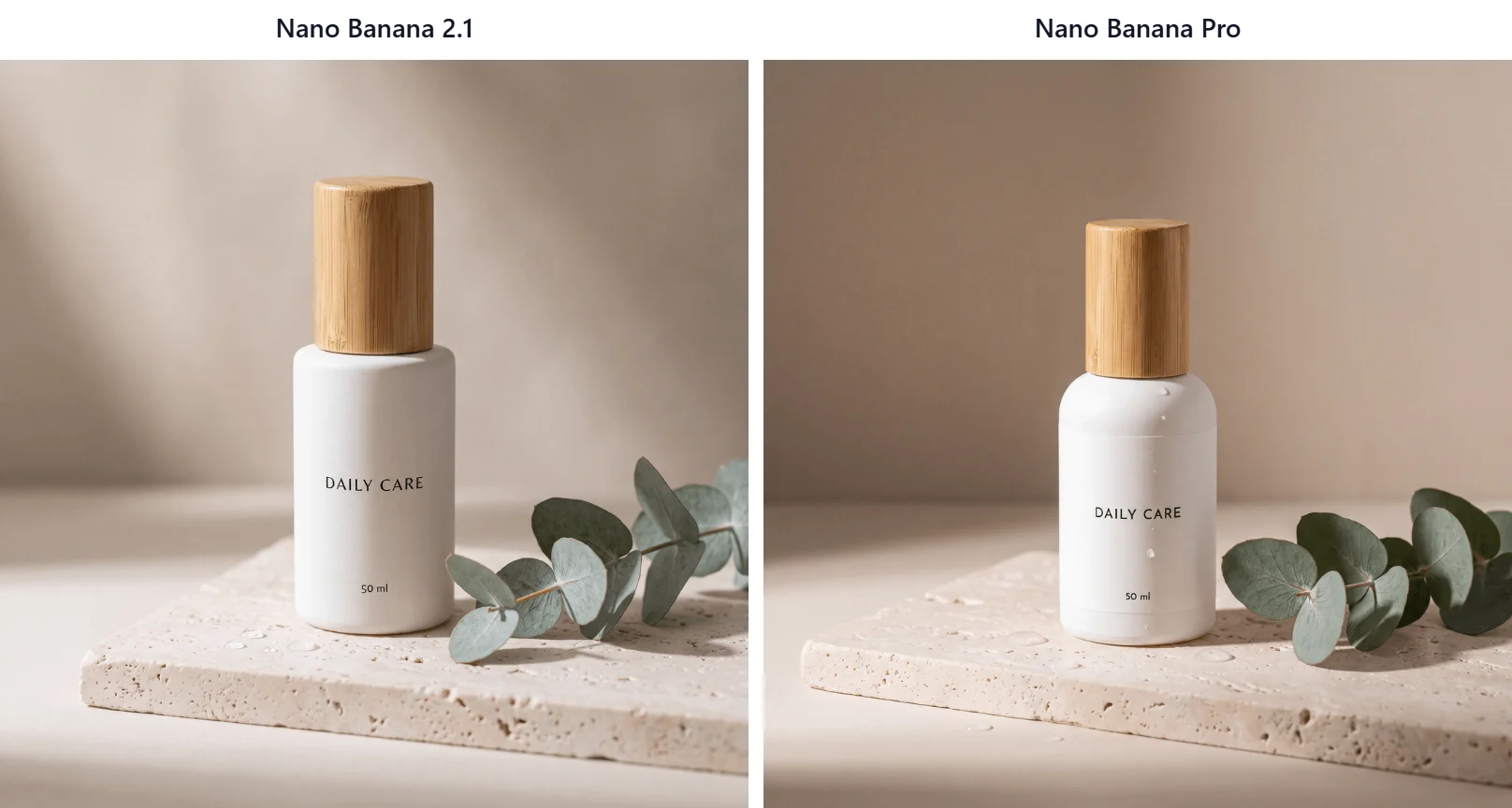
We also ran a 4K product shot to check fine label text at full resolution.
A studio product photograph of a matte white ceramic skincare bottle with a bamboo cap, standing on pale travertine stone. Soft side lighting from the left, a few water droplets on the stone, a sprig of eucalyptus beside the bottle, shallow depth of field, neutral beige background. The label on the bottle reads “DAILY CARE” in small black capital letters, with “50 ml” in smaller text beneath it.
Nano Banana 2.1 and Pro both returned true 4096 × 4096 files with crisp label text. Pro added water droplets to the bottle itself, while the prompt only asked for droplets on the stone.
2.1: 79.4 seconds, 4 credits. Pro: 106.4 seconds, 5 credits.
Test 6: Image Editing and Multi-Reference Composites
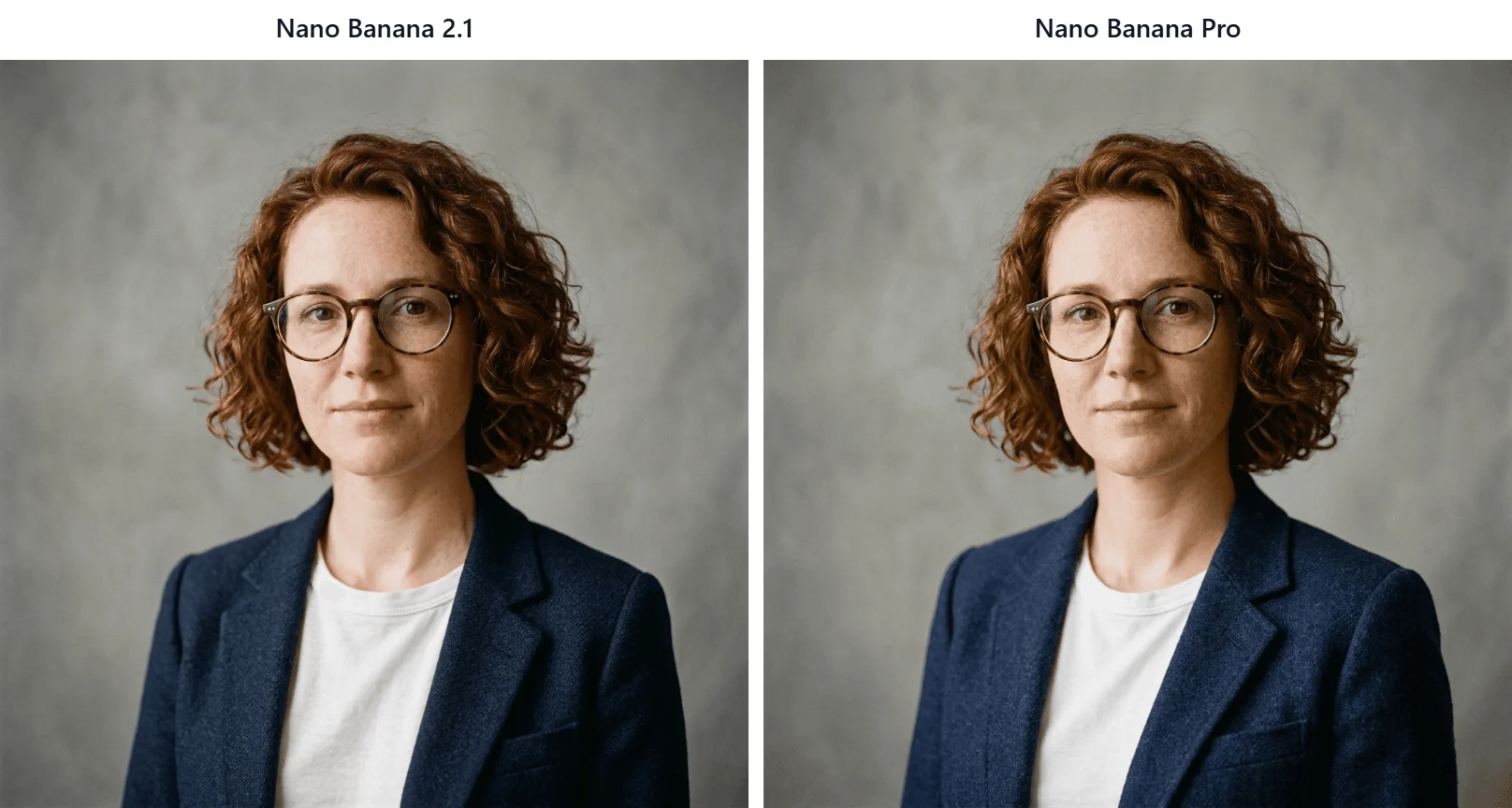
First we uploaded one portrait of a woman in a mustard sweater and asked both models for a single-detail edit.
Change only her sweater to a navy wool blazer over a white crew-neck T-shirt. Keep her face, freckles, curly auburn hair, tortoiseshell glasses, expression, pose, gray background, framing, and lighting exactly the same.
Both edits succeeded and look almost identical. This was the one 1K pair where Pro finished ahead of Nano Banana 2.1.
2.1: 60.6 seconds, 1 credit. Pro: 51.8 seconds, 4 credits.
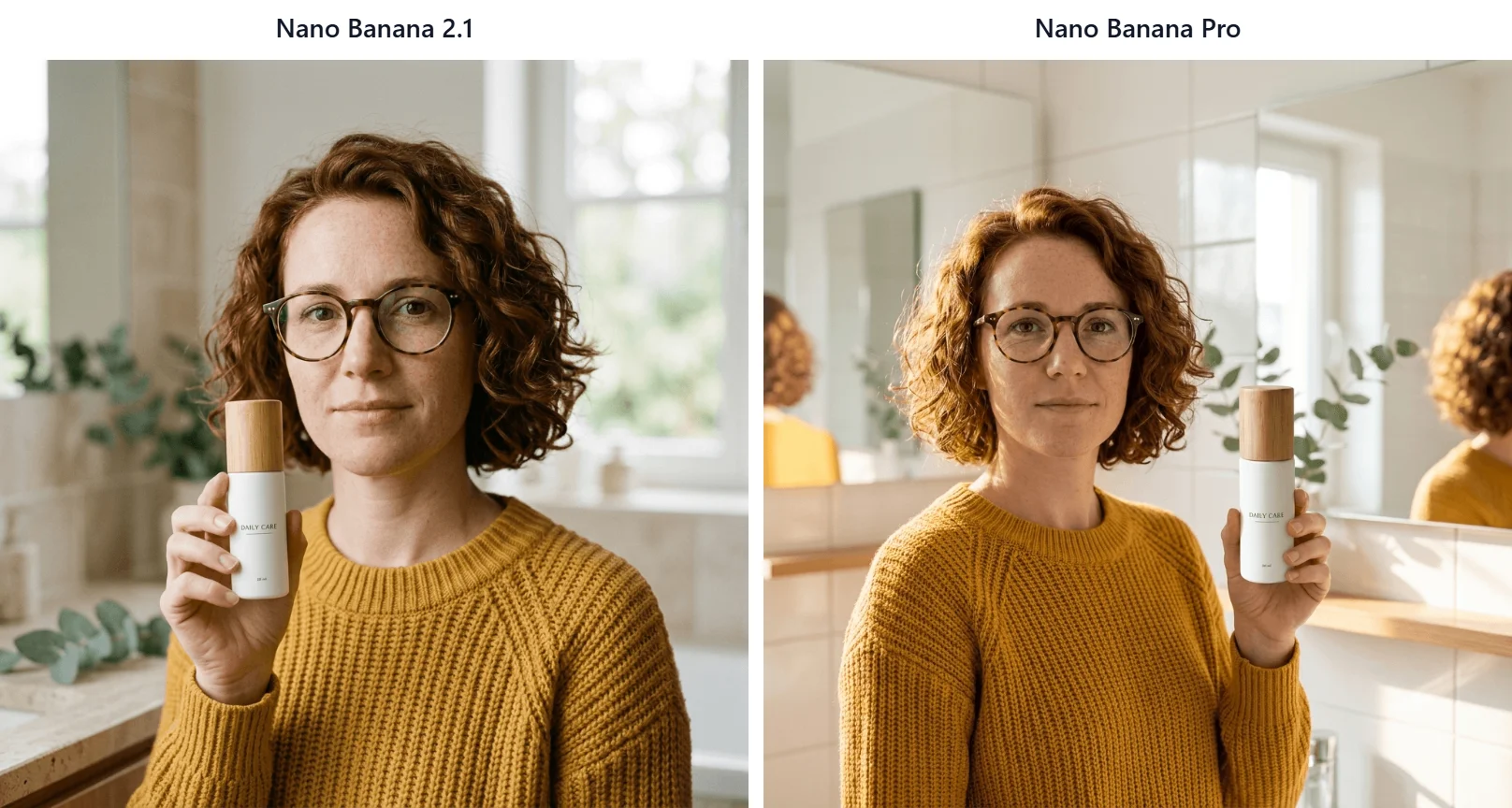
Then we uploaded her portrait and a product photo together.
Combine the two references into one photo. The woman from the portrait holds the white DAILY CARE bottle from the product photo in her right hand at chest height, in a bright modern bathroom with soft daylight. Keep her face, curly auburn hair, tortoiseshell glasses, and mustard sweater the same. Keep the bottle shape, bamboo cap, and label text the same and readable.
Both kept her identity and outfit. The 2.1 composite put the bottle in her right hand; Pro put it in her left. In our earlier 2.1 testing the same instruction failed, so treat left-and-right placement as something to check on either model.
2.1: 28.3 seconds, 2 credits with the second reference. Pro: 51.4 seconds, 4 credits.
Nano Banana 2.1 vs Nano Banana Pro Speed
Across eight 1K pairs, Nano Banana 2.1 finished first seven times. Its 1K runs averaged 45.4 seconds against 51.4 for Pro. The single 4K pair showed a wider gap: 79.4 seconds against 106.4.
These are browser-observed times from one day of testing, so queue load can shift them.
Nano Banana 2.1 vs Nano Banana Pro Pricing
On JXP, the gap depends on resolution. At 1K, Nano Banana 2.1 displayed 1 credit and Pro displayed 4. At 2K the ratio drops to 2 against 4, and at 4K to 4 against 5. Two references cost 2 credits on 2.1 and still 4 on Pro. For all 18 runs, Nano Banana 2.1 displayed 13 credits in total and Pro displayed 37.
Google’s own API pricing follows the same pattern. The Gemini API pricing page lists these output-image equivalents:
Resolution | Nano Banana 2.1 | Nano Banana Pro | Pro costs |
|---|---|---|---|
1K | $0.0336 | $0.134 | About 4× more |
2K | $0.0504 | $0.134 | About 2.7× more |
4K | $0.113 | $0.24 | About 2.1× more |
Those figures cover the output image only; input tokens and search grounding are billed separately.
Which Model Should You Choose?
Choose Nano Banana 2.1 if you want:
The lowest cost for drafts, batches, and social graphics
Strict adherence to layouts, placement, and prop lists
Web Search or Image Search in the JXP workspace
Panoramic ratios such as 4:1 and 8:1
Choose Nano Banana Pro if you want:
A second visual interpretation when 2.1 looks too literal
Handcrafted-looking lettering, as in our chalkboard menu
A comparison run before committing to a high-value final image
Left-and-right placement still needs manual checking: Nano Banana 2.1 missed it in an earlier run, while Pro missed it in this matched pair.
Nano Banana 2.1 vs Nano Banana Pro FAQ
Is Nano Banana 2.1 better than Nano Banana Pro?
Across our six test categories, Nano Banana 2.1 followed more of the small instructions, ran faster in most pairs, and cost less. Pro produced more convincing hand-lettering in the menu test and closer object scale in one counting test. Neither result is guaranteed on every generation.
Is Nano Banana 2.1 cheaper than Nano Banana Pro?
Yes. On JXP it displayed 1, 2, or 4 credits at 1K, 2K, or 4K, against 4, 4, or 5 for Pro. On the Gemini API, a 1K image costs about a quarter of the Pro price.
Which model is better for text in images?
Both spelled every requested word, number, and price correctly in our poster, menu, chart, and label tests. Nano Banana 2.1 followed layout and “no extra text” instructions more closely; Pro’s lettering looked more natural on the chalkboard.
Does Nano Banana Pro support more reference images?
No. In the JXP workspaces, Nano Banana 2.1 accepted up to 14 reference images and Pro up to 10.
Which model is faster?
Nano Banana 2.1 was faster in seven of eight 1K pairs and in the 4K pair. Pro was faster in one editing run.
Nano Banana 2.1 vs Nano Banana Pro: Final Verdict
Start with Nano Banana 2.1. In our matched runs it was cheaper, usually faster, and more literal about tables, alignment, props, and placement. Nano Banana Pro is worth a second run when you care more about a particular visual style than about strict instruction-following, and the 4K price gap is small enough that the comparison costs little.
Whichever you choose, check text, counts, and left-and-right placement before you publish.