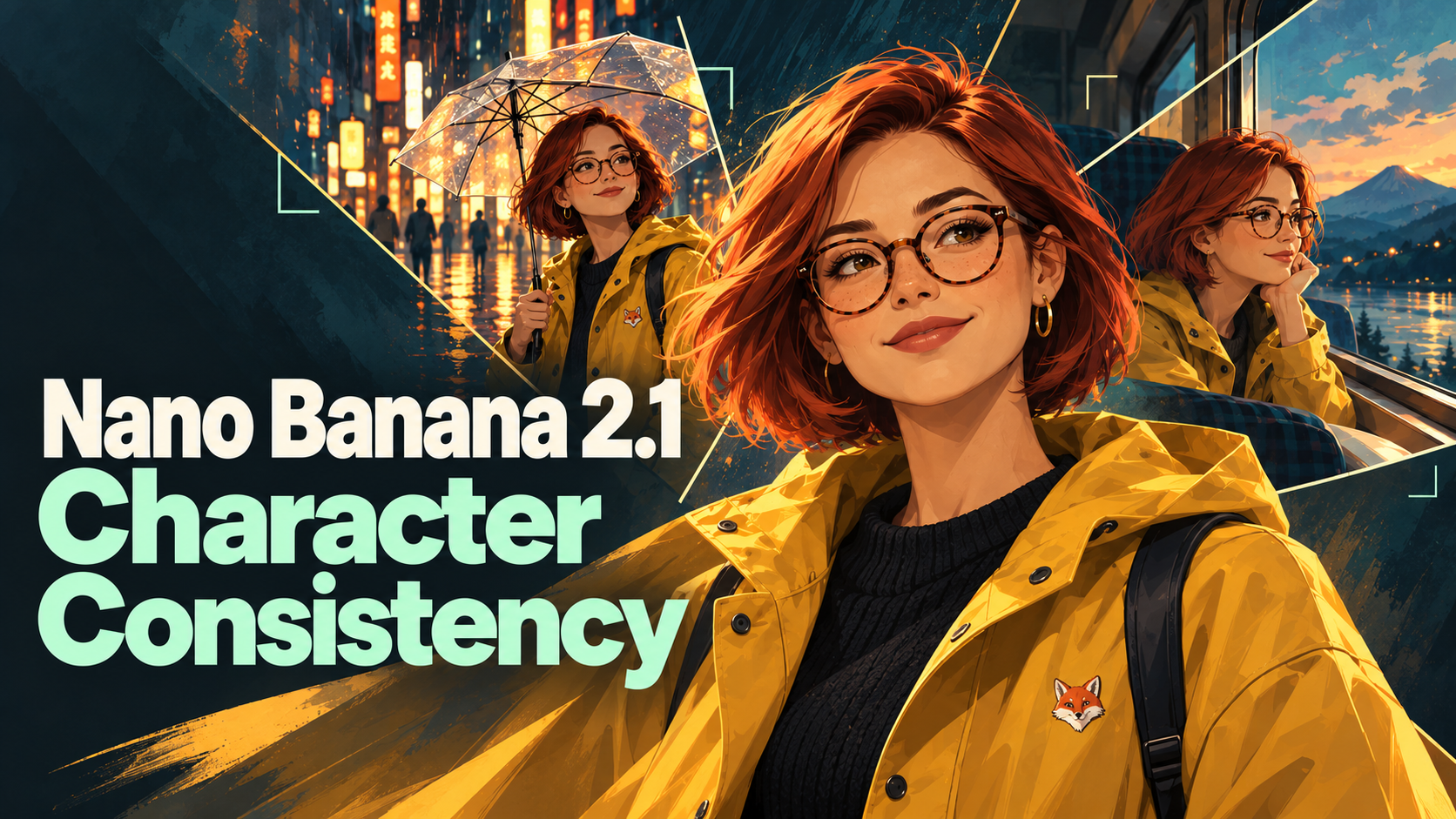
Nano Banana 2.1 character consistency is easiest to judge with a small story. Mira walks down a rainy Tokyo street at night. The next morning, she’s laughing behind a bakery counter. By sunset, she’s on a mountain ridge, and later she’s reading on a vintage train.
The places should change. Her copper-red bob, tortoiseshell glasses, mustard raincoat, tiny fox patch, and single gold earring should not.
We gave Nano Banana 2.1 one portrait of Mira, a fictional character, and asked for all four scenes. She was recognizably the same person in every one.
Then we pushed harder. We put two, four, and five characters in one scene, ran an edit chain (one starting scene, then three successive edits), and tried a character turnaround sheet. All five characters remained recognizable by visual inspection, although this was not a measured face-matching test. What kept failing was one gold hoop earring. Whenever Mira’s right side faced the camera, the earring jumped to her right ear, in 7 of 7 images.
Here’s what we found, what it cost, and the prompt template we’d use next time.
What we tested | Result |
|---|---|
One character, four new scenes | Recognizable in all four; hair, glasses, raincoat, and fox patch carried over |
Two, four, and five characters in one shot | Every character stayed recognizable in all 6 group images, including both 5-person runs |
A single earring on one ear | Correct in all 11 images where her left side or front faced the camera; wrong in all 7 where her right side did |
One starting scene, then three successive edits | No visible drift by the last edit |
Turnaround sheet as the reference | Clean sheet; no clear advantage, and didn’t fix the earring |
How We Tested Nano Banana 2.1 Character Consistency
All tests ran on JXP on October 23, 2026, using Nano Banana 2.1 in Image to Image mode at 1K, PNG, with search options off.
We created the five starting portraits with Seedream 5.0, then used them as external references for Nano Banana 2.1. All five characters are fictional.
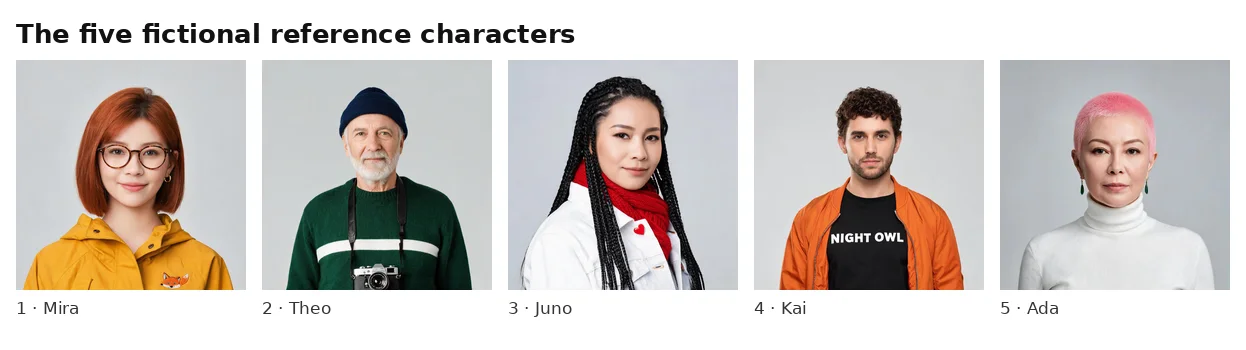
We gave each character a short checklist of details to look for in every result:
Mira: copper-red chin-length bob, round tortoiseshell glasses, one gold hoop on her left ear only, mustard-yellow raincoat, small fox patch on the left chest
Theo: short silver beard, navy beanie, green sweater with one white stripe, vintage film camera
Juno: long black box braids, white denim jacket, red heart pin, red scarf
Kai: curly dark hair, orange bomber jacket, black T-shirt printed “NIGHT OWL”
Ada: pink buzz cut, white turtleneck, green drop earrings
A detail counted as kept when it matched the reference at full size. When a detail was hidden by the pose, such as a patch facing away from the camera, we didn’t count it either way.
In total, we made 19 Nano Banana 2.1 images: 18 scene outputs and one turnaround sheet. In our October 23 tests, JXP displayed a cost of 1 credit for a 1K generation with one reference, plus 1 credit for each additional reference:
Test | Generations | References each | Credits shown each | Subtotal |
|---|---|---|---|---|
Four scenes plus the 3D style | 5 | 1 | 1 | 5 |
Two characters | 1 | 2 | 2 | 2 |
Four characters (including the fix attempt) | 3 | 4 | 4 | 12 |
Five characters | 2 | 5 | 5 | 10 |
Starting scene, three edits, one fresh prompt | 5 | 1 | 1 | 5 |
Turnaround sheet and two bike scenes | 3 | 1 | 1 | 3 |
Total | 19 | 37 |
These 19 outputs include all Nano Banana 2.1 generations made for this article, including the planned repeat runs and the earring-fix attempt. None were excluded from the analysis. The five Seedream 5.0 reference portraits are not included in those 37 credits (we generated Theo’s portrait twice because we didn’t record the first one’s link). It’s a small sample: it shows patterns, not failure rates.
Test 1: One Character, Four New Scenes
The most common job is simple: you have one character and want them somewhere new. We used the same prompt template for every scene and only changed the scene line:
Use the uploaded photo as the character reference. Show the same woman with the same face, copper-red chin-length bob, round tortoiseshell glasses, a single small gold hoop earring on her left ear only, and the mustard-yellow raincoat with the small embroidered orange fox patch on the left chest. Scene: [scene]. Photorealistic cinematic still. No text anywhere in the image.
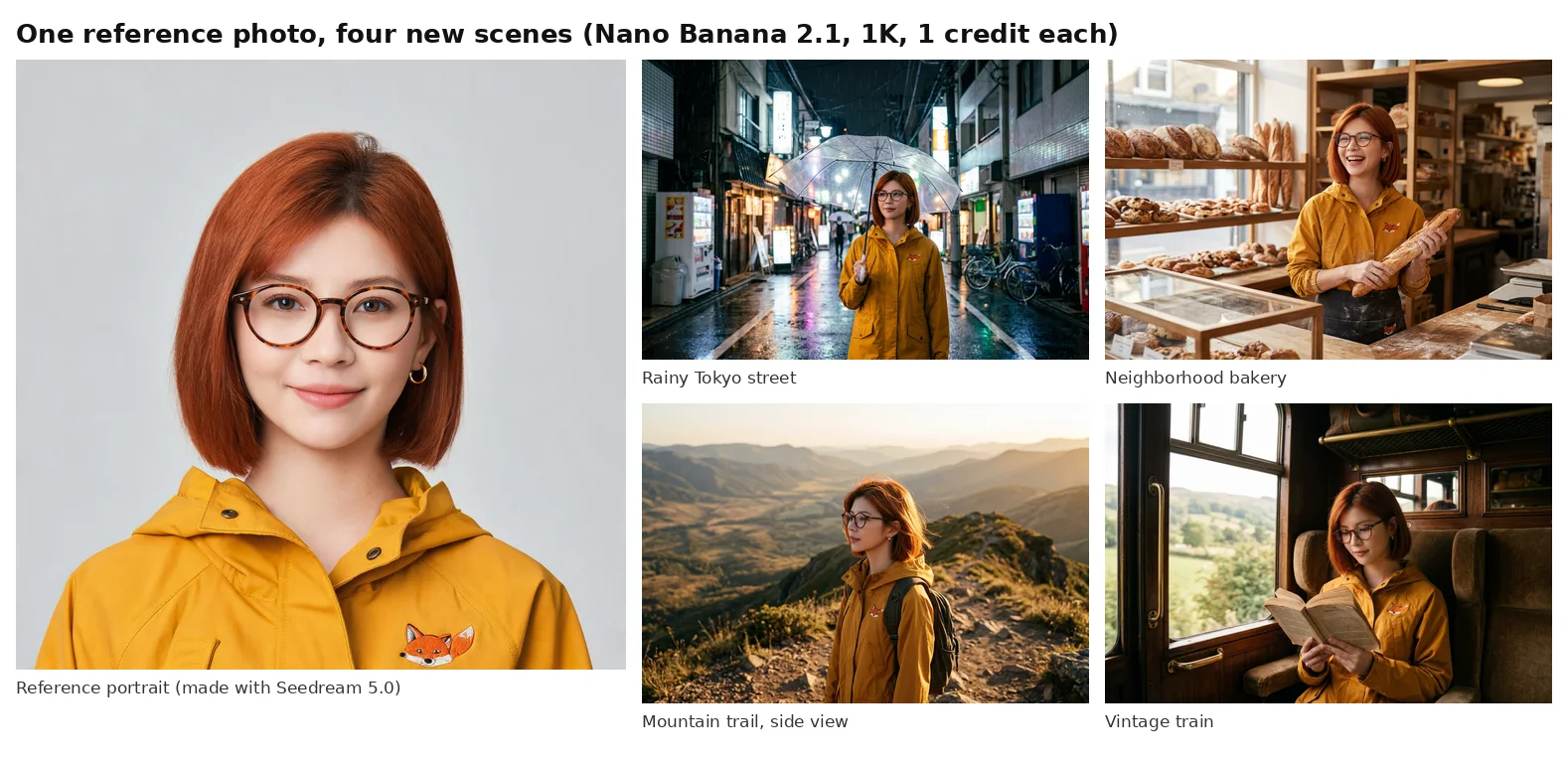
All four images passed our checklist. Her hair length and color, her glasses, the raincoat, and the fox patch all carried over, even in the mountain shot, where she’s turned to the side and the wind is in her hair. The lighting and camera angle changed completely from scene to scene, and she still looked like the same person.
The one oddity was in the bakery: the model added an apron with a second fox patch on it. We’ll come back to that.
For these four runs, we measured 25–67 seconds from clicking Generate to the completed image appearing in the browser.
Test 2: Two, Four, and Five Characters in One Shot
Group shots are harder: every person needs to retain their own identifying details. Google’s Nano Banana 2.1 model page says the model can keep character consistency for up to four characters. We wanted to see that stated support in practice, so we built the same rooftop dinner scene with four characters, ran it twice, and then added Ada for a fifth.
Each prompt listed every character by reference number, for example “the man from reference 2: short silver beard, navy knit beanie…”, and asked to keep every face and outfit as in the references.
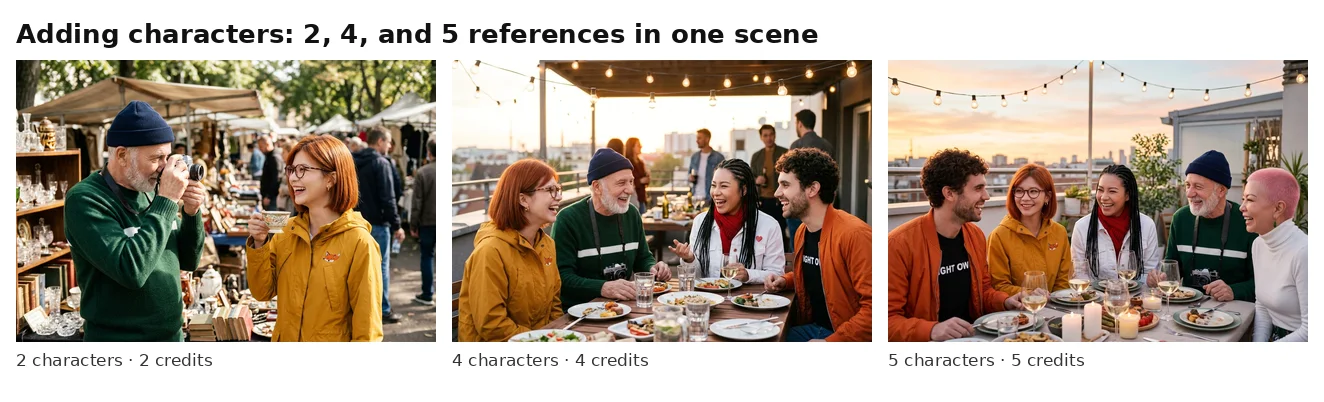
This was the most impressive result in our test. In all six group images, including both five-person runs, every character was recognizable at a glance. Theo’s striped sweater and camera, Juno’s braids and red scarf, Kai’s orange jacket, and Ada’s pink buzz cut and green earrings all came through.
Two small caveats. Kai’s “NIGHT OWL” shirt was partly covered by his open jacket in every group shot. The visible letters were always correct, but we can’t say the full word was rendered. And in one later four-person run, Juno’s heart pin wasn’t clearly visible.
Two five-person runs are not enough to establish reliable consistency beyond Google’s stated support for four characters. But in our scenes, going from four to five didn’t cause any visible breakdown. More references do cost more: 2 credits for two characters, 4 for four, and 5 for five.
The Weak Spot: A Single Earring
Faces, hair, and clothing stayed recognizable. The detail that kept failing was much smaller: Mira’s one gold hoop, which belongs on her left ear only.
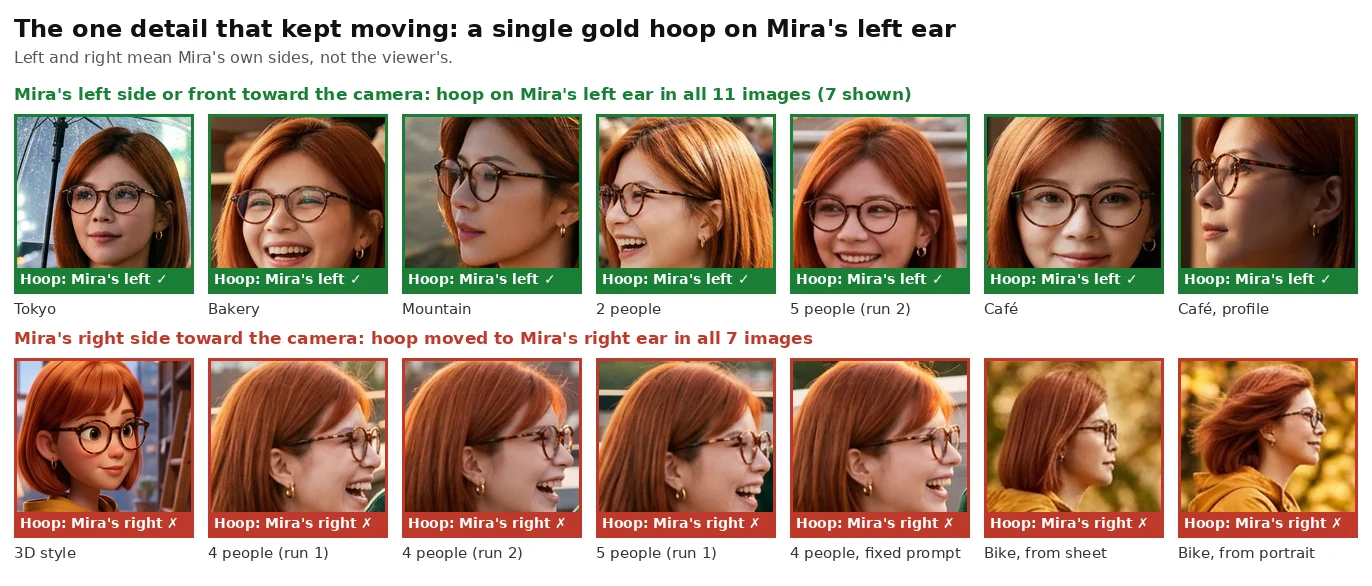
Left and right refer to Mira’s own anatomical sides, not the viewer’s. The earring tally covers the 18 scene outputs. We inspected the turnaround sheet separately and did not count its individual panels as separate results. An image would have been marked “can’t judge” if hair or the pose hid the ear in question; none of the 18 needed that label. Across those 18 images, the pattern was completely consistent:
Front view, or her left side toward the camera: the hoop was on the correct ear in all 11 images.
Her right side toward the camera: the hoop moved to her right ear in all 7 images. That included the 3D style test, four group shots (one of them the fix attempt below), and both bike scenes.
It looks as if the model attaches the earring to whichever ear is visible rather than remembering which ear it belongs to. That’s our reading of the pattern, not something we can confirm from outside the model.
We tried one fix. We reran a four-person scene with a longer instruction: “a single small gold hoop earring on her left ear only (her right ear has no earring, so if her left ear is turned away from the camera, no earring should be visible).” The earring still moved to her right ear. One run doesn’t prove that no wording works, but this wording didn’t.
What this means in practice:
Check one-sided details from every angle. We only tested an earring, but other details that appear on one side, such as a watch, a sling bag, a tattoo, or a name badge, are worth the same check.
Choose camera angles that show the correct side when that detail matters, or plan to fix it in an editor.
Consider symmetrical accessories for a recurring character, such as matching earrings in both ears. Ada’s pair of green drop earrings came through in both five-person runs, though we didn’t test this directly.
Test 3: Chained Edits vs One Fresh Prompt
A long project usually means editing an image, then editing the result, and so on. We wanted to know if Mira would slowly drift away from her reference after several rounds.
We started with Mira at a café window, then ran three edit rounds, each one uploading the previous result: add snow outside, change to night, and turn her head into profile. Separately, we wrote one prompt describing the final scene and generated it straight from the original portrait.
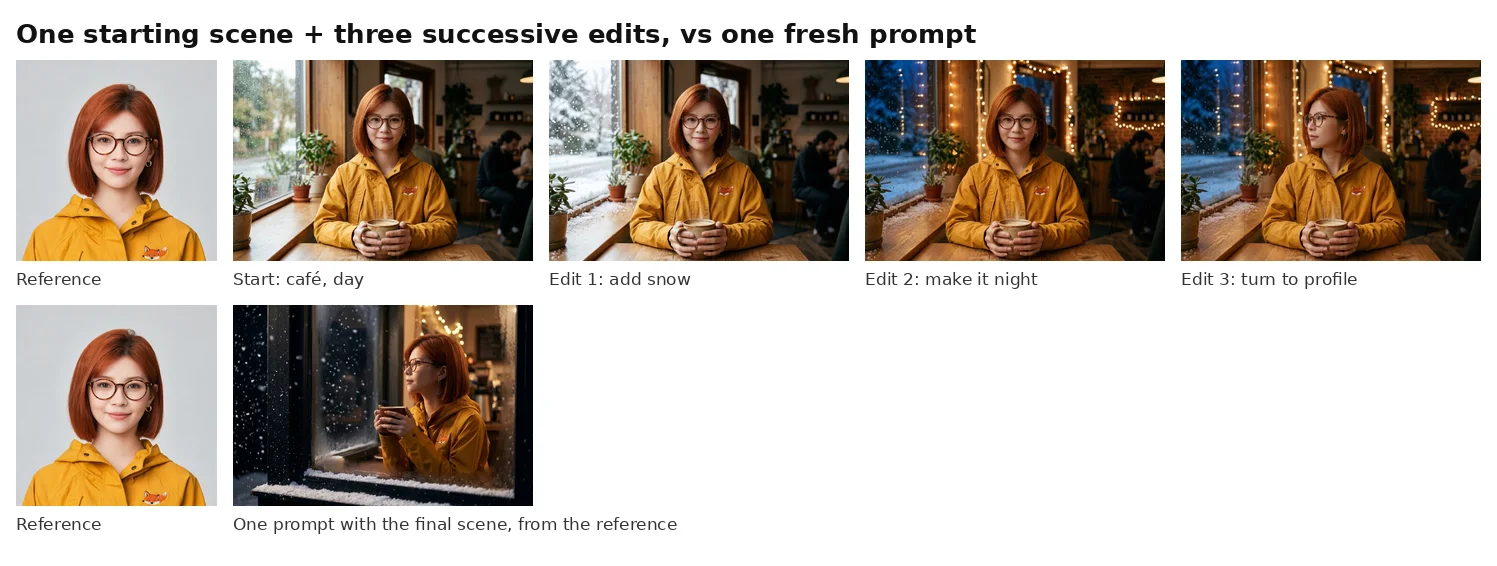
After the third edit, we saw no visible drift. Her glasses, hair, fox patch, and earring all matched the reference, and each edit changed only what we asked for. The fresh single prompt also kept every detail, though it framed the scene differently, showing her through the snowy window.
We ran this chain once, so treat it as one good result rather than proof that chains never drift. Both approaches worked here, and we’d still follow a simple rule: if the scene is right and you’re adjusting it, keep editing the latest image. If a detail of the character has already changed, go back to the original reference rather than editing the mistake forward.
Test 4: Does a Turnaround Sheet Help?
Many creators build a character sheet with front, side, and back views, then use it as the reference. We asked Nano Banana 2.1 to make one from Mira’s portrait, then generated the same bike scene twice: once from the sheet and once from the portrait alone.
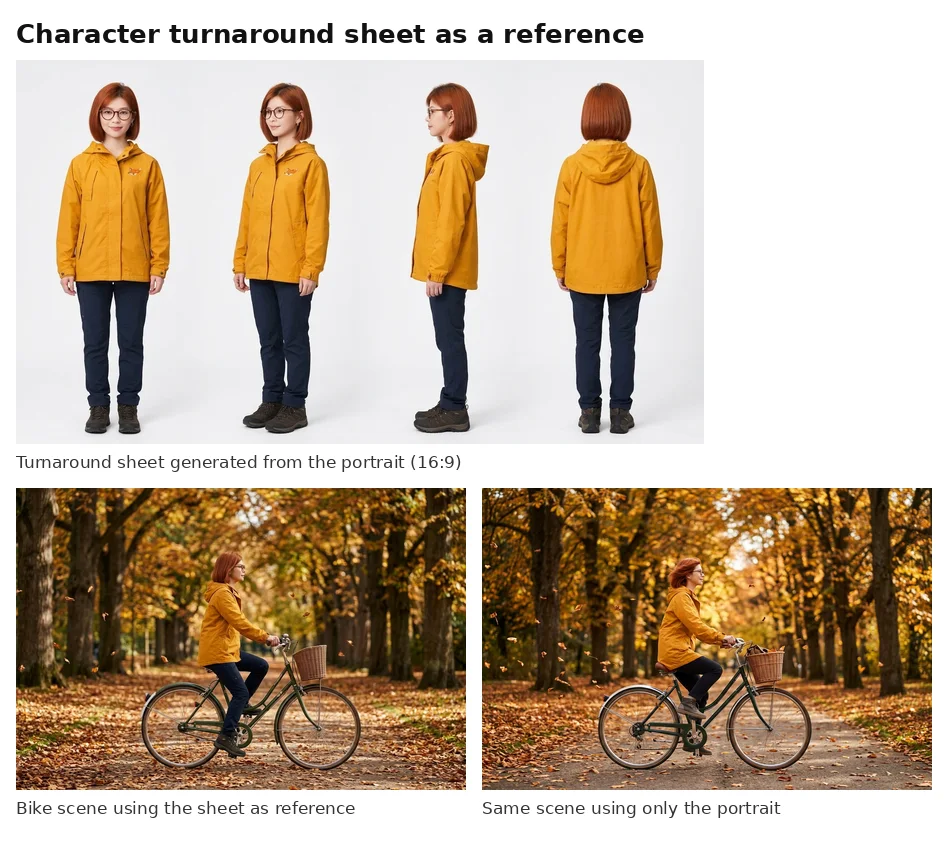
A generated sheet is another output to check, not an automatic identity lock, so we inspected every panel before using it. All four views matched the reference: same bob, glasses, raincoat, and fox patch, with the earring on her left ear wherever it was visible.
Our prompt asked for front, three-quarter, left profile, and back views. None of them shows her right side, so the sheet never showed what her right ear should look like, which is exactly the angle where the earring kept failing.
In the bike scene, we saw no clear consistency advantage from the sheet in this single comparison. Both versions got her hair, glasses, and raincoat right, and both put the earring on her visible right ear. We ran each version once, so this is a single comparison, not a verdict on sheets.
If you build a sheet for a character with one-sided details, ask for both side profiles, for example “left profile with the earring, right profile with no earring.” We didn’t test that version, but it at least gives the model a view of the side that went wrong.
Original, Sheet, or Latest Result: Which Reference to Use
Choosing the right reference matters, too. Across Tests 1, 3, and 4, each type of reference did a different job. Here’s how we’d choose:
Use this reference | When | Watch out for |
|---|---|---|
The original portrait | Each new scene stands on its own | It only shows the angles in that one photo |
A turnaround sheet | You need angles the original doesn’t show | Check every panel first, and make sure it covers both sides |
The latest result | You’re adjusting a scene you already like | Approve the whole image first, or mistakes carry forward |
The real question isn’t “original or latest.” It’s which image contains the correct information for the next shot.
Smaller Changes We Spotted
Beyond the earring, two other changes are worth knowing about.
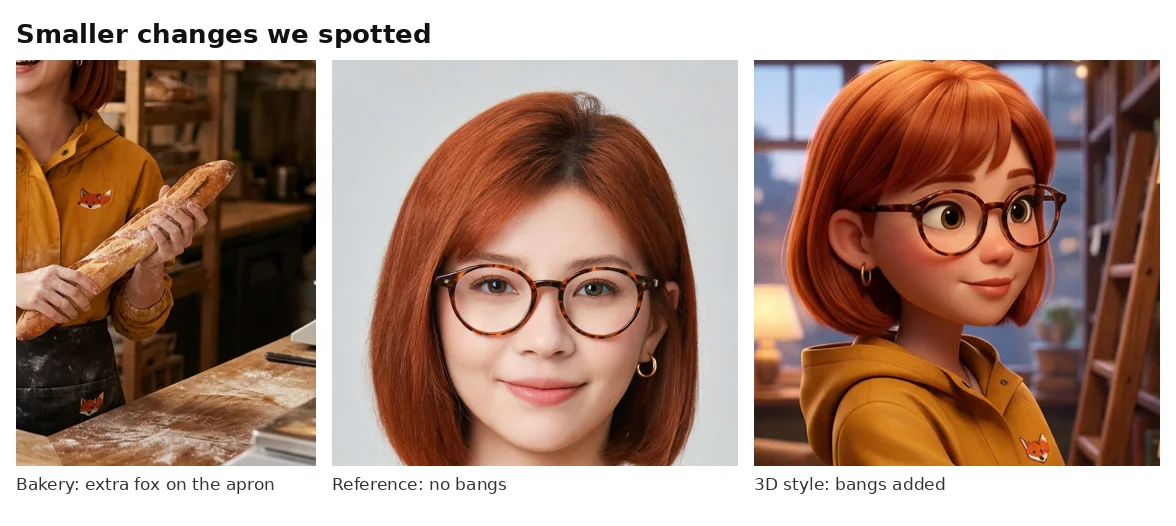
Details can copy themselves. In the bakery scene, the model gave Mira an apron and put a second fox patch on it. The original patch stayed on her raincoat, so nothing was lost, but something extra appeared.
Style changes can change the character. When we asked for a stylized 3D animated version, she kept her bob, glasses, raincoat, and fox patch, but gained bangs she doesn’t have in the reference. If you switch styles, recheck the hairline.
A Nano Banana 2.1 Character Consistency Prompt Template
Based on these tests, here’s the structure we’d use for a recurring character:
Use the uploaded photo as the character reference. Show the same [person] with the same face, [hair: color, length, style], [glasses or other face details], [outfit: main item and color], and [small identifying detail and exactly where it is]. Scene: [location, action, camera angle]. [Style]. No text anywhere in the image.
For more than one character, label each one by reference number:
Use each uploaded photo as a character reference and keep every person’s face and outfit exactly as in their reference. Show [the woman from reference 1: details]; [the man from reference 2: details]; … Scene: [one shared scene, with everyone fully visible].
A practical checklist for your next run:
Name the features you’ll check. Listing hair, glasses, and outfit in the prompt also gives you a checklist for reviewing every result.
Say where each person is in the frame when you have three or more characters, so you can find and check each one quickly.
Keep one-sided details to a minimum, for the reason shown in the earring test.
Start at 1K. At 1 credit per image with one reference, you can afford several tries before moving to 2K or 4K.
For more prompt ideas, see our Nano Banana 2.1 review and our comparison of Nano Banana 2.1 vs GPT Image 2.5.
Create your character with Nano Banana 2.1
Nano Banana 2.1 Character Consistency FAQ
Can Nano Banana 2.1 keep the same character across different images?
In our tests, yes. Mira remained recognizable across the tested scenes and styles, although some identifying details changed. We judged this by visual inspection across four very different scenes, a 3D style, an edit chain, and two bike scenes. The recurring problem was a single earring, which moved to the wrong ear whenever her right side faced the camera. We also saw two one-off changes: an extra fox patch on a new apron, and bangs added in the 3D style.
How many characters can Nano Banana 2.1 keep consistent?
Google’s model page describes support for up to four. In our two five-person runs, all five characters were still recognizable, but two runs are not enough to establish reliable consistency beyond that stated support, so we wouldn’t rely on it for important work.
How many reference images can I upload?
Google lists up to 14 reference images. In our October 23 tests, JXP displayed 1 credit for a 1K generation with one reference, plus 1 credit for each additional reference.
Does a character turnaround sheet improve consistency?
We saw no clear consistency advantage from the sheet in our one bike-scene comparison. Every panel of our sheet matched the reference, but none showed her right side, and neither the sheet nor the single portrait fixed the earring. Check every panel of a sheet before you use it, and include both side profiles.
Why do small accessories change between images?
In our tests, the clearest recurring issue was a single earring switching sides: the earring appeared to follow whichever ear was visible, but this test cannot establish why. We also saw a fox patch copied onto a new apron once. Check small details like these in every image.
Start With One Character and a Checklist
These results suggest Nano Banana 2.1 character consistency is worth trying for a character series, such as storyboards, comics, brand mascots, or social posts with the same faces. In our tests, characters stayed recognizable across scenes, groups, and repeated edits, judged by eye rather than a face-matching tool.
Plan for the small things. Write down three to five features for each character, check them in every image, and pay extra attention to anything that only appears on one side.