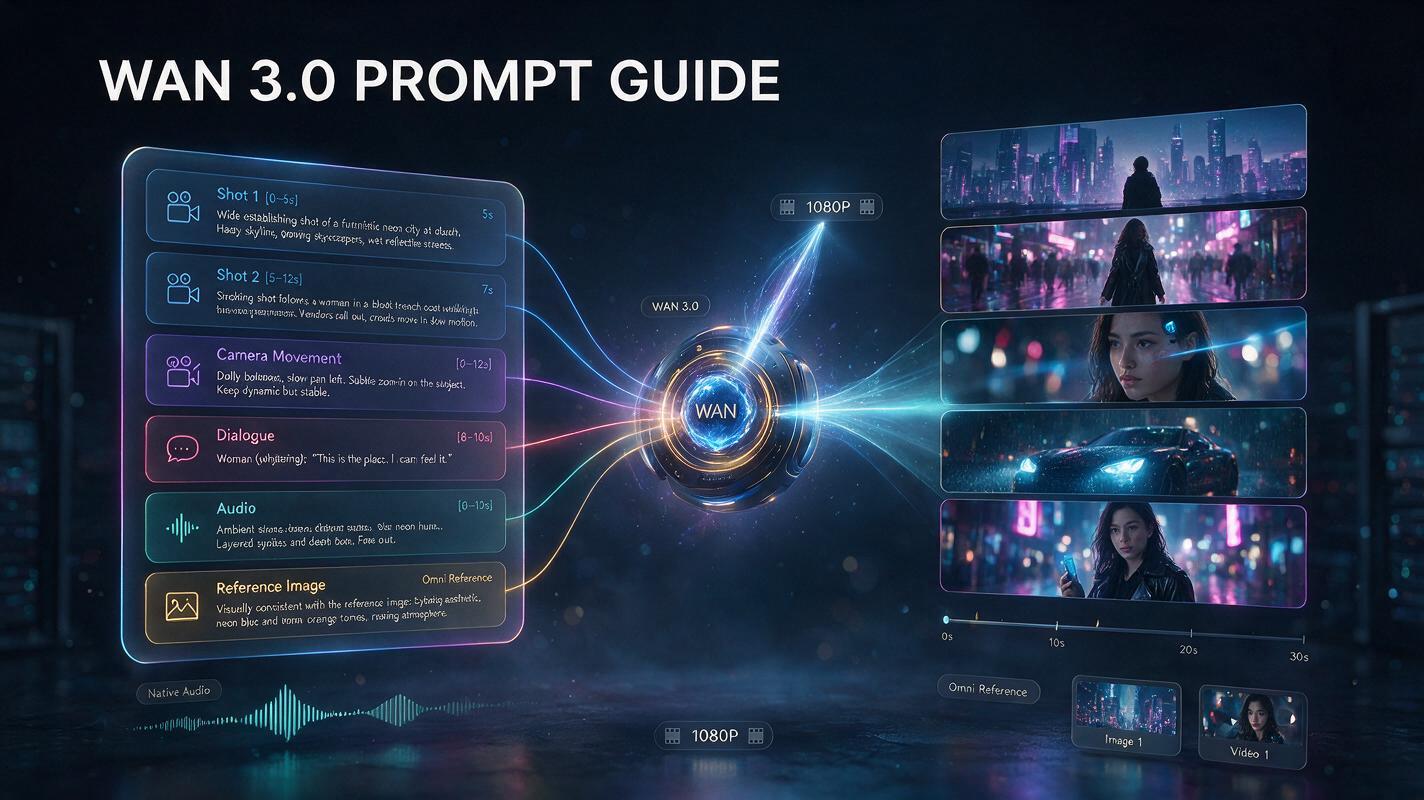
A strong Wan 3.0 prompt is less like an image description and more like a short directing brief. With native generation up to 30 seconds, multimodal Omni Reference, synchronized audio, multiple shots, dialogue, documents, and webpages, Wan 3.0 gives creators enough control to describe not only what a scene looks like, but also what happens over time.
That changes how prompts should be written.
A basic prompt such as “a woman walking through Tokyo at night, cinematic” may establish a subject and mood, but it leaves the model to decide the shot order, movement, pacing, sound, and ending. A more useful Wan 3.0 prompt defines those elements deliberately.
Alibaba’s Wan 3.0 launch positions the model around a single “director prompt” that connects characters, environments, camera behavior, dialogue, action, and synchronized audio across sequences lasting up to 30 seconds. Its official showcase even breaks one 30-second generation into timed narrative sections, demonstrating why temporal structure matters more as clips become longer.
Want to test these structures yourself?
This Wan 3.0 Prompt Guide explains prompt formulas, shot structure, camera language, reference syntax, dialogue and sound direction, document prompting, copy-ready examples, and common mistakes.
The Best Wan 3.0 Prompt Formula
A practical general-purpose formula is:
Subject + action + environment + shot sequence + camera movement + visual style + lighting + dialogue + sound + reference instructions + continuity requirements
Not every Wan 3.0 prompt needs every field.
A simple five-second clip may need only:
Subject + action + scene + camera
A 20–30 second cinematic scene usually benefits from:
Subject + narrative sequence + shots + camera + sound + continuity
And an Omni Reference prompt may need:
Reference identifier + subject role + action + scene + dialogue + audio + consistency instructions
The goal is not to make prompts unnecessarily long. The goal is to remove ambiguity where control matters.
How Wan 3.0 Prompts Differ from Short AI Video Prompts
Short AI video prompts often behave like animated image prompts. For example:
A stylish sports car races through a rainy cyberpunk city at night, cinematic lighting, reflections on wet asphalt.
That may be enough for a short visual clip. But a 30-second Wan 3.0 video has room for:
establishing shots
multiple actions
transitions
dialogue
reaction shots
changing camera distance
sound development
an ending
Alibaba positions Wan 3.0 specifically around this longer narrative space, describing 30-second generation as enough time for characters, dialogue, action, and camera work to unfold within one piece.
So instead of thinking: What should this frame look like? Think: What should happen first, next, and last?
Use Shot Structure for Longer Wan 3.0 Prompts
Alibaba’s existing Wan prompt documentation recommends structured multi-shot descriptions for complex video sequences. Earlier Wan prompt examples explicitly use labels such as “Shot 1,” “Shot 2,” and time ranges to describe scene changes.
Wan 3.0’s own release showcase similarly divides a 30-second generation into timed narrative phases. A useful format is:
Shot 1 [0–5s] — Establish the location and subject.
Shot 2 [5–12s] — Introduce the main action.
Shot 3 [12–20s] — Develop the action or dialogue.
Shot 4 [20–27s] — Deliver the key moment.
Shot 5 [27–30s] — Finish with a clear closing image.
Treat these timestamps as directing intent rather than frame-accurate editing commands. Generative video models may not follow every cut at the exact specified second.
Example: 30-Second Cinematic Wan 3.0 Prompt
Shot 1 [0–6s]: Wide establishing shot of a nearly empty train station in Tokyo just after midnight. Rain falls beyond the platform roof, reflecting warm station lights on the wet ground. A young woman in a dark green coat stands alone beside a vending machine.
Shot 2 [6–13s]: Slow tracking shot from behind as she walks toward the edge of the platform. A distant train approaches. Her coat moves gently in the wind.
Shot 3 [13–20s]: Cut to a medium side profile. She receives a phone call, pauses, and quietly says, “I thought you weren’t coming.”
Shot 4 [20–26s]: Close-up as she looks toward the arriving train. Her expression changes from uncertainty to relief.
Shot 5 [26–30s]: Wide shot as the train enters the station and fills the background with warm light. Hold briefly on her silhouette.
Realistic nighttime cinematography, restrained blue-and-amber palette, natural skin texture, shallow depth of field, subtle handheld realism. Rain ambience, distant railway sounds, soft footsteps, natural female dialogue, no background music. Keep the woman’s face, hairstyle, green coat, and proportions consistent across every shot.
This prompt controls much more than appearance. It defines:
pacing
camera distance
action
emotional progression
dialogue
sound
continuity
How to Describe Camera Movement in Wan 3.0 Prompts
Camera instructions are most useful when they describe a clear physical movement. Useful phrases include:
slow push-in
pull back
tracking shot
dolly forward
orbit around the subject
pan left / pan right
tilt up / tilt down
handheld follow shot
crane upward
static locked-off shot
overhead shot
low-angle tracking shot
close-up / medium shot / wide establishing shot
Alibaba’s Wan video documentation uses explicit camera descriptions such as orbiting, tilt-up movement, and reference-camera replication in its video workflows.
Instead of: Dynamic camera movement. Write: The camera slowly orbits clockwise around the product while maintaining the product in the center of the frame.
Instead of: Cinematic camera. Write: Begin with a wide static shot, then slowly push into a medium close-up as the character turns toward the window.
Specific movement is easier to interpret than an abstract adjective.
Avoid Conflicting Camera Instructions
A common prompt mistake is stacking cinematic terms that imply different movements:
Fast dolly forward, slow orbit, handheld camera, locked-off composition, dramatic zoom.
This gives the model conflicting directions. A better approach is to assign one primary camera behavior per shot. For example:
Shot 1: static wide shot.
Shot 2: slow tracking movement.
Shot 3: close-up with minimal handheld motion.
Clarity usually beats camera vocabulary density.
How to Use Omni Reference in Wan 3.0 Prompts
Wan 3.0’s biggest prompting advantage is Omni Reference. Alibaba describes the model as using images, text, video, audio, documents, and webpages together as creative references. Its official API example uses prompts such as:
Video 1 holds Image 1…
to connect uploaded assets with instructions. Existing Wan reference documentation establishes the same identifier pattern:
Image 1,Image 2, …Video 1,Video 2, …
Images and videos are numbered independently according to their upload order.
Good to know — reference input limits: per Alibaba Cloud’s official Wan3.0 API reference, a single request supports up to 10 reference images, up to 5 reference videos (15 seconds combined), up to 5 reference audio clips (15 seconds combined), and 1 document or web link. Planning references against these caps up front avoids trial-and-error.
A strong reference prompt should explain what role each reference plays.
Weak Reference Prompt
Use Image 1 and Image 2.
The model knows the assets exist but receives little instruction about why they matter.
Better Reference Prompt
Use the woman from Image 1 as the main character. Preserve her face, hairstyle, black jacket, and silver earrings throughout the video. Use Image 2 as the apartment environment, preserving the wooden furniture, large windows, and warm afternoon lighting.
Now each reference has a job.
Wan 3.0 Character Consistency Prompt
Use Image 1 as the exact character reference. Preserve the woman’s facial structure, short black hair, silver earrings, black leather jacket, height, and body proportions across the entire sequence.
Shot 1: Image 1 walks into a modern bookstore and looks around. Shot 2: Track beside Image 1 as she moves through the shelves and picks up a red hardcover book. Shot 3: Close-up as Image 1 opens the book and smiles. Shot 4: Pull back into a wide shot as she sits beside the window and begins reading.
Warm late-afternoon light, realistic bookstore ambience, gentle footsteps, subtle page-turning sounds. Do not change the character’s clothing, face, hairstyle, or accessories between shots.
The important part is repeating the identity constraints that matter. Do not rely only on:
Keep the character consistent.
Tell the model what consistency actually means.
Wan 3.0 Product Video Prompt
Reference prompting is equally useful for products.
Use Image 1 as the exact product reference. Preserve the product’s shape, proportions, surface material, packaging colors, button positions, and logo placement throughout every shot.
Shot 1 [0–5s]: Close-up hero shot of Image 1 on a dark stone surface. Soft side lighting reveals the material texture. Shot 2 [5–12s]: Slow clockwise orbit around the product. Fine water droplets appear on the surface. Shot 3 [12–20s]: A hand enters the frame, picks up the product, and demonstrates its main control. Do not alter its proportions or controls. Shot 4 [20–27s]: Cut to the product being used in a minimal modern studio environment. Shot 5 [27–30s]: Return to a clean hero shot with the product centered.
Premium commercial cinematography, realistic materials, controlled reflections, subtle electronic sound design, no dialogue, restrained background music. Keep the product design identical to Image 1 in every shot.
For e-commerce and advertising, instructions such as:
preserve logo placement
preserve packaging
preserve color
preserve proportions
do not redesign the product
are often more useful than adding extra aesthetic adjectives.
How to Write Dialogue in Wan 3.0 Prompts
Wan’s prompt documentation recommends writing dialogue directly with the speaking subject and quoted line. Existing Wan guidance also notes that when lines are explicitly supplied, the model uses those lines as dialogue direction; if no dialogue is wanted, the prompt can explicitly request no dialogue.
A useful format is: Character + says + exact line
Example: The woman looks at the man and quietly says, “You knew I would come back.”
For multiple speakers:
Image 1 turns toward Video 1 and says, “Why are you here?” Video 1 pauses, then replies, “Because you asked me to come.”
Keep dialogue reasonably short. Long monologues compete with:
action
camera movement
visual continuity
the available clip duration
A 10-second scene should not contain 25 seconds of natural speech.
How to Control Sound and Music
Wan 3.0 supports native audio-visual generation, and Alibaba explicitly positions sound, dialogue, action, and imagery as parts of the same directing process.
A useful sound structure is: Dialogue + ambience + sound effects + music
For example:
Natural café ambience, soft ceramic cup sounds, distant conversation, light rainfall against the window. The woman speaks quietly. No background music.
Or:
Heavy mechanical footsteps, metallic impacts, distant warning alarms, low cinematic percussion building toward the final shot.
If you do not want an element, say so directly:
No dialogue.
No background music.
Ambient sound only.
Alibaba’s Wan prompt documentation specifically recommends explicit “No dialogue” or “No background music” instructions when those elements should be suppressed.
Wan 3.0 Image-to-Video Prompt Example
When starting from an image, do not waste most of the prompt redescribing details that are already obvious. Focus on:
movement
camera
changes over time
facial expression
environmental motion
sound
Example
The woman in the reference image initially looks directly at the camera. A soft breeze moves several strands of her hair. She slowly turns toward the ocean, closes her eyes for a moment, then smiles slightly.
The camera begins as a medium close-up and slowly pulls back to reveal the cliffs and waves behind her. Golden-hour sunlight shifts subtly across her face. Realistic wind movement, natural ocean ambience, distant seabirds, no dialogue, no background music. Preserve the woman’s face, clothing, hairstyle, and the original photographic style.
The input image establishes appearance. The Wan 3.0 prompt establishes motion and progression.
Wan 3.0 Text-to-Video Prompt Example
A red vintage convertible drives slowly along an empty coastal road at sunrise.
Begin with a low-angle front tracking shot as the car rounds a bend. The ocean is visible beyond the cliff edge. Cut to a side profile shot showing warm sunlight reflecting across the red paint. Move into an overhead drone-style view as the road curves beside the water. Finish with a wide rear shot as the car disappears toward the horizon.
Realistic automotive cinematography, natural suspension movement, accurate wheel rotation, warm early-morning light, restrained lens flare, ocean wind, engine sound, tire noise, no dialogue, subtle cinematic music.
Notice that the prompt describes actions and shots, rather than simply adding:
masterpiece, ultra detailed, cinematic, beautiful, 8K.
Those image-generation-style modifiers usually provide less useful video direction than actual motion and camera instructions.
Wan 3.0 Document-to-Video Prompt Example
Wan 3.0 can also use documents and webpages as creative references. Alibaba specifically lists DOC, XLS, PPT, PDF, Markdown, and webpages among Wan 3.0’s expanded input types (one file or web link per request).
For document prompts, factual boundaries are more important than cinematic detail.
Example
Use the attached presentation as the factual source for the video.
Create a 30-second business explainer aimed at potential customers. Focus on the problem defined in slides 1–2, the three product capabilities presented in slides 3–6, and the final recommendation.
Shot 1 [0–5s]: Introduce the customer problem with a clean animated visual. Shot 2 [5–15s]: Present the first two capabilities using simple interface-style motion graphics. Shot 3 [15–23s]: Visualize the strongest numerical result from the presentation. Preserve the value and label exactly. Shot 4 [23–30s]: Explain the final benefit and finish with the recommendation from the last slide.
Professional narration, restrained technology graphics, clear visual hierarchy, subtle background music. Use only claims contained in the document. Do not invent numbers, product capabilities, or conclusions.
For document-to-video, include instructions such as:
use the document as the source of truth
preserve numbers exactly
do not invent claims
prioritize specified sections
ignore irrelevant appendices
Wan 3.0 Prompt for a Vertical Social Video
Create a 20-second 9:16 vertical product video designed for social media.
Shot 1 [0–3s]: Extreme close-up of water splashing across the product. Fast opening movement designed as a visual hook. Shot 2 [3–8s]: Pull back to reveal a creator holding the product outdoors. Shot 3 [8–14s]: Show the product being used in one continuous action. Keep the product clearly visible. Shot 4 [14–18s]: Close-up of the most important feature. Shot 5 [18–20s]: Clean hero shot.
Fast but readable pacing, strong foreground movement, realistic daylight, crisp product details, energetic sound effects, minimal upbeat music. Preserve product appearance across all shots.
For vertical video, the first few seconds matter disproportionately. Do not spend six seconds establishing a location if the video’s primary purpose is to demonstrate a product.
Wan 3.0 Prompt for a Single-Shot Scene
Multi-shot prompting is useful, but not every video should contain cuts. Alibaba’s Wan prompt guide recommends explicitly asking for a single shot when continuous camera movement is desired.
Example:
Generate a single-shot video.
A chef stands behind the counter of a small open kitchen preparing ramen. Begin with a medium shot from the dining area. Slowly move the camera forward while the chef lifts noodles from the pot, places them into a bowl, adds broth and toppings, then slides the finished bowl toward the camera. Continue the same uninterrupted camera movement throughout the scene. Warm restaurant lighting, natural steam, realistic hand movement, kitchen ambience, boiling water, ceramic sounds, no dialogue.
Single-shot prompts work particularly well when the main creative value is:
choreography
continuous action
camera movement
immersion
Common Wan 3.0 Prompt Mistakes
1. Writing an Image Prompt Instead of a Video Prompt
Weak: Beautiful futuristic woman, cinematic, ultra-detailed, masterpiece. Better: A woman walks through the laboratory, pauses beside a holographic display, reaches toward it, and turns as the camera slowly moves around her.
Describe change.
2. Asking for Too Much in Too Little Time
Ten seconds is not enough for: five locations, seven dialogue lines, three characters, a chase, a product demonstration, and a closing logo shot. Match narrative complexity to duration.
3. Leaving Reference Roles Undefined
Do not just say: Use Image 1, Image 2 and Video 1. Say: Use the person in Image 1 as the main character, Image 2 as the environment, and reference the walking motion from Video 1.
4. Using Conflicting Instructions
Avoid: dark night scene, bright midday sunlight. Or: static camera, fast handheld tracking shot.
Choose one clear intention per shot.
5. Overusing Style Adjectives
Words such as cinematic, beautiful, epic, professional, detailed can help establish tone, but they cannot replace: action, camera, lighting, shot sequence, sound, and timing.
6. Forgetting Continuity Instructions
For characters: preserve face, hair, clothing, accessories, and body proportions.
For products: preserve shape, color, logo position, proportions, and packaging.
For environments: keep room layout, furniture placement, lighting direction, and architectural details consistent.
A Better Workflow for Writing Wan 3.0 Prompts
Step 1: Write the Story in One Sentence
Example: A woman waits at a station, receives a call, and realizes the person she is waiting for has arrived.
If the story cannot be explained clearly in one sentence, the video may contain too many ideas.
Step 2: Divide It into Shots
Turn the sentence into: station establishing shot, walking shot, phone call, emotional close-up, train arrival.
Step 3: Assign Camera Behavior
Give each shot one main camera instruction.
Step 4: Add References
Specify exactly which asset controls character, product, scene, motion, or voice. Alibaba’s reference workflow uses identifiers such as Image 1 and Video 1, with numbering tied to uploaded media order.
Step 5: Add Audio
Decide whether the scene needs dialogue, voice, ambience, sound effects, music, or silence.
Step 6: Add Continuity Constraints
Explain what absolutely must not change.
Step 7: Remove Unnecessary Adjectives
If a phrase does not affect appearance, movement, story, camera, sound, or consistency, consider removing it.
Should Wan 3.0 Prompts Be Long?
Not automatically.
Wan 3.0’s API documentation supports very long textual input, but maximum prompt length should not be treated as a target. Per Alibaba Cloud’s official Wan3.0 API reference, prompt input is capped at 20,000 characters (each Chinese character or Latin letter counts as one character).
A longer prompt is useful when the video genuinely contains multiple shots, several references, dialogue, sound direction, and continuity requirements. For a simple five-second action, a shorter prompt is usually easier to control.
The best Wan 3.0 prompt is not the longest prompt. It is the prompt with the least unnecessary ambiguity.
Wan 3.0 Prompt Guide FAQ
What is the best Wan 3.0 prompt structure?
A useful general formula is: Subject + action + environment + shot sequence + camera + style + lighting + dialogue/audio + references + continuity. Short clips can use fewer elements, while longer 20–30 second videos benefit from stronger temporal structure.
Can Wan 3.0 follow timestamps in prompts?
Wan 3.0 is designed for long-form narrative generation, and Alibaba’s own showcase breaks 30-second outputs into time-based story phases. Existing Wan prompt documentation also uses shot/time structures. However, timestamps should be treated as directing guidance rather than guaranteed frame-accurate cuts.
How do I reference an uploaded image in a Wan prompt?
Use identifiers such as Image 1, Image 2, and so on. For videos, use Video 1, Video 2, etc. Images and videos are numbered independently according to upload order.
Can Wan 3.0 prompts include dialogue?
Yes. Wan 3.0 supports native audio-visual generation, including dialogue and synchronized sound. Write the speaking character and dialogue explicitly when exact lines matter.
How do I tell Wan 3.0 not to add dialogue?
Use a direct instruction such as: No dialogue. Alibaba’s Wan prompt documentation uses explicit negative sound instructions when dialogue or background music should be suppressed.
How do I write a Wan 3.0 product prompt?
Use a product reference and specify what must remain unchanged: preserve product shape, dimensions, colors, material, controls, packaging, and logo placement. Then separately describe the action, scene, camera movement, and sound.
Can Wan 3.0 use reference videos in prompts?
Yes. Wan 3.0 supports video as part of its Omni Reference system, and its official example uses identifiers such as Video 1 and Image 1 within the prompt. Per Alibaba Cloud’s documentation, a request can include up to 5 reference videos totaling 15 seconds.
Can Wan 3.0 prompts use PDF or PowerPoint files?
Wan 3.0 officially expands reference input to documents and webpages, including DOC, XLS, PPT, PDF, Markdown, and web pages (one file or link per request). For factual material, tell the model to use the source as ground truth and explicitly prohibit invented data.
What is the maximum Wan 3.0 prompt length?
The official Wan3.0 API reference lists a maximum textual prompt length of 20,000 characters. Longer input is truncated.
Final Thoughts
The main lesson from this Wan 3.0 Prompt Guide is simple: write for time, not just appearance.
Wan 3.0’s 30-second generation window means a prompt can now describe a small narrative rather than a single animated moment. Omni Reference means a prompt can assign different images, videos, audio, documents, and webpages different creative roles. Native audio means dialogue, ambience, music, and effects can be directed alongside the visuals.
The strongest prompts therefore behave like miniature production plans. Define: who is in the scene, what happens, where it happens, how the camera sees it, what changes over time, what should be heard, which references control which elements, and what must remain consistent.
For a simple clip, keep that plan short. For a 30-second sequence, divide it into shots and give the video a beginning, development, and ending.
Ready to start writing your own?
Generate with Wan 3.0 on JXP →
The goal is not to write the most elaborate prompt. It is to give Wan 3.0 the clearest possible directing intent.