This Seedream 5.5 review found the model useful for focused product-image revisions and short English poster copy, with limits around exact brand details and transparent exports. Across five consecutive edits, the bottle scene stayed visually coherent, but recoloring the bottle also changed its label lettering. Two posters preserved the supplied words; only one of two transparency requests returned a file with an alpha channel.
Below, you can inspect the original results, enlarged label comparisons, and the same transparent asset on different backgrounds. These ten outputs are a small practical sample, intended to help you choose a workflow rather than establish a universal success rate.
Quick Verdict
Seedream 5.5 is worth trying for product concepts and focused image revisions. Its material rendering was convincing in our bottle scene, and the English poster outputs preserved the requested dates, price, and small copy. Following exact layout instructions proved less dependable.
Test | Observed result | What it means for your work |
|---|---|---|
Five consecutive edits | Every requested change appeared; label lettering also changed color in edit 3 | Useful for iterations, with a brand-detail check after every round |
Two English posters | Supplied copy was correct; layout constraints were not fully followed | Good starting points for concepts; exact templates may need manual layout |
Two transparency requests | Ceramic bird had alpha; amber ribbon was opaque | Check each downloaded file before using it as an overlay |
Ten 1.5K requests | Each quoted 1 credit | 10 quoted credits, before any additional finishing or retries |
Transparency needs a separate export check. A ceramic bird downloaded with a real alpha channel; a translucent amber ribbon downloaded as an opaque RGB PNG despite the Transparent setting. That is a limitation of the result we received through JXP, rather than proof that the underlying model cannot generate translucent assets.
How We Tested Seedream 5.5
We submitted ten requests through JXP’s image generator on November 11, 2026: one product baseline, five sequential edits, two poster generations, and two transparency tests. Every request used the 1.5K tier, Auto size mode, and one output. We left the negative prompt empty and reference strength at its displayed default of 0.50.
For the product sequence, we downloaded each result and uploaded that file as the sole reference for the next edit. This matters: the sequence tests changes accumulating on the same image, rather than independent variations from the original.
The poster prompt ran twice without modification. The transparency tests used two different subjects with Background explicitly set to Transparent. We kept the original downloads and checked their file formats before compositing them over light and dark backgrounds.
These are small practical tests, not a benchmark of every style or use case. We did not test portraits, multilingual copy, layer decomposition, or a matched comparison against Seedream 5.0 Pro. ByteDance’s official model page describes improvements in editing, transparency, and realism; our observations below concern the specific outputs delivered through JXP.
Seedream 5.5 Image Quality: The Product Photography Test
Product Photography Prompt and Settings
The baseline brief asked for a matte cobalt blue insulated bottle with a black cap, a white NORTH label, and “500 ml” beneath it. An orange sphere and cream linen cloth supplied nearby details that later edits would need to preserve.
Studio product photograph of a matte cobalt blue cylindrical insulated bottle with a black screw cap. Center it on a pale beige tabletop against a warm gray wall. Small white label on the bottle reads exactly “NORTH” with “500 ml” below. One orange sphere sits to the left, a folded cream linen cloth to the right. Soft window light from the left, realistic matte powder-coated metal, clean commercial photography, no other text.
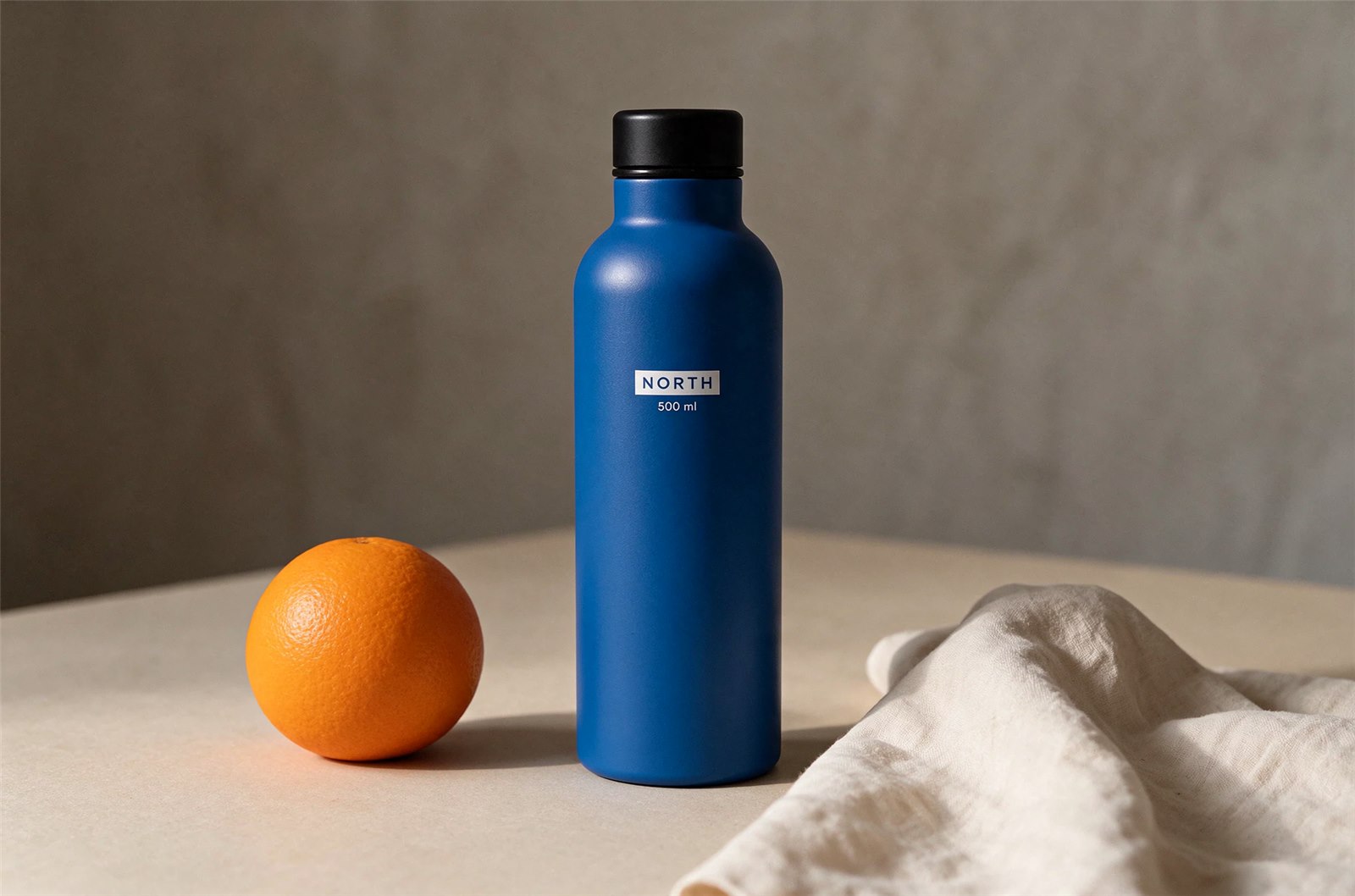
First output, without retries or retouching. Downloaded at 1888 × 1248 pixels.
Materials, Lighting, and Instruction Following
The bottle had a believable powder-coated finish, readable lettering, and a coherent highlight from the left. The cap, fabric weave, and contact shadows gave the scene enough physical detail to work as a product concept.
The phrase “orange sphere” also exposed an ambiguity in our brief: the model rendered an orange fruit, complete with peel texture. That interpretation is plausible, so we would not score it as clear evidence of a model failure. For an abstract prop, a better instruction would be “a smooth orange-colored geometric sphere, not a fruit.” The linen looked draped rather than neatly folded, another detail to specify more carefully if the arrangement matters.
For AI product photography, the more useful checks were the bottle silhouette, label readability, and material finish. All three looked convincing in this first image. Because the bottle was generated from text rather than matched to a real SKU, the result demonstrates concept quality; it does not establish faithful reproduction of an existing product.
Seedream 5.5 Multi-Turn Editing: Five Consecutive Revisions
Background Replacement and Object Editing
The first edit changed only the wall to pale sage green. The bottle, label, orange, cloth, and overall framing remained visually close to the starting image. We would accept that as a useful background revision, although visual similarity is not a measurement of identical pixels.
The second edit replaced the orange fruit with a smooth white ceramic sphere. That request succeeded, and NORTH and 500 ml remained legible. Some original downloads included a visible AI-generation label; those original files are retained separately from the presentation images below.
Product Recoloring and Label Preservation
The third edit changed the bottle body to terracotta red. Its silhouette, cap, position, and readable capacity text held together. However, the NORTH lettering also changed from blue to red, even though the prompt explicitly asked to leave the label exactly unchanged. That is a meaningful limitation for a brand asset: a small color change can be a failed revision even when the overall image looks coherent.
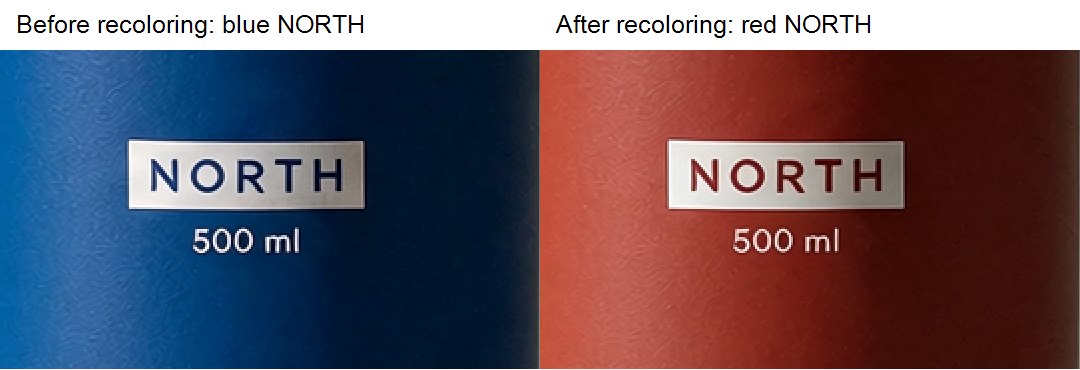
Detail crops from edits 2 and 3, enlarged equally for inspection. The label color changed even though the instruction asked to preserve it. No colors or lettering have been retouched.
The fourth edit changed the cream cloth to navy. Its main folds and placement remained visually close, while the bottle, white sphere, and sage wall continued to look like the same scene.
Editing Small Text Without Rebuilding the Scene
For the fifth edit, we requested only a capacity-copy change from “500 ml” to “750 ml.” The result showed the correct new text without an obvious redesign of the bottle or surrounding scene.
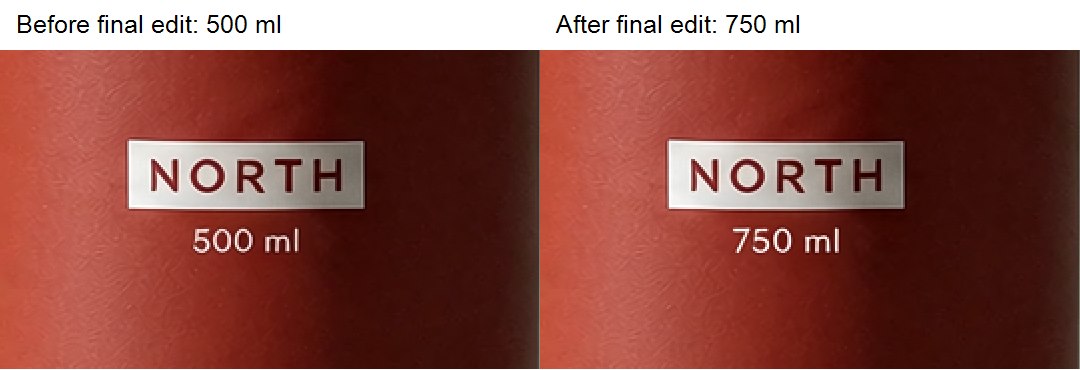
Detail crops from edits 4 and 5. The capacity changed while NORTH remained readable. Enlargement makes the text easier to inspect; it is not a separate generation.
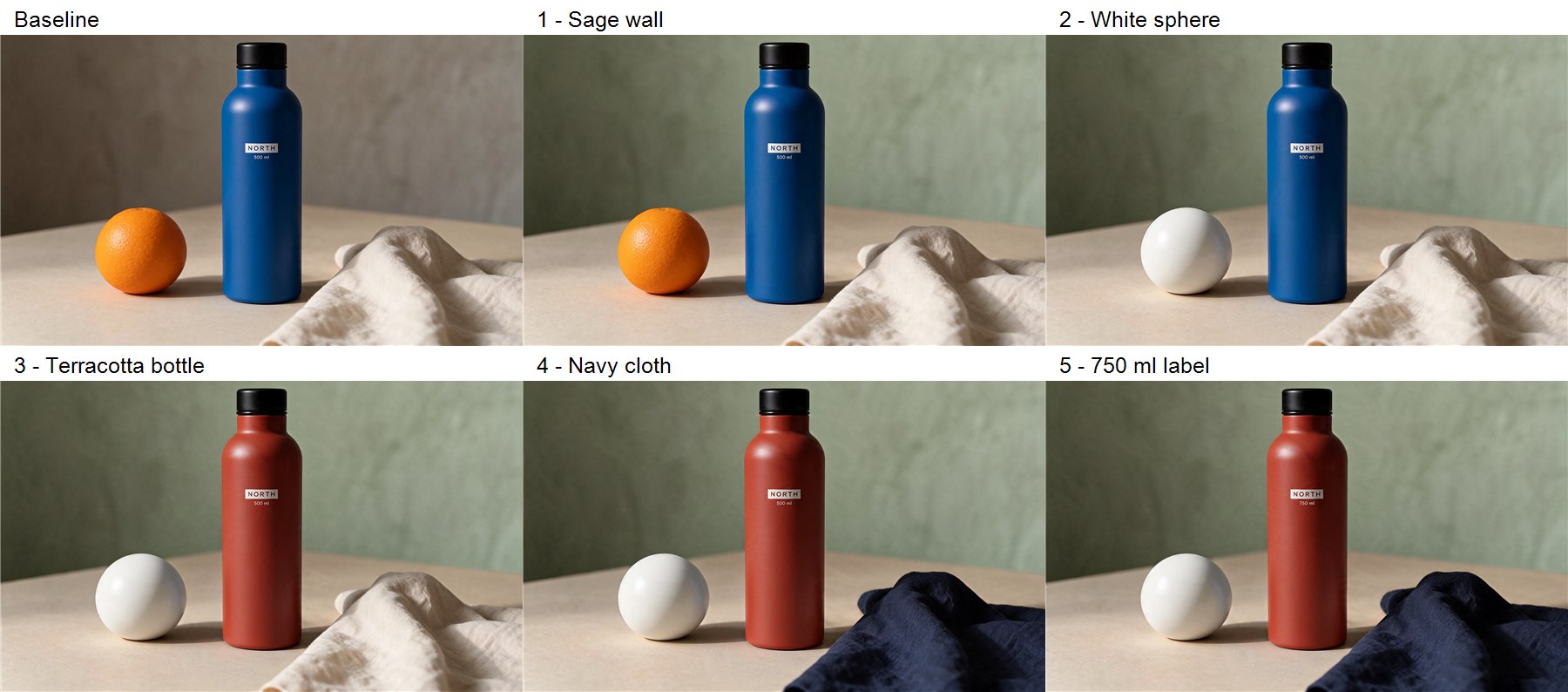
All six stages in order, with equal top-edge crops to exclude corner AI labels. Each edit used the preceding stage as its reference. The product details shown are not retouched; original downloads are retained.
Stage | Requested change | What we observed |
|---|---|---|
Edit 1 | Gray wall to sage green | Background changed; product and props visually held |
Edit 2 | Orange fruit to white sphere | Requested replacement succeeded; label stayed readable |
Edit 3 | Blue bottle to terracotta | Body changed, but NORTH lettering also changed color |
Edit 4 | Cream cloth to navy | Color changed while the main folds and placement held |
Edit 5 | 500 ml to 750 ml | Correct new capacity text; scene remained visually coherent |
All five requested changes were visibly applied on their first attempt. That does not make the chain five perfect preservation successes: the label-color change in edit 3 missed an explicit constraint. We would use this workflow for iterative concepts, then compare every brand detail against the original before approving a final asset.
The useful prompt pattern was consistent throughout: name one change, then name what must stay. For the final round, our full instruction was:
Change only the small white capacity text below NORTH from “500 ml” to exactly “750 ml”. Keep NORTH unchanged, including its letter shapes, color and white label. Preserve the terracotta bottle body, black cap, white sphere, navy linen cloth, sage wall, tabletop, lighting, crop and camera angle.
Seedream 5.5 Text Rendering: English Poster Accuracy
We asked for an ivory-and-cobalt pottery workshop poster with five specified text blocks. The brief included a date, a price, and a small booking sentence so that the test went beyond a decorative headline.
Design a square premium poster for a fictional ceramics workshop. Warm ivory paper, cobalt blue typography, one small hand-drawn ceramic bowl. Render exactly these five lines, with clear hierarchy: “MAKE SOMETHING SLOW” / “Saturday pottery workshop” / “November 21, 2026” / “$48 per person” / “Clay, tools, and firing included. Book by November 18.” The headline is large; the last sentence is small but readable. No extra words, no logos.
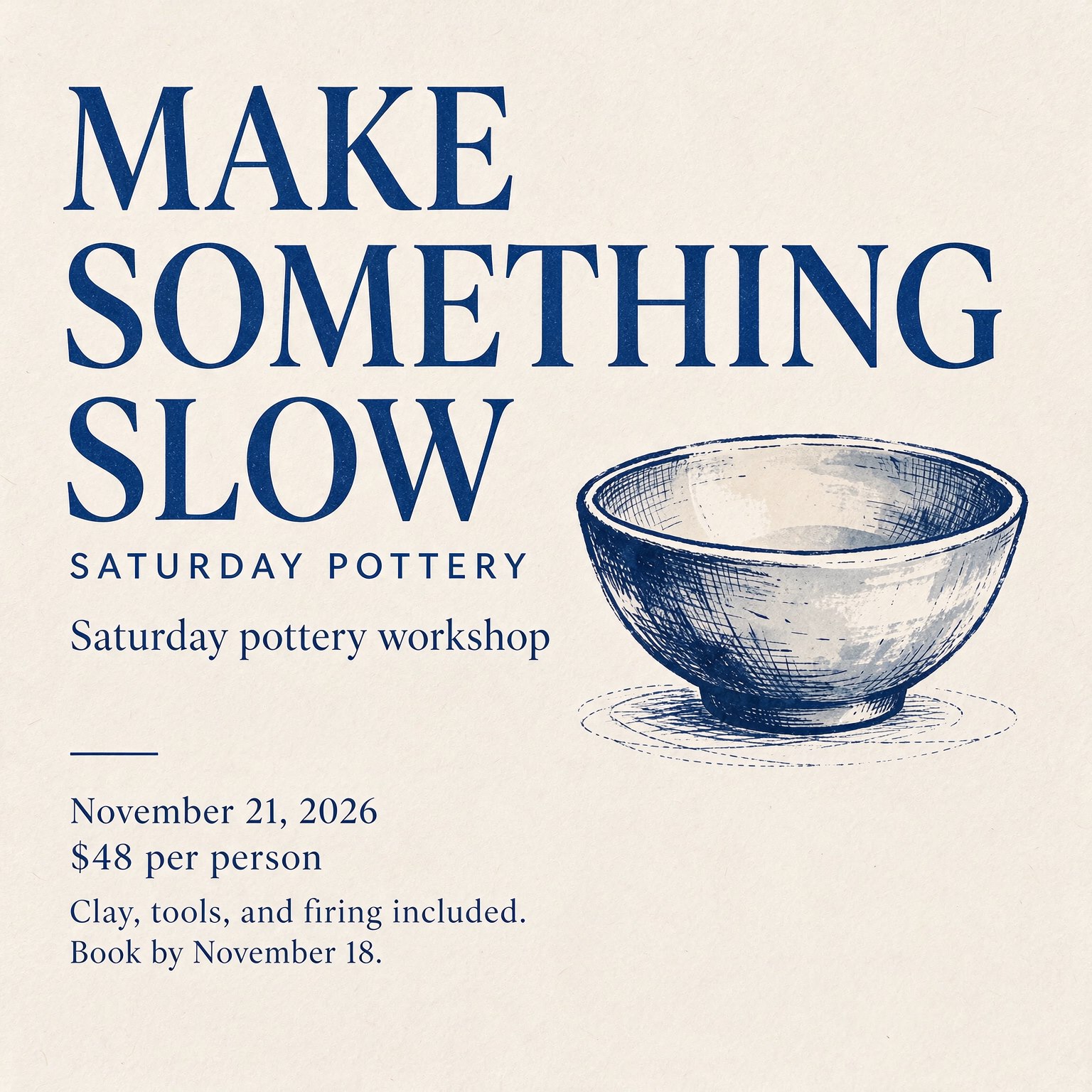
First attempt: supplied copy reads correctly, but an extra “SATURDAY POTTERY” line appears.
First Attempt: Correct Copy with an Extra Heading
The first output rendered the requested words, November 21 date, $48 price, and November 18 booking deadline correctly. The smaller sentence remained readable in the downloaded image. However, it added “SATURDAY POTTERY” above the requested subtitle and wrapped the headline across three lines. It therefore failed the strict five-line and no-extra-words instructions.
Same-Prompt Repeat: A Different Layout
We ran the exact prompt again, requesting one new output rather than a batch to select from.
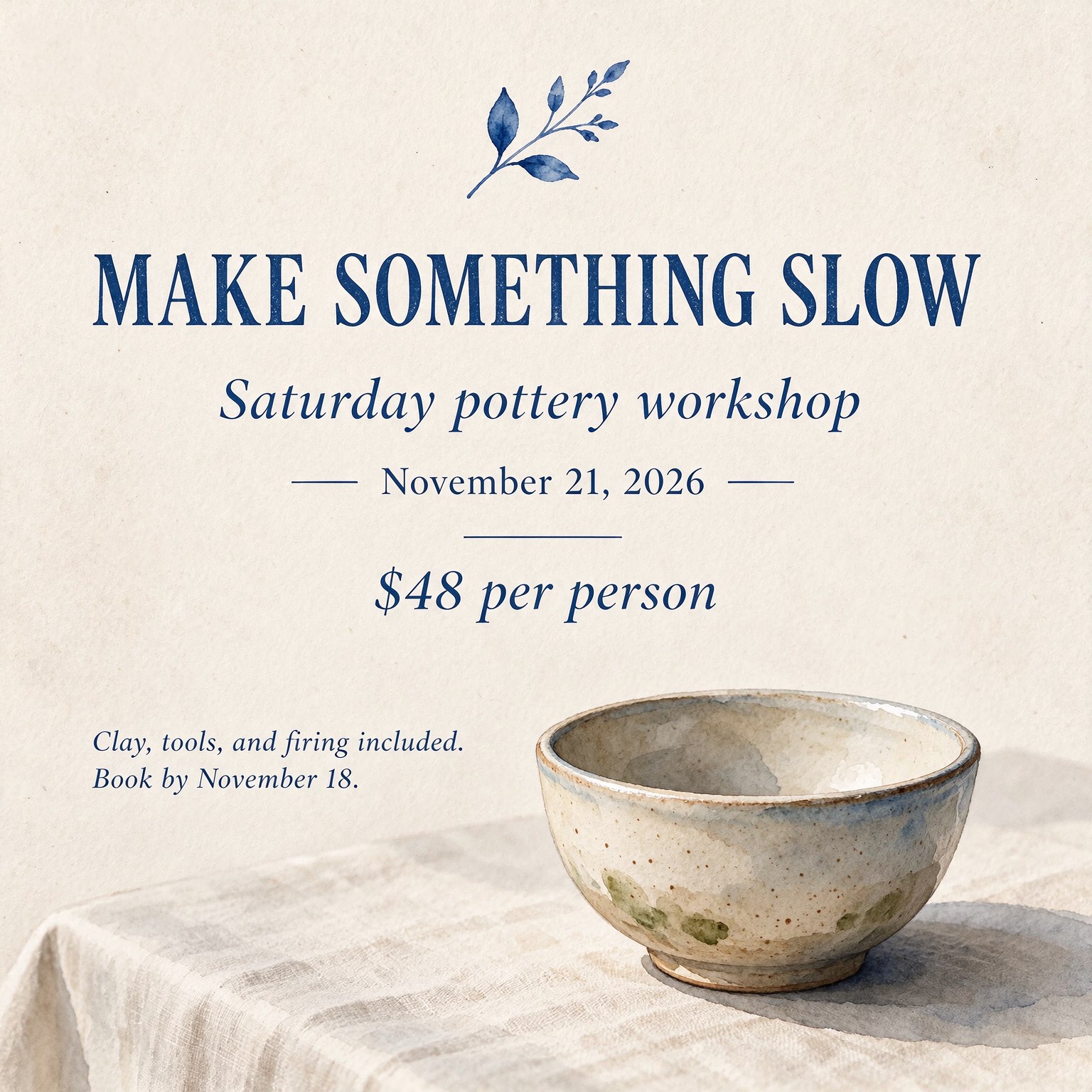
Second attempt: the same copy in a substantially different composition; the final sentence still wraps. Only the corner AI label has been removed for presentation; poster text and artwork are unchanged.
The second image also preserved the supplied wording, date, and price. It avoided the first output’s extra workshop heading and introduced botanical decoration. The bowl had a more detailed painted treatment than the first output; whether that fits “hand-drawn” is a stylistic judgment, so we would not count it as a definite failure. The clearer constraint miss was the final sentence wrapping into two lines.
Our practical judgment is that Seedream 5.5 handled this short English copy well across both attempts. It was less exact about line breaks and visual constraints. That makes it useful for exploring poster designs, while a fixed brand template or mandatory text placement still benefits from manual layout work. This test does not establish accuracy on long paragraphs or other languages.
Seedream 5.5 Transparent PNG Test: Solid and Translucent Assets
The transparency results differed enough to change how we would use the feature.
Amber Ribbon: The Transparency Request Failed
We first requested a translucent amber ribbon with smooth edges and darker overlapping sections. Background was set to Transparent in JXP. The output had attractive highlights and convincing glass-like shading, but the downloaded PNG contained RGB color data without an alpha channel. Its dark background remained when placed over white.

Downloaded ribbon placed on white for inspection. The dark background remains because this file has no alpha channel.
Ceramic Bird: A Real Transparent Background
For a simpler subject, we requested an isolated cobalt blue ceramic bird with no floor or shadow, keeping the same Transparent setting. This time the file was an RGBA PNG. Its corner pixels were fully transparent, and the space between the legs also showed the new background when composited.
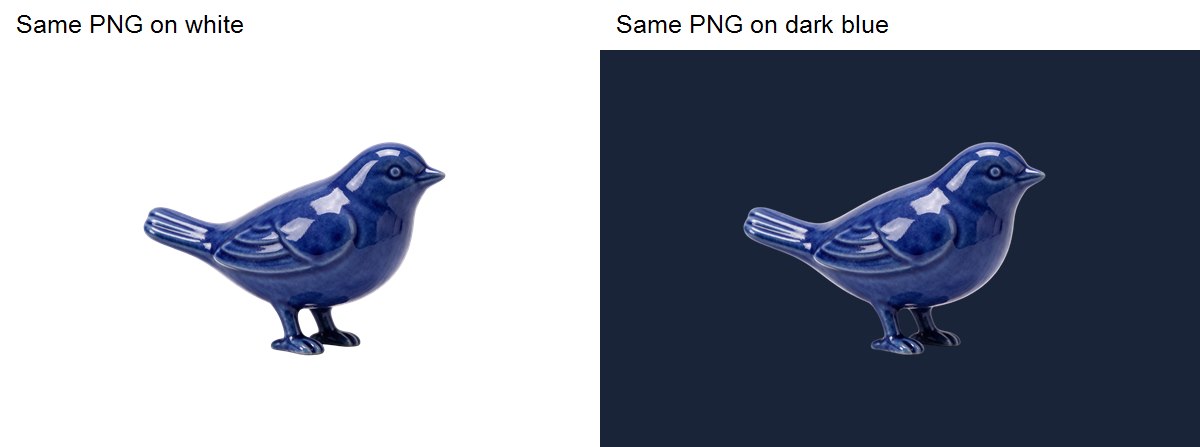
One downloaded bird file placed over two solid backgrounds. The original alpha channel is unchanged; no background removal was applied.
The bird was useful as a reusable isolated graphic in these previews. We would still inspect edges at the final delivery size. The ribbon would require additional work before use as a transparent overlay.
Two examples cannot establish a general transparency success rate. They do show that selecting Transparent and receiving a PNG are insufficient checks on their own. Download the file and place it over the actual layout background before approving the asset. Our test also cannot identify whether the ribbon result arose during generation or elsewhere in the delivery path.
Seedream 5.5 Pricing on JXP: Credits and Finishing Work
JXP displayed a quote of 1 credit per image at 1.5K for every request in this test. Its page lists 2 credits per image at 2K, which we did not test. These are JXP platform prices, not a universal Seedream API rate.
The product baseline and five edits account for six quoted credits, the two poster attempts for two, and the two transparency requests for two: 10 quoted credits across 10 outputs. Each product stage used one attempt without rerunning it. We retained all outputs rather than selecting a best image from a hidden batch.
“Generated successfully” and “ready to deliver” still mean different things. The first poster needed an extra heading removed to meet its brief, the bottle label changed color during a revision, and the ribbon needed a different transparency workflow. Those finishing costs belong in a real production budget.
Costs are the quotes displayed before submission, rather than independently reconciled charges. Timing observations included queueing and inspection intervals, so this review does not provide a controlled speed benchmark.
Who Should Try Seedream 5.5?
The strongest fit from these tests is a creator developing a product scene through focused changes, or a marketer exploring a poster with a short, explicit English brief. The model produced useful visual detail and gave us readable supplied text without requiring a separate text-repair attempt.
For a product concept that needs a new wall color, a different prop, and a revised caption, the sequence suggests a practical way to keep developing an approved composition. For a final package label, fixed advertising template, or strict brand palette, keep the source artwork available and verify the exact details after every edit. A coherent thumbnail can hide a change that matters at delivery size.
We would allow more finishing time for tightly controlled layouts, exact prop interpretation, and translucent overlays. Some downloads also included visible AI-generation labels, so inspect the saved file rather than assuming every output is ready for final delivery.
How to Try the Same Workflow on JXP
Open the JXP image workspace, select Text to Image, and start with a brief that names the subject, material, lighting, composition, and exact wording. Choose one output initially so you can evaluate the result before expanding the batch.
For revisions, switch to Image to Image and upload the previous result. Ask for one focused change, then explicitly name the details that should remain. After each generation, compare the full image with both the previous version and the starting point.
For isolated graphics, open Advanced settings and choose Transparent under Background. Download the result and check the file over contrasting backgrounds. The preview alone will not tell you whether you received an alpha channel.
Seedream 5.5 Review FAQ
Is Seedream 5.5 worth trying?
Yes, for the product concepts and short English poster briefs tested here. Its strongest result was maintaining a recognizable scene through focused revisions. Allow finishing time when exact label colors, rigid layouts, or transparent delivery files are essential.
Can Seedream 5.5 preserve details across multiple edits?
It preserved the overall composition through our five-edit sequence, but not every protected detail. The NORTH lettering changed color during bottle recoloring. Compare brand colors, label shapes, and small text against the original after each revision.
Does Seedream 5.5 generate transparent PNG images?
Our ceramic bird download had real transparency; the amber ribbon download did not. Both used JXP’s Transparent setting. Check the saved file over contrasting backgrounds instead of relying on its extension or preview.
How accurate is Seedream 5.5 at rendering text?
Both poster attempts preserved our supplied English wording, dates, and price. Layout was less exact: one added a heading, and both wrapped text. We did not test multilingual copy or long paragraphs, so those require separate evaluation.
How much does Seedream 5.5 cost on JXP?
On November 11, 2026, JXP quoted 1 credit per image at 1.5K and listed 2 credits at 2K. We tested only 1.5K. Check the generator’s current quote and your plan before starting a larger batch.