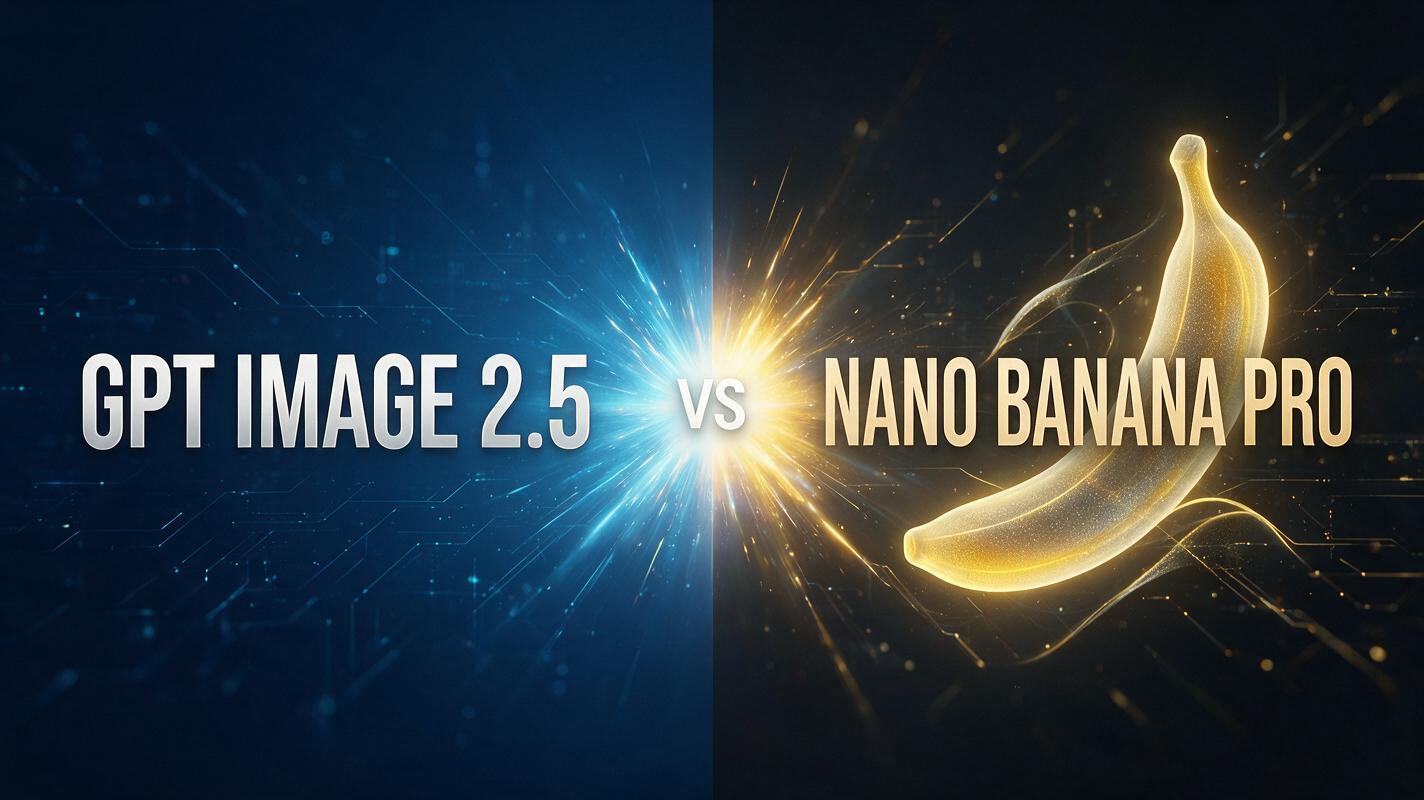
GPT Image 2.5 and Nano Banana Pro (Google’s Gemini 3 Pro Image) are both current flagship-tier image models, and each gets compared constantly to its own predecessor — GPT Image 2.5 against GPT Image 2, Nano Banana Pro against Nano Banana 2. Most comparisons focus on specs or vendor claims, so we put these two models head-to-head ourselves: identical prompts, matched resolution and aspect ratio, and each model’s default quality settings, across four separate tests.
This isn’t a spec-sheet comparison copied from press releases. Every image, every timing number, and every credit cost below came from a generation we ran ourselves on JXP.
Quick answer: GPT Image 2.5 was faster and cheaper in our tests, making it the better default for frequent iteration. Nano Banana Pro cost more and sometimes took longer, but it delivered a full 4096×4096 file in our 4K test and produced the more polished product-photo result.
GPT Image 2.5 vs Nano Banana Pro at a Glance
Platform settings below reflect the options available on JXP during our September 2026 test; the underlying models’ full capabilities may extend beyond what any one platform exposes.
GPT Image 2.5 | Nano Banana Pro | |
|---|---|---|
Model options | Flare, Sunburst | Single tier |
Reference images | Up to 16 | Up to 10 |
Aspect ratio presets | 15 | 10 |
Output formats | PNG, JPEG, WebP | PNG, JPG |
Resolution | 1K, 2K, 4K | 1K, 2K, 4K |
Cost at 1K, Medium (our test) | 1 credit | 4 credits |
Cost at 4K, Medium (our test) | 3 credits | 5 credits |
Generation time (our test) | Roughly 20–40 seconds | Roughly 40 seconds to over 2 minutes |
Credit costs are JXP’s own pricing, read directly from each tool’s settings panel during this test — not estimated from API rates. Generation time varied more than we expected between sessions; see “Speed and Cost” below.
What Is GPT Image 2.5?
GPT Image 2.5 is OpenAI’s current image generation and editing model, split into two variants on JXP: Flare, built for fast everyday generation, and Sunburst, positioned as the more precision-focused option for editing work. OpenAI states that Images 2.5 reduces generation latency by up to 50% compared with Images 2.0. We tested Flare at Medium quality throughout this comparison, since that’s the default most users will hit first.
What Is Nano Banana Pro?
Nano Banana Pro is Google’s name for Gemini 3 Pro Image. Google positions it around text rendering, factual/world-aware generation, and subject consistency, and states it can maintain resemblance across up to five people while blending up to fourteen reference images in one generation. It supports 1K, 2K, and 4K output. We tested it at its default settings, matching resolution and aspect ratio to GPT Image 2.5 in each round.
Our Test Methodology
We ran four tests: two text-to-image generations (text rendering, product photography) and two follow-up tests probing editing precision and real output resolution. Each test used identical prompts on both models, default quality settings, one generation per prompt per model — no cherry-picking from multiple attempts. This is a small, honest sample, not an exhaustive benchmark. Four tests can’t tell you how either model handles every subject, style, or aspect ratio. Treat the results as real data points, not the final word.
Test 1: Text Rendering
Prompt: “A rustic wooden café sign hanging outside a shop, hand-painted lettering that reads ‘Fresh Coffee Daily,’ warm afternoon sunlight, photorealistic photo.”
Text rendering has historically been a weak point for AI image models, so this is a meaningful test.
GPT Image 2.5 | Nano Banana Pro |
|---|---|
 |  |
Result: Both models rendered “Fresh Coffee Daily” perfectly, with no misspellings or garbled letters — a tie. GPT Image 2.5’s version leaned into a tighter close-up with cursive script and a small coffee-cup icon; Nano Banana Pro produced a wider street scene with a more weathered, distressed sign texture. Stylistic preference aside, both are publication-ready on text accuracy alone.
Test 2: Product Photography
Prompt: “A minimalist skincare bottle on a wet marble surface, soft studio lighting, water droplets, subtle reflection of the bottle, small label text that reads ‘HYDRA GLOW,’ high-end product photography, 50mm macro lens, shallow depth of field.”
GPT Image 2.5 | Nano Banana Pro |
|---|---|
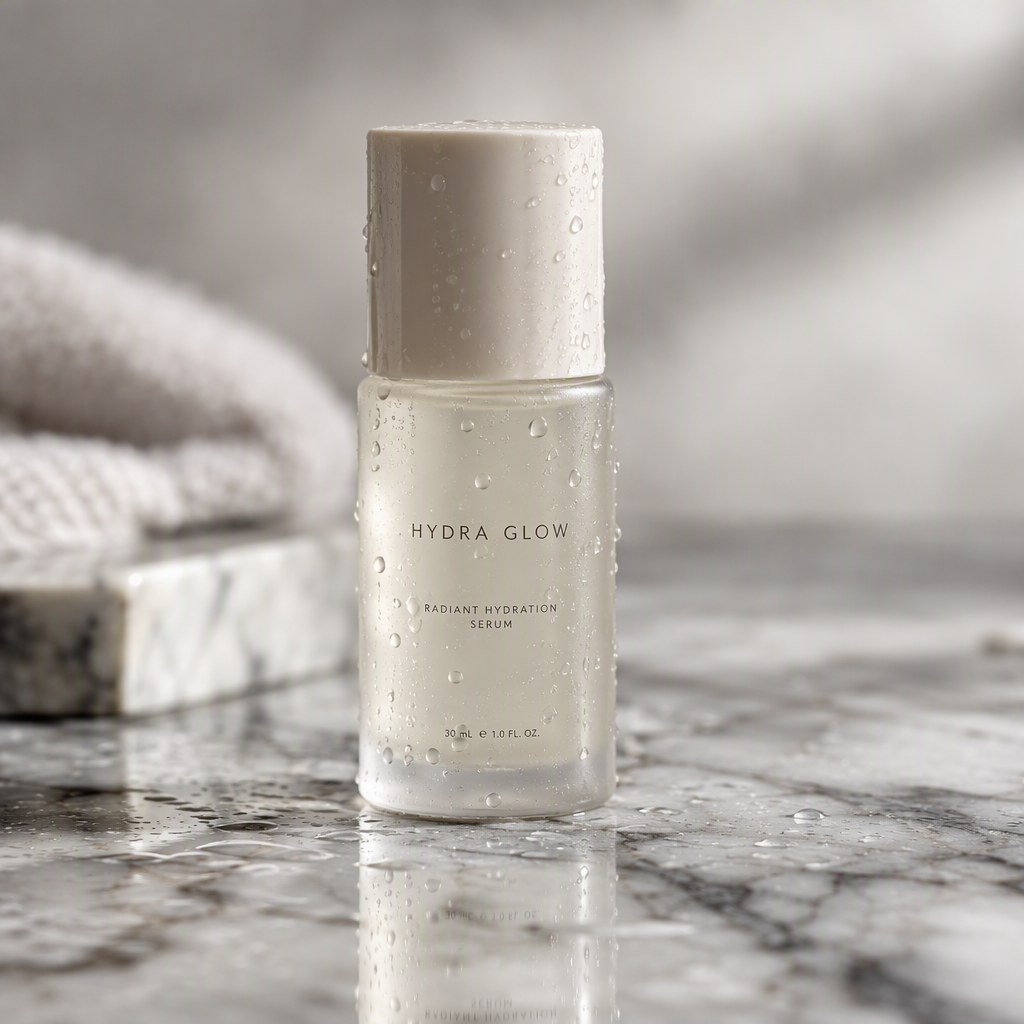 | 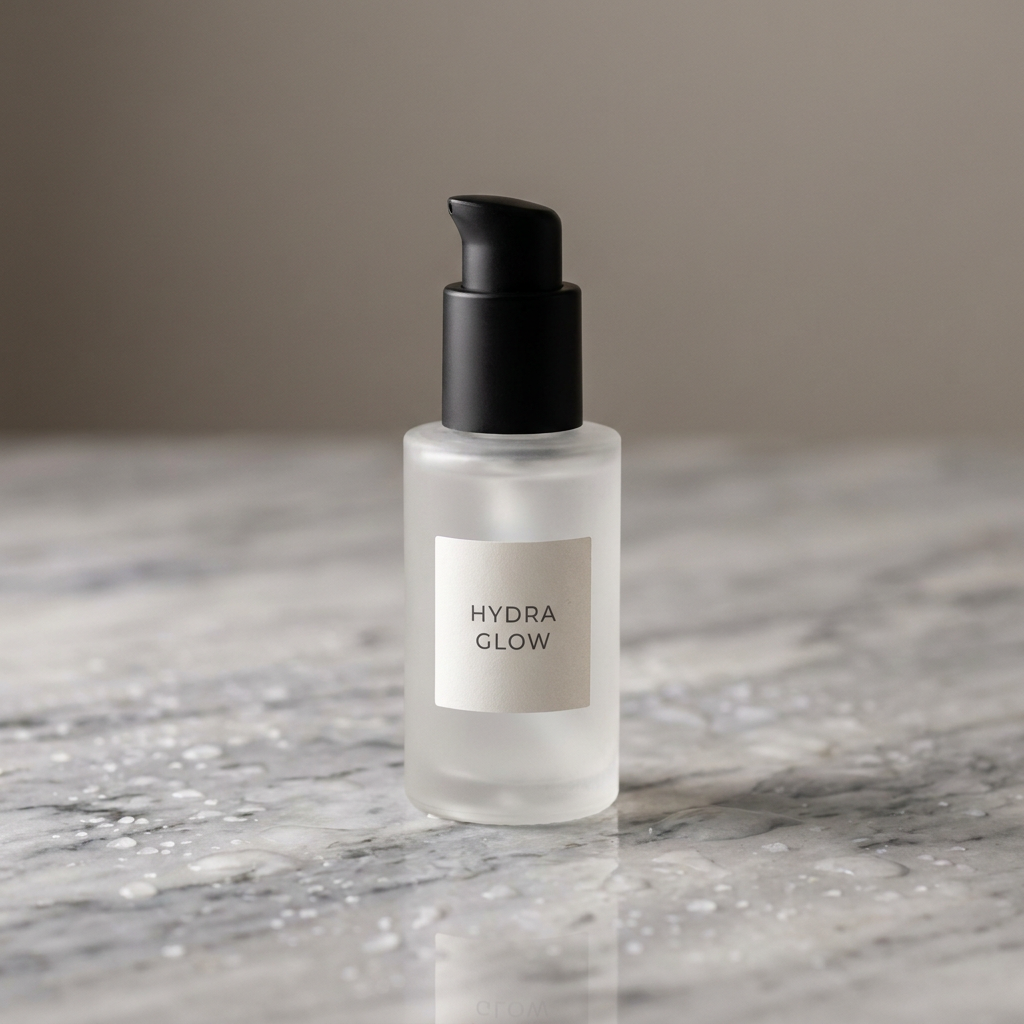 |
Result: Another tie on label accuracy — both rendered “HYDRA GLOW” cleanly. GPT Image 2.5 went further than asked, inventing plausible secondary label copy on its own initiative, which reads as a nice bonus for mockups but is worth double-checking since it’s the model improvising, not something we specified. Nano Banana Pro’s result leaned more editorial — a matte pump bottle, cooler tones, tighter composition — and felt closer to a finished ad asset straight out of the model.
Test 3: Precise, Localized Editing
Spec sheets for both models emphasize editing precision, so we tested it directly instead of taking that at face value. We generated a base image separately with each model using the same prompt — “a bright red vintage bicycle with a wicker basket, parked against an exposed red-brick wall, soft afternoon sunlight” — then fed each model’s own base image back into its edit mode with the same instruction: change only the bicycle’s color, and keep the basket, wall, lighting, and ground exactly the same.
Model | Before (its own base image) | After (its own edit) |
|---|---|---|
GPT Image 2.5 | 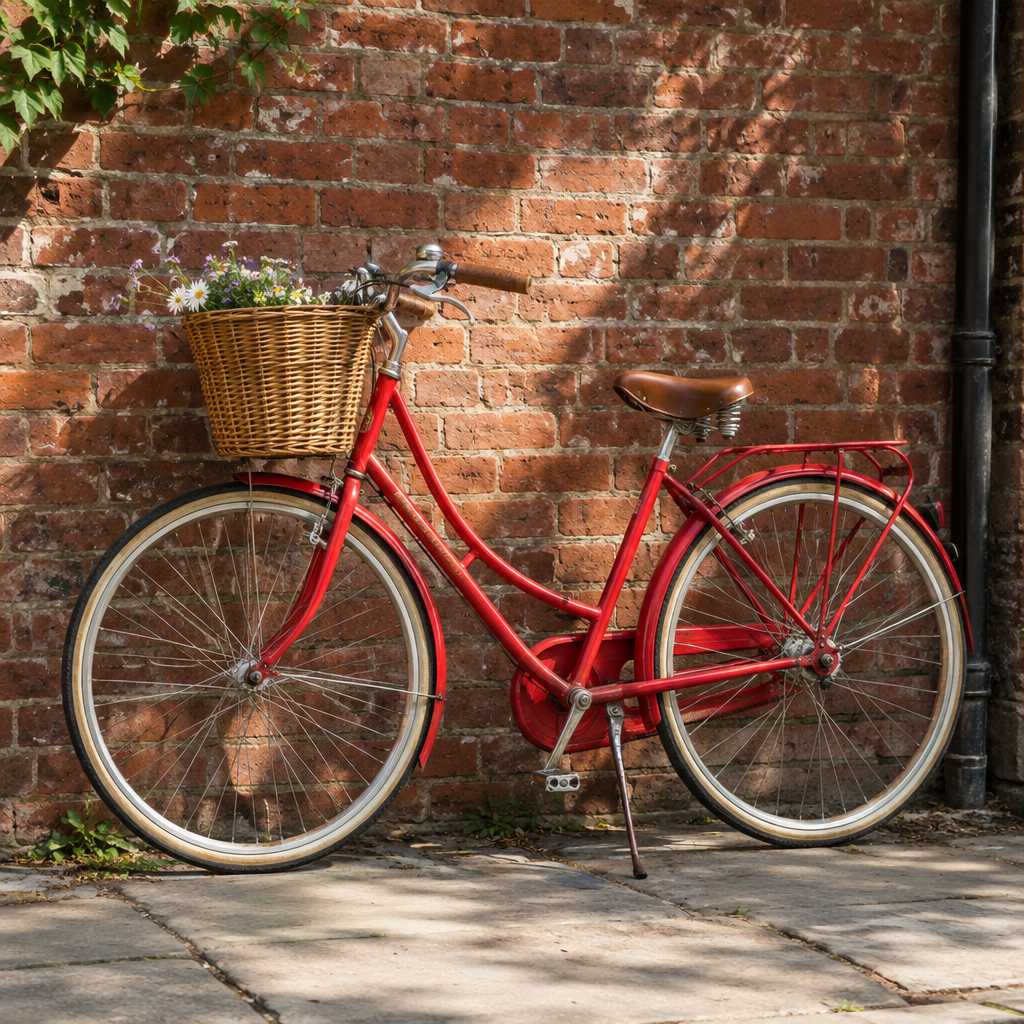 |  |
Nano Banana Pro |  |  |
Result: Both models handled this correctly. GPT Image 2.5 changed the frame and fenders to teal while leaving the basket, brick wall, lighting, and ground untouched. Nano Banana Pro did the same, with its own untouched background matching the original just as closely. On this single localized edit, we didn’t see a meaningful difference between the two — despite each brand’s marketing leaning on editing precision as a differentiator, neither one broke the rest of the image in our test.
Test 4: 4K Output — What “4K” Actually Delivers
Both models list 4K as a resolution option, so we generated the same prompt — “a single fresh orange sliced in half on a white marble kitchen counter, dramatic side lighting, water droplets on the peel, ultra-detailed macro photography” — on both, at 1:1 aspect ratio, with 4K selected, and then checked the actual pixel dimensions of the file each tool returned.
Result: Nano Banana Pro’s “4K” output measured exactly 4096 × 4096 pixels, while GPT Image 2.5 Flare at Medium quality returned 2880 × 2880 pixels. In this 1:1 test, Nano Banana Pro therefore delivered substantially more native pixel resolution at the selected 4K setting. This was a single test at one quality tier, and GPT Image 2.5 offers higher quality settings (High, Extra High, Max) that may output at larger dimensions than Medium — we didn’t test those tiers here. But at the default-adjacent Medium setting most users will reach for first, the two tools’ “4K” label did not produce the same pixel count.
On credits, GPT Image 2.5 at 4K/Medium cost 3 credits per image; Nano Banana Pro at 4K cost 5 credits, regardless of quality tier since it doesn’t expose a separate quality slider.
GPT Image 2.5 vs Nano Banana Pro: Test Results
Test | Result |
|---|---|
Text rendering | Tie |
Product photography | Tie — Nano Banana Pro looked more ad-ready |
Localized editing | Tie |
4K pixel output | Nano Banana Pro |
Speed | GPT Image 2.5 |
Cost on JXP | GPT Image 2.5 |
Speed and Cost: What We Actually Measured
Across our four tests, GPT Image 2.5 was consistently faster: roughly 20–40 seconds per image at 1K, and around 40–60 seconds at 4K. Nano Banana Pro’s timing varied more between sessions — one 1K generation took about 130 seconds, while a later 1K edit and a 4K generation both finished in under a minute. We ran these tests at different points in the same day, so server load likely explains some of that swing; treat our Nano Banana Pro numbers as “can range from under a minute to a bit over two,” not a fixed figure.
On cost, GPT Image 2.5 was cheaper at every resolution we tested: 1 credit vs. 4 credits at 1K, and 3 credits vs. 5 credits at 4K. That gap holds up whether you’re iterating quickly or generating a handful of final assets.
GPT Image 2.5 vs Nano Banana Pro: Best Use Cases
Putting the four tests together, here’s how they map onto common jobs:
Use Case | Better Choice | Why |
|---|---|---|
Fast social content | GPT Image 2.5 | Lower credit cost and faster iteration |
Ecommerce variations | GPT Image 2.5 | Cheaper for repeated generations |
Localized edits | Tie | Both passed our edit test |
Product hero images | Nano Banana Pro | More polished result in our sample |
High-resolution final assets | Nano Banana Pro | 4096×4096 in our 4K test |
Text-heavy simple graphics | Tie in our test | Both rendered the requested text correctly |
Large batches | GPT Image 2.5 | Speed and credit advantage |
If you’re pushing out social posts, ad variations, or ecommerce listing images all day, the credit and speed gap we measured adds up fast — GPT Image 2.5 costs less per image and returns results sooner at every resolution we tested, which matters most when you’re generating dozens of images to find the one that works.
If the job is a single hero shot — a product photo for a landing page, a poster, or any asset you’ll only generate a handful of times — the calculus changes. Our Test 2 result showed Nano Banana Pro leaning toward a more finished, ad-ready look out of the box, and our Test 4 result showed it delivering more native pixel resolution at the same “4K” setting. When there’s only one image to get right, that extra polish and resolution can be worth the added time and credits.
For localized edits and simple text-in-image graphics, our tests found no real gap between the two, so those use cases come down to whichever tool already fits your workflow rather than a quality difference.
Which Should You Choose?
Based on what we actually observed: GPT Image 2.5 is the better fit for high-volume, iterative work — drafting variations, testing prompts, or any workflow where you’ll generate many images and want results quickly without burning through credits. Its larger reference-image limit (16 vs. 10) and wider aspect-ratio selection also give it more flexibility for structured projects.
Nano Banana Pro is worth the extra time and cost when maximum native pixel resolution matters — our test showed a real, measurable resolution gap at the same “4K” setting — or when you’re doing a smaller number of higher-stakes generations where its slightly more editorial, finished look (as seen in Test 2) might save a retouching step.
For localized editing specifically, our test found no meaningful difference: both models did what we asked without disturbing the rest of the image. If your workflow leans heavily on small, incremental edits — swap a color, adjust one object, fix one detail — either tool should hold up, so the deciding factor comes down to speed and cost rather than editing quality.
Put simply: a solo creator or small team pushing out a lot of variations day to day will likely save both time and credits by defaulting to the faster option, and reaching for the other only on the handful of images where resolution or finish genuinely matters more than turnaround.
Limitations of This Test
Four tests across two models is a real but small sample. We tested one prompt per scenario, one generation per prompt per model, and only GPT Image 2.5’s Flare variant at Medium quality — not Sunburst, and not GPT Image 2.5’s higher quality tiers, which may close or widen the 4K resolution gap we measured. We didn’t test complex multi-subject scenes, character consistency across multiple generations, or reference-image blending with more than one input image. Generation times can vary with server load at any given moment, which our own results demonstrated directly — our Nano Banana Pro timings ranged from under a minute to over two, all in the same day.
FAQ
Is GPT Image 2.5 or Nano Banana Pro better for text in images?
In our test, both rendered a specific line of text perfectly with no errors. Neither showed a clear text-accuracy advantage on this sample.
Which is faster, GPT Image 2.5 or Nano Banana Pro?
GPT Image 2.5 was consistently faster across our tests, typically finishing in 20–40 seconds versus Nano Banana Pro’s range of under a minute to a little over two minutes. Nano Banana Pro’s timing varied more between sessions in our testing.
Which is cheaper, GPT Image 2.5 or Nano Banana Pro?
On JXP, GPT Image 2.5 cost fewer credits at every resolution we tested: 1 vs. 4 credits at 1K, and 3 vs. 5 credits at 4K.
Does “4K” mean the same thing on both models?
Not in our test. Nano Banana Pro’s 4K output measured 4096×4096 pixels. GPT Image 2.5’s 4K output at Medium quality measured 2880×2880 pixels — we didn’t test its higher quality tiers, which may produce larger files.
Which model handles precise, localized edits better?
In our single-edit test — changing only an object’s color while preserving the rest of the scene — both models succeeded without altering the untouched areas. We didn’t find a meaningful difference on this test.
Does GPT Image 2.5 or Nano Banana Pro support more reference images?
GPT Image 2.5 supports up to 16 reference images per edit; Nano Banana Pro supports up to 10 on JXP.
Which model is better for product photography?
Both produced clean, accurate results in our test. GPT Image 2.5 added extra label detail on its own initiative; Nano Banana Pro produced a more editorial, ad-ready composition. Which you prefer comes down to style, not accuracy.