GPT Image 2.5 character consistency is one of the most useful improvements in the new image model, especially if you need the same person or fictional character to appear across multiple scenes.
The challenge is simple: generating one good portrait is easy. Generating the same recognizable person again while changing the outfit, camera angle, location, lighting, pose, or visual style is much harder.
OpenAI’s own release notes for the model specifically claim three upgrades relevant to this workflow: better preservation of subjects from reference photos across new settings and styles, more precise editing that changes only what you asked for, and steadier multi-turn editing where earlier changes stay intact. Those are real claims from OpenAI’s own materials — but a claim on a release page and what happens when you actually run the workflow are two different things. We tested it ourselves, and the results were more mixed than the marketing copy suggests. You’ll find the exact test partway through this guide.
Good GPT Image 2.5 character consistency still depends on how you build the reference, which traits you lock, how many things you change at once, and whether you edit an existing image or repeatedly start from text. This guide covers a practical workflow, copy-ready prompts, multi-scene examples, our own test results, and fixes for common identity drift.
What Does Character Consistency Mean in GPT Image 2.5?
Character consistency means a person remains recognizably the same character even when other parts of an image change.
For example, imagine a woman with a short dark wavy bob, light freckles across her cheeks, brown eyes, an oval face, a small beauty mark below her left eye, and a slim build. A consistent image series should preserve those identity-defining characteristics when she moves from a café to a city street, changes from a cream cardigan to a leather jacket, turns from a frontal portrait to a three-quarter pose, or appears under completely different lighting.
The goal is not to make every frame identical. The goal is to separate identity from scene variables.
Identity traits should stay fixed: facial structure, eye color, nose shape, hairstyle and hair color, freckles/scars/beauty marks, approximate age, body proportions, and any distinctive accessories that are part of the character design.
Scene traits can change: clothing, pose, expression, location, camera angle, lighting, weather, props, background, and visual style.
If your prompt treats every property as equally flexible, the model has more freedom to reinterpret the character. If it clearly states which features are permanent and which are allowed to change, the task becomes much more constrained — and, as our test below shows, how much you ask it to change in one step matters just as much as how clearly you describe it.
Why GPT Image 2.5 Should Be Better at Character Consistency
According to OpenAI, Images 2.5 (the name used in OpenAI’s own materials for what most tools, including JXP, market as GPT Image 2.5) is better at preserving recognizable subjects from reference photos when moving them into new settings, styles, and compositions, and distinctive features are more likely to carry through between transformations. OpenAI also describes improved targeted editing — changing only the requested element while preserving surrounding subjects and composition — and steadier multi-turn editing, where an earlier change is less likely to be lost by a later one.
On paper, that supports a workflow like:
reference portrait → outfit change → new background → pose adjustment → lighting change
rather than asking the model to rebuild the same person from scratch five separate times. In our own test, the first part of that promise held up well. The second part — a bigger jump in a single edit — did not.
Hands-On Test: What Actually Happens With a Large Scene Change
Before handing you a full prompt workflow, it’s worth showing what we found when we actually ran it, since this shapes how the rest of this guide is structured.
We generated a character reference on JXP’s GPT Image 2.5 tool — Flare model, Medium quality, 1K, 1:1 — using a detailed reference-sheet prompt (curly red hair, green eyes, freckles, blue denim jacket, silver stud earrings). We then used that single image as the reference in Edit Image mode across five follow-up generations.
Small scene change (same seated pose, new background — a Paris street café): identity consistency was excellent, twice in a row. Face shape, hair, freckle pattern, earrings, jacket, and expression all carried over almost exactly.
Large scene/pose change (full-body shot, running on a beach at sunset, athletic wear instead of the jacket): this is where it broke down. We tried it three separate times — a plain instruction, a version explicitly stating “do not reuse the cafe setting or seated pose,” and a repeat on the Sunburst model instead of Flare. All three came back as a near-identical seated café scene, coffee cup and denim jacket included. The running pose, the outfit change, and the beach setting never appeared.
Latency, single-sample observation only: the Flare edits each finished in roughly 20–30 seconds; the one Sunburst edit we ran took closer to 40–45 seconds.
The practical read: a single reference image is very reliable for identity-preserving, moderate-change edits — new background, new lighting, a different close-up — but not reliable for asking for a dramatically different pose or setting in one step. The reference image’s own composition tended to dominate the output regardless of what the prompt asked for, on both Flare and Sunburst. This is the real-world reason the “change one variable at a time” advice in the next section isn’t just a best practice — in our test, it was the difference between a result that worked and one that silently ignored the prompt.
GPT Image 2.5 Character Consistency Test
Reference | Café Scene — Identity Held |
|---|---|
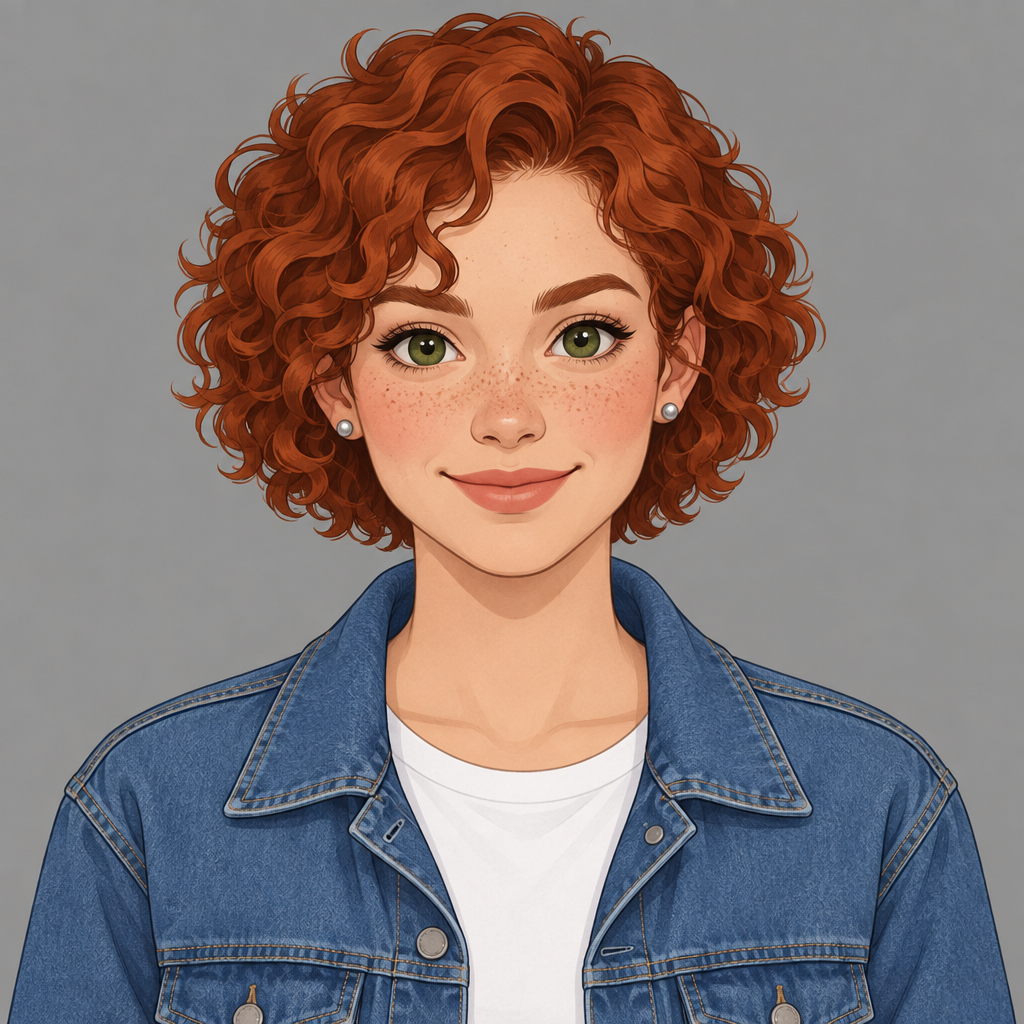 | 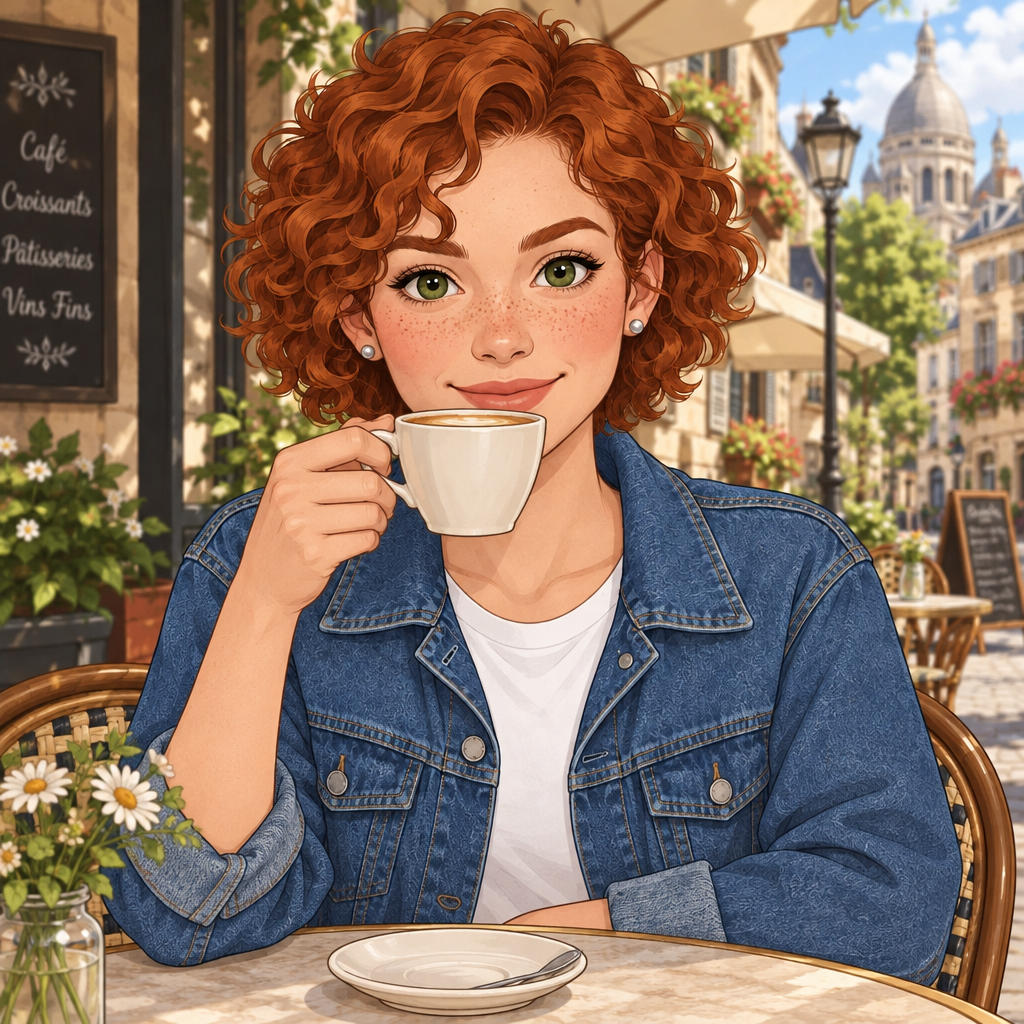 |
Beach Pose — Flare (Failed) | Beach Pose — Sunburst (Failed) |
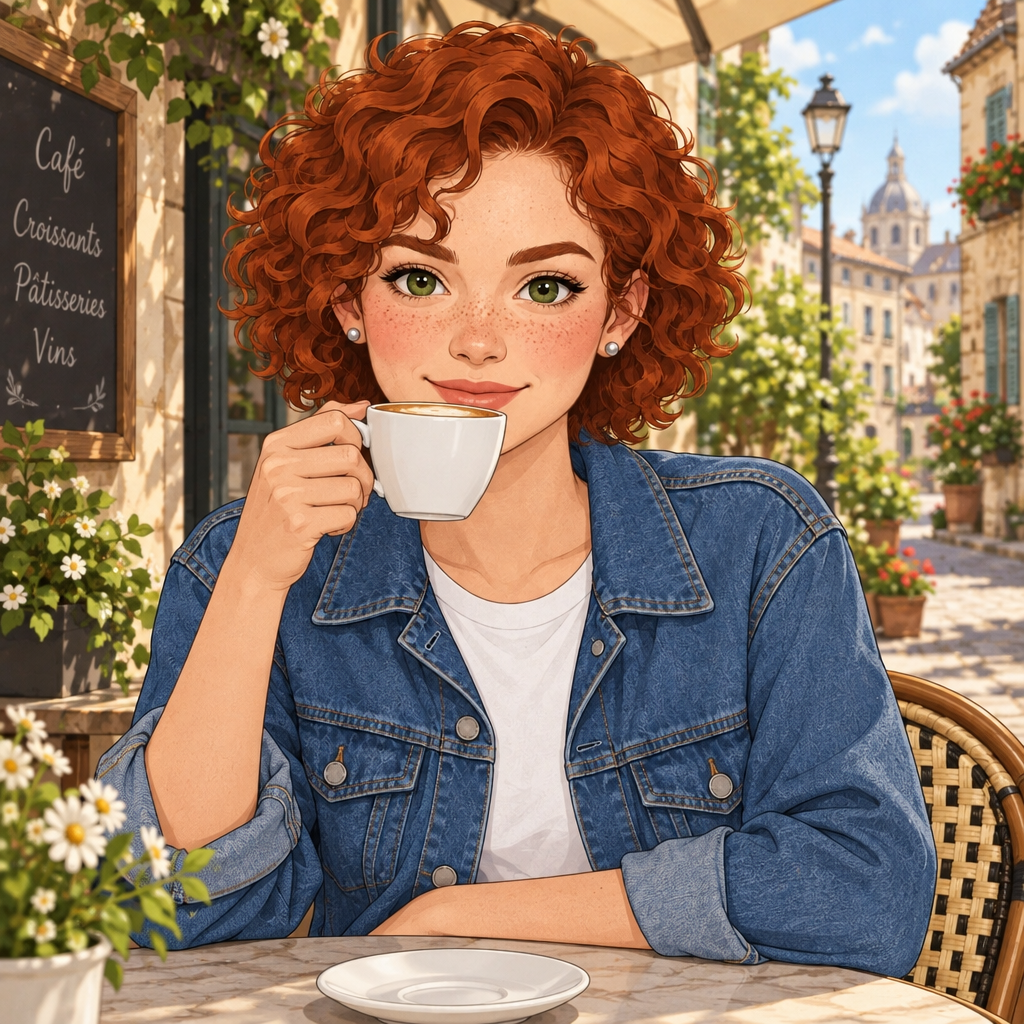 | 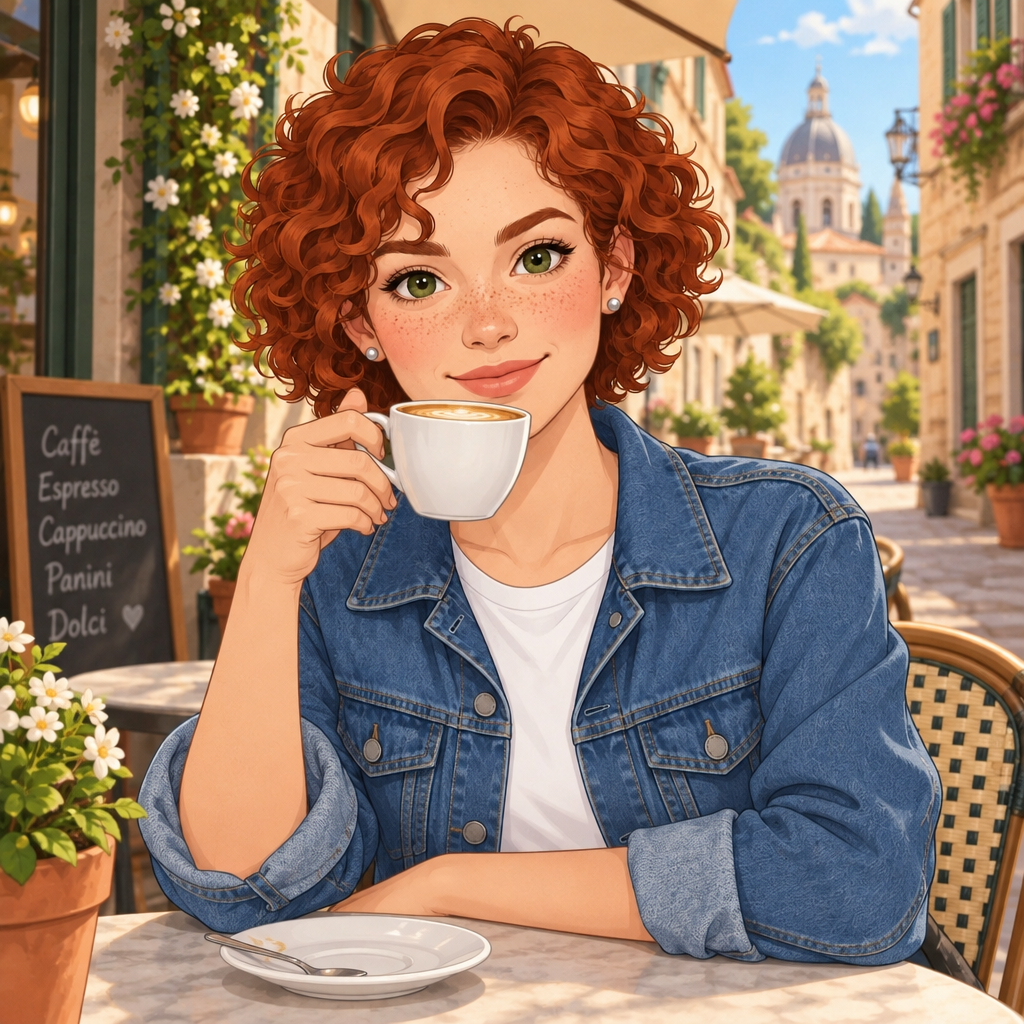 |
In our test, moderate background changes preserved identity well, while large pose-and-scene changes remained strongly anchored to the original reference composition.
The Best GPT Image 2.5 Character Consistency Workflow
For reliable results, don’t begin by generating ten unrelated scenes. Build the character first.
Step 1: Create a Canonical Character Reference
Your canonical reference is the visual source of truth for every later image. The strongest starting reference is clear, neutral, and easy to read. Avoid extreme shadows, sunglasses covering the eyes, heavy motion blur, hair hiding most of the face, dramatic fisheye distortion, distant full-body framing, or unusual expressions.
Prompt: Create a realistic character reference portrait of a 28-year-old woman with an oval face, warm brown eyes, a short dark wavy bob, light freckles across both cheeks, and a small beauty mark below her left eye. Natural skin texture, neutral expression, soft daylight, plain light-gray background, eye-level camera, 50mm portrait photography. Keep the face clearly visible and avoid dramatic shadows or accessories.
Once you get the right identity, stop changing its defining traits. That image becomes the base for future generations.
Step 2: Write an Identity Lock
Explicitly state what must remain unchanged, then describe the new scene separately.
Example: Identity lock: Keep the exact same woman from the reference image. Preserve her facial structure, brown eyes, short dark wavy bob, freckles, beauty mark below the left eye, skin tone, age, and body proportions. Change: Replace her cream cardigan with a black leather jacket. Place her on a rainy Tokyo street at night. Camera: Medium portrait, eye-level, 50mm lens. Lighting: Reflections from neon signs, realistic wet pavement, soft light on her face. Do not change: Face shape, hairstyle, eye color, freckles, beauty mark, or apparent age.
This structure tells the model that the jacket and environment are variables while the face is not.
Step 3: Change One Major Variable at a Time
A common mistake is trying to change everything in one prompt — outfit, location, pose, hairstyle, lighting, and style all at once. Our test above is a direct example of why this fails: even a single large pose-and-setting change was enough to make the reference image override the instruction entirely, let alone five changes bundled together.
A safer workflow:
Edit 1: Change outfit. Edit 2: Change location. Edit 3: Change pose. Edit 4: Change lighting.
Treat the process as controlled editing rather than repeated regeneration.
Step 4: Say What Must Not Change
Positive instructions tell the model what you want. Consistency instructions tell it what you don’t want rebuilt.
Weak prompt: Put this woman in a luxury hotel lobby wearing a red dress.
Strong prompt: Use the uploaded woman as the identity reference. Keep the same face, facial proportions, eye shape, brown eye color, nose, lips, freckles, beauty mark, short dark wavy hair, skin tone, and apparent age. Change only her outfit and environment. Dress her in an elegant dark-red evening gown and place her inside a luxury hotel lobby with warm ambient lighting. Keep the camera framing and overall body proportions natural. Do not redesign, beautify, age, de-age, or reinterpret her face.
The second prompt gives GPT Image 2.5 far fewer opportunities to drift — though as our test shows, it still won’t rescue a prompt that also asks for a completely different pose or setting in the same step.
A Copy-Ready GPT Image 2.5 Character Consistency Formula
Reference: Use the uploaded image as the primary identity reference. Identity: Keep the exact same character, preserving [face shape], [eyes], [hair], [skin tone], [distinctive features], [age], and [body proportions]. Change: Change only [outfit / location / pose / expression / lighting] — one of these per edit. Scene: Place the character in [environment]. Camera: Use [shot size], [angle], and [lens/look]. Lighting: Use [lighting description]. Style: Render as [photorealistic / cinematic / editorial / illustration]. Do not change: Do not alter [specific identity features].
This is more reliable than simply repeating a character’s name — AI image models don’t know that “Sarah” in Prompt A must visually match “Sarah” in Prompt B unless you provide enough visual or descriptive continuity.
GPT Image 2.5 Character Consistency Prompt Examples
The five examples below apply the identity-lock formula above to the most common real-world cases: an outfit swap, a new location, a new camera angle, a full cinematic scene, and an expression change.
Example 1 — Same Person, Different Outfit Use the uploaded portrait as the identity reference. Preserve the exact same woman’s face, facial proportions, brown eyes, short dark wavy bob, freckles, beauty mark below her left eye, skin tone, and apparent age. Replace only her cream cardigan with a tailored navy business suit and white shirt. Keep her hairstyle, makeup level, facial structure, and body proportions unchanged. Professional studio portrait, neutral gray background, soft directional lighting, realistic skin texture, 50mm lens.
Example 2 — Same Character, Different Location Keep the exact same woman from the reference image. Preserve her face, hairstyle, eye color, freckles, beauty mark, skin tone, age, and proportions. Move her from the studio into a quiet Paris café in the morning. She sits beside a window holding a ceramic coffee cup. Warm natural window light, shallow depth of field, candid editorial photography. Do not modify her facial identity or hairstyle.
Example 3 — Same Character, New Camera Angle Use the reference image as the identity source. Show the same woman in a three-quarter profile facing slightly left. Keep her facial proportions, brown eyes, short wavy dark hair, freckles, beauty mark, nose shape, lips, jawline, and skin tone consistent with the reference. Do not reinterpret the face simply because the viewing angle changes. Natural daylight, realistic portrait photography, 85mm lens.
Example 4 — Same Character Across a Cinematic Scene Use the uploaded portrait as the permanent identity reference. The same woman walks alone through a rainy city street at night wearing a dark trench coat. Preserve the exact facial identity, hairstyle, freckles, eye color, age, skin tone, and proportions from the reference. Medium full-body cinematic shot. Neon reflections on wet pavement. Subtle rim lighting. Realistic rain. The environment, clothing, pose, and lighting may change. Her identity must remain unchanged.
Example 5 — Same Character, Different Expression Keep the exact same character and facial structure from the reference. Change only her expression from neutral to a natural, restrained smile. Preserve her eye shape, nose, lips, jawline, freckles, beauty mark, hairstyle, skin tone, age, and face proportions. Avoid changing facial anatomy to create the smile. Soft daylight portrait, realistic skin detail.
How to Keep the Same Character Across Multiple Scenes
When building a story, comic, campaign, or storyboard, consistency becomes harder because each image introduces more variables. A useful solution is a character sheet: one image containing a front portrait, three-quarter view, profile, full-body pose, neutral expression, smiling expression, and key wardrobe details.
Prompt: Create a clean character reference sheet for the same woman. Include a front-facing portrait, left three-quarter portrait, side profile, full-body standing pose, neutral expression, and subtle smile. Keep facial structure, brown eyes, short dark wavy bob, freckles, beauty mark below the left eye, age, skin tone, and proportions identical across every view. Plain neutral background, consistent studio lighting, no decorative layout elements.
After approving the sheet, use it as the reference for individual scenes — and per the test above, still change only one major variable per follow-up edit.
Character Consistency for Fashion and Outfit Changes
Fashion images are an ideal way to stress-test GPT Image 2.5 character consistency, because you want clothing to change without the person changing.
Prompt: Use the uploaded portrait as the identity reference. Keep the exact same woman and preserve all facial features, hairstyle, freckles, skin tone, age, and body proportions. Create three fashion variations: 1) oversized beige trench coat; 2) black minimalist evening dress; 3) blue denim jacket over a white shirt. The clothing changes between images, but the character does not. Maintain realistic anatomy and the same recognizable identity.
Character Consistency for Different Art Styles
Style transfer is where GPT Image 2.5 character consistency faces a different risk: the model may redesign the character instead of merely restyling the image. The fix is to define identity separately from rendering style.
Prompt: Use the uploaded portrait as the identity reference. Preserve the character’s facial geometry, hairstyle, freckles, beauty mark, eye color, age, and proportions. Re-render the image as a detailed hand-painted storybook illustration with soft gouache textures and warm colors. Translate the original character into the new medium without redesigning her face or replacing distinctive features.
Why Faces Still Drift
Even with stronger reference fidelity on paper, GPT Image 2.5 character consistency can still weaken. Six patterns commonly cause problems:
The reference image is unclear. If the face occupies a tiny portion of the image, the model has less useful identity information. Fix: start with a clear portrait or character sheet.
Too many identity features change at once. Changing hair, age, makeup, expression, angle, and lighting simultaneously can effectively create a new person. Fix: preserve several strong identity anchors while editing fewer variables.
The prompt contradicts the reference. If the reference has short black hair but the prompt asks for long blonde hair while also saying “keep the exact same appearance,” the instructions conflict. Fix: decide which features are permanent and which are deliberately editable.
You regenerate instead of edit. Starting from text every time forces the model to reconstruct the character from language. Fix: use the strongest approved image as the next reference.
The prompt becomes too long. Piling every previous scene detail into a growing prompt creates competition between instructions. Fix: keep the identity block stable and replace only the scene block.
The scene or pose change is too large for one edit. Confirmed directly in our test: asking for a dramatically different pose, outfit, and setting in a single edit repeatedly failed, on both Flare and Sunburst, with the output reverting to the reference image’s own composition instead. Fix: split it into smaller edits, or start a fresh text-to-image generation with the character’s details spelled out instead of editing.
A Better Multi-Scene Workflow
For a five-image sequence:
Scene 1 — Establish the character. Create the canonical portrait and approve it before moving on. Scene 2 — Change the outfit, using Scene 1 as the reference. Scene 3 — Change the environment, using the strongest result from Scene 2, preserving identity and outfit. Scene 4 — Change the pose, using the latest approved image, with the face explicitly locked. Scene 5 — Change lighting or mood as the final stylistic edit, without redesigning the subject.
This incremental approach is consistent with what we observed in our test: moderate, single-variable changes succeeded, while a large bundled pose-and-scene change repeatedly failed.
Reference Images vs. Text Descriptions
A text description such as “27-year-old woman with brown eyes and dark hair” can match thousands of possible faces. A reference image carries far more specific information about facial geometry, proportions, feature spacing, hairstyle, and appearance. Text is still useful, but its best role is telling the model what to preserve and what to change, rather than trying to reconstruct the entire identity every time.
On JXP’s GPT Image 2.5 generator, the Edit Image workflow currently allows multiple JPG, PNG, or WebP references, with up to 16 images supported — which makes a reference-led workflow practical for character sheets, outfit sets, and other consistency tasks.
Flare or Sunburst for Character Consistency?
JXP provides both GPT Image 2.5 Flare and GPT Image 2.5 Sunburst. OpenAI positions Flare as the general-purpose option focused on quality, editing, and speed, and Sunburst as built for premium workflows that benefit from tighter control across edits, at the cost of longer generation time.
In our test, that speed difference showed up exactly as described — Flare edits finished in roughly 20–30 seconds versus about 40–45 seconds for the one Sunburst edit we ran. What didn’t show up was a consistency advantage for Sunburst: both models produced the same result when we asked for a large pose and scene change, reverting to the reference image’s original composition instead of following the new instruction. Treat this as one data point, not a benchmark, but it suggests reference-image anchoring is a shared behavior across both models rather than something Sunburst’s “tighter control” solves.
Use Flare when: exploring several character concepts, testing outfits or scene ideas, iterating quickly, producing many draft variations.
Consider Sunburst when: refining an approved character, making a more demanding final edit, working on polished campaign imagery where precision matters more than iteration speed.
Reference quality and prompt structure still matter more than which model you pick.
GPT Image 2.5 Character Consistency Checklist
Is there one approved identity reference?
Is the face clearly visible?
Have permanent traits been written down?
Does the prompt separate identity from scene changes?
Does it say what must remain unchanged?
Are you changing only one major variable per edit, rather than bundling pose, outfit, and location together?
Are you editing an approved image instead of restarting unnecessarily?
Are hairstyle, age, eye color, and distinctive marks still locked?
Is the camera-angle change realistic?
Did the previous image preserve the identity well enough to become the next reference?
If a generation starts drifting badly, don’t continue building from it — return to the last strong reference.
FAQ
Can GPT Image 2.5 keep the same character across images?
Yes, for moderate changes — new backgrounds, lighting, or close-up framing — identity consistency held up very well in our own test. For a large pose or scene change in a single edit, it did not follow the prompt reliably on either Flare or Sunburst. Based on that result, we recommend breaking larger transformations into smaller edits rather than changing pose, outfit, and setting together.
What is the best prompt for GPT Image 2.5 character consistency?
Separate permanent identity traits from editable scene traits. Tell the model to use the uploaded image as the identity reference, specify which facial features must remain unchanged, and describe only one category of change — clothing, pose, background, or lighting — at a time.
Should I use a reference image or only text?
Use a reference image whenever a specific identity matters. Text descriptions help reinforce important traits, but an approved visual reference gives the model far more precise information than a description alone.
How do I stop GPT Image 2.5 from changing the face?
Add an explicit identity lock naming facial structure, eyes, nose, lips, hairstyle, skin tone, age, proportions, and distinctive marks. Also avoid changing too many other elements in the same generation — see the next question.
Why didn’t my character end up in the new pose or setting I asked for?
In our testing, a single reference image can strongly anchor the output to its original pose and composition, even against an explicit instruction to change it — we saw this happen three times in a row, on both Flare and Sunburst. Change only one major element per edit, or generate a fresh text-to-image version with the character’s details written out instead of editing.
Is there a difference between Flare and Sunburst for character consistency?
OpenAI positions Sunburst for tighter control at a slower speed. In our test, the speed difference was real (Sunburst took noticeably longer), but both models showed the same pose-anchoring limitation on a large scene change — treat this as one data point rather than a full benchmark.
Can I change clothes without changing the character?
Yes. Tell GPT Image 2.5 that clothing is the only variable, preserve the face, hair, skin tone, age, and body proportions, then describe the replacement outfit.
Can GPT Image 2.5 create a consistent character in different styles?
Yes, but make clear that the visual medium should change while the character design stays fixed. A strong character reference or character sheet helps when moving between photographic, illustrated, cinematic, or stylized outputs.
Final Thoughts
GPT Image 2.5 character consistency works best when you treat the character as a reusable visual asset rather than a description that needs to be recreated every time. Start with one strong canonical reference, lock the identity, separate permanent traits from scene variables, and change one major element at a time. Reuse approved images instead of repeatedly rebuilding the character from text, and whenever an output starts drifting, return to the last image where the identity was still correct.
OpenAI’s own materials promise stronger reference fidelity and multi-turn editing — and for moderate, single-variable changes, our test backs that up. For anything bigger, treat it as several small edits rather than one big one.