How to use Seedance 2.5 is the question every content creator, marketer, and filmmaker started asking after ByteDance unveiled this next-generation AI video model at its Volcano Engine FORCE conference on June 23, 2026. With native 30-second clip generation in a single pass, support for up to 50 multimodal references, and region-level local re-draw editing, Seedance 2.5 raises the ceiling for what AI video tools can do. This guide walks you through everything you need — from your first prompt to a finished clip — so you can learn how to use Seedance 2.5 with confidence.
Access the Seedance 2.5 workspace →
What Is Seedance 2.5?
Seedance 2.5 is ByteDance’s latest AI video generation model, built on the Seedance 2.0 architecture and aimed at closing the gap between AI-generated footage and professional cinematic production. It was announced by Volcano Engine president Tan Dai at the FORCE conference on June 23, 2026, entered global enterprise beta immediately after, and is targeted for public launch in early July 2026.
The headline upgrade is duration. Where most competing models top out at roughly 8–15 seconds and require stitching shorter clips together, Seedance 2.5 generates a single, continuous 30-second clip in one inference pass — with scene changes and tempo shifts handled inside that one generation. The result is footage where motion, lighting, character identity, and pacing stay coherent from the first frame to the last, which is exactly what advertising, short-form storytelling, and e-commerce product videos need.
Understanding the model’s strengths is the foundation of how to use Seedance 2.5 well: the better your prompt and references match what the model is built for, the more usable your output becomes.
Key Seedance 2.5 Specifications
Feature | Seedance 2.5 | Seedance 2.0 |
|---|---|---|
Max native clip length | 30 seconds (single pass) | Up to ~15s native / 30s via stitching |
Multimodal references | Up to 50 | Up to ~12 |
Local re-draw editing | Yes (region-level) | Generation-only |
3D white-model (blockout) input | Yes (industry first) | No |
Generation modes | Text, Image, Motion-Reference | Text, Image |
Native 4K / 10-bit | Not officially confirmed for 2.5 | Yes (added in June 2026 upgrade) |
Accuracy note: The native 4K, 10-bit color upgrade announced at FORCE 2026 was attributed primarily to Seedance 2.0. ByteDance has not published an official resolution spec for Seedance 2.5 as of the June 23 announcement — treat resolution figures you see elsewhere as unconfirmed until general availability.
When Can You Use Seedance 2.5?
As of June 23, 2026, Seedance 2.5 is in global enterprise beta with public access targeted for early July 2026; no exact date or pricing had been confirmed at launch. Access is expected via the Volcano Engine Model Ark API and ByteDance apps including Dreamina, Doubao, and CapCut, with third-party platforms adding support once the official API opens. Preparing your workflow and prompts now means you can start generating on day one.
Preview Seedance 2.5 tools and prepare your workflow →
Seedance 2.5 vs Competing AI Video Models
Before diving into how to use Seedance 2.5, it helps to see where it stands among the leading AI video generators. One credibility anchor worth noting: the shipping Seedance 2.0 already ranks first on the independent Artificial Analysis Video Arena, ahead of Google Veo 3.1 and Kling 3.0 — and at a fraction of the cost. No independent Seedance 2.5 benchmark exists yet, so the figures below are vendor-stated specifications pending third-party testing at general availability.
Feature | Seedance 2.5 | Veo 3.1 | Kling 3.0 | Runway Gen-4.5 |
|---|---|---|---|---|
Native clip length | 30 seconds | ~8 seconds | ~10 seconds | ~10 seconds |
Max reference inputs | Up to 50 | Limited | Limited | Limited |
Native synchronized audio | Yes (Seedance family) | Yes | Yes | No |
Local re-draw editing | Yes | No | No | No |
3D white-model input | Yes | No | No | No |
Free tier | No (enterprise beta) | Limited | Yes | No |
Best use case | Long narrative, brand films | Short photoreal clips | Volume / motion quality | Ad creative control |
Takeaway: If you want short, eye-catching one-off clips, several tools serve that need well. But if your priority is clip duration, brand consistency across many references, and editing without a full re-render, knowing how to use Seedance 2.5 gives you a meaningful edge over any single competing model.
How to Use Seedance 2.5: Step-by-Step
Seedance 2.5 ships with three generation modes — Text-to-Video, Image-to-Video, and Motion-Reference — all accessible from one interface. Here is the full workflow inside the Seedance 2.5 workspace.
Step 1 — Choose Your Generation Mode
Open the Seedance 2.5 generator and select the mode that matches your starting point:
Text-to-Video — you have only a written idea; the model builds the full clip from a prompt alone.
Image-to-Video — you have a still image (product photo, concept art, character reference) and want to animate it into a scene.
Motion-Reference — you have an existing clip whose camera movement or motion style you want applied to new footage.
For most first-timers learning how to use Seedance 2.5, Text-to-Video is the fastest entry point.
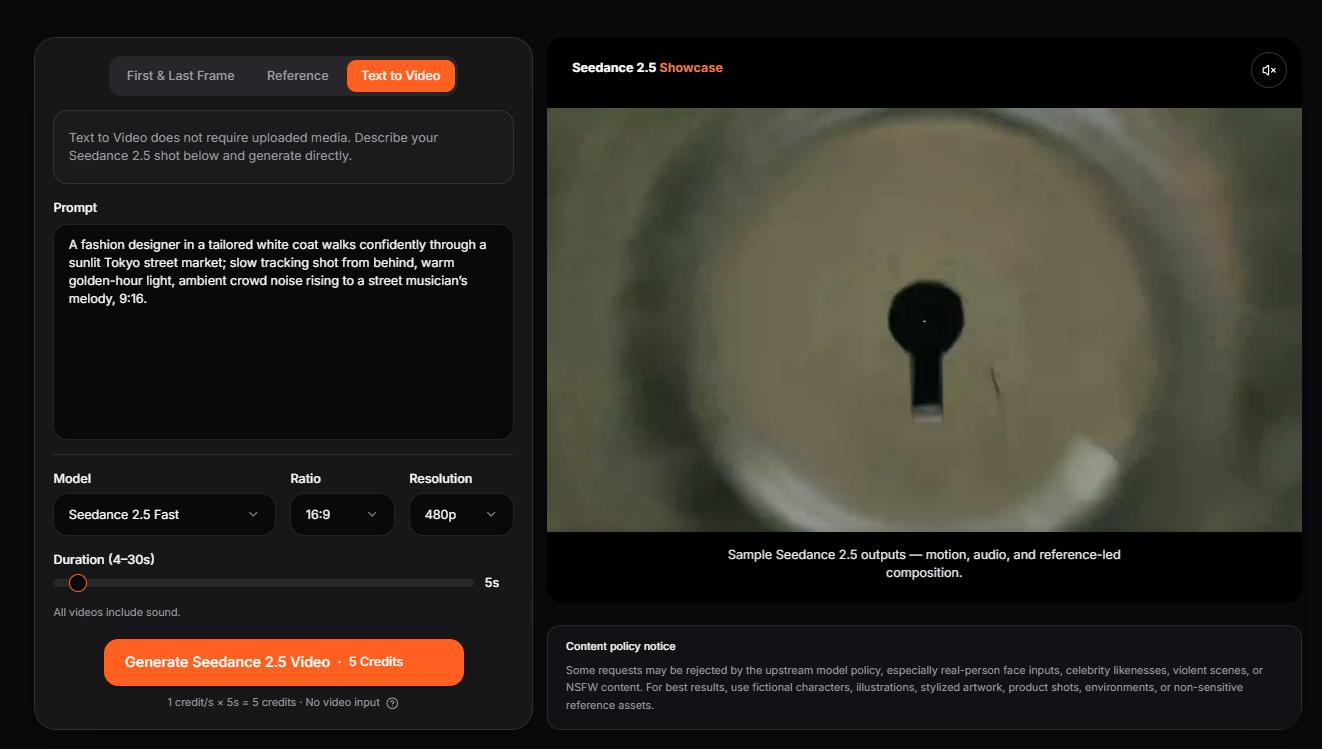
Step 2 — Write a Cinematic Prompt
A strong Seedance 2.5 prompt describes four things in one cohesive sentence: subject, setting, camera movement, and action. The model responds well to specific cinematic language, so name the camera move explicitly — “slow push-in,” “handheld tracking,” “aerial pan,” “rack focus.” Because a clip now runs up to 30 seconds natively, your prompt can describe a complete scene arc — setup, action, and resolution — without chaining multiple generations. This single habit does more for output quality than any other technique when learning how to use Seedance 2.5.
Weak prompt:
A woman walking in a city.
Strong prompt:
A fashion designer in a tailored white coat walks confidently through a sunlit Tokyo street market; slow tracking shot from behind, warm golden-hour light, ambient crowd noise rising to a street musician’s melody, 9:16.
Step 3 — Upload and Label Your Reference Inputs
This is where Seedance 2.5 separates itself from every competing model. You can attach up to 50 reference files in a single generation, combining:
Image references — character photos, brand asset guides, product renders, color-palette swatches
Video references — motion examples, camera-movement guides, style-matching footage
Audio references — music files, ambient tracks, or dialogue for beat-synced output
3D white-model (blockout) inputs — rough scene geometry for pre-staging camera and composition
Label each reference in natural language inside your prompt — for example, “use the jacket from the product photo as the character’s outfit throughout” — and the model resolves which reference applies where. For brand campaigns, you can upload your logo, color guide, hero product image, and a camera-style reference video all at once without leaving any asset out.
Step 4 — Set Duration and Aspect Ratio
Pick a clip length up to 30 seconds and the aspect ratio that matches your distribution platform:
16:9 — YouTube ads, landscape social, product landing pages
9:16 — TikTok, Instagram Reels, YouTube Shorts
1:1 — square feed posts
Setting the right format upfront saves a re-crop pass later.
Step 5 — Generate and Preview
Generate the clip, then review for character identity consistency across the full duration, audio sync quality, camera-movement adherence, and scene transitions. If the overall motion and framing are right but one element is off, do not regenerate from scratch — proceed to Step 6.
Step 6 — Use Local Re-Draw for Targeted Edits
Local re-draw is the feature most likely to change your workflow once you know how to use Seedance 2.5. Select a region of the clip and describe the change — swap a product in-frame, recolor an outfit, fix an off-brand background element, correct on-screen text — and only that region updates. The surrounding video, camera path, character identity, and audio stay untouched. No full re-roll for a small correction.
Step 7 — Export and Publish
Download your finished clip and publish directly, or import it into DaVinci Resolve, Premiere Pro, or Final Cut Pro for color grading and additional sound design. Because commercial licensing terms for Seedance 2.5 were still being finalized at launch, confirm the current terms of service before deploying output in paid campaigns.
Try these steps in the Seedance 2.5 workspace →
Real-World Use Cases for Seedance 2.5 (With Ready-to-Use Prompts)
Knowing the steps is one thing; knowing how to use Seedance 2.5 for a specific creative goal is what turns it into a production tool. Here are three realistic scenarios, each with a copy-ready prompt.
Use Case 1 — E-Commerce Product Launch Video
A beauty brand needs a 25-second serum reveal for a paid social campaign. Using Image-to-Video, the team uploads the product bottle, a color-palette reference, a lifestyle image of the target customer, and an ambient audio file, then generates one continuous clip — no stitching, no separate audio pass.
Prompt (product photo + palette + lifestyle image attached):“A frosted-glass serum bottle on a minimalist white studio plinth slowly transitions to a warm, sunlit bathroom shelf with soft morning light; gentle 90-degree orbit into a slow push-in, condensation catching the light, calm ambient room tone rising to soft piano, premium skincare-commercial look, 9:16, 25 seconds.”
Use Case 2 — Short-Form Narrative Ad
A travel-brand agency uses Text-to-Video with two camera-reference clips to lock a documentary movement style, then tracks one character across three locations — lobby, room reveal, terrace breakfast — in a single 30-second clip. Previously this needed three separate generations, two stitching rounds, and a compositing pass to fix lighting drift.
Prompt (2 camera-style reference clips attached):“A traveler in a linen shirt arrives at a coastal hotel at golden hour — shot 1: handheld follow through the open-air lobby; shot 2: slow reveal of the sea-view room; shot 3: terrace breakfast as the camera pulls back to the horizon. Keep the same character, wardrobe, and warm light throughout, documentary movement style, ambient waves and distant gulls, 16:9, 30 seconds.”
Use Case 3 — Social Media Content at Scale
A fashion-retail content team uploads a fixed brand reference set once — logo placement guide, approved model images, seasonal color palette — and reuses it across 15 session generations. Each clip has a unique scene and camera style while maintaining consistent brand identity, cutting weekly production time significantly.
Prompt (brand reference set attached, reused per clip):“Model from the approved reference walks through an autumn city street wearing the seasonal collection; slow tracking shot, soft overcast light, warm seasonal color grade matching the palette reference, brand-consistent styling, 9:16, 10 seconds.”
Prompt Tips for Better Seedance 2.5 Results
Front-load subject and action. The model weights the start of the prompt heavily — lead with who is doing what before describing camera and environment.
Name the camera move explicitly. “Slow push-in,” “dolly left,” “handheld follow,” and “aerial tilt-down” each produce reliably distinct motion.
Use references to lock consistency, not restrict creativity. Upload a character reference to hold the face and outfit stable, then let the prompt drive scene and mood variation.
Write the full scene arc. A 30-second clip has room for a beginning, middle, and end — describe the progression to use the length well.
Iterate small, then re-draw. Change one variable at a time; once a take is mostly right, fix details with local re-draw instead of regenerating the whole clip.
FAQ: How to Use Seedance 2.5
Can I use Seedance 2.5 for free?
Seedance 2.5 entered enterprise beta in late June 2026, with public access targeted for early July 2026; no free tier or pricing had been officially announced at launch. Preparing your prompts and references now means you can learn how to use Seedance 2.5 and run your first clip the moment access opens.
Does Seedance 2.5 support text-to-video generation?
Yes. Text-to-Video is one of three native generation modes alongside Image-to-Video and Motion-Reference, so a well-written prompt alone can produce a full 30-second clip.
How many reference files can I upload to Seedance 2.5?
Up to 50 multimodal references per generation — images, video clips, audio files, and 3D white-model inputs — roughly four times the ~12-input capacity of Seedance 2.0.
What is the difference between Seedance 2.5 and Seedance 2.0?
Seedance 2.5 generates a native single-pass 30-second clip without stitching, expands reference inputs from about 12 to 50, adds region-level local re-draw editing, and introduces 3D white-model input support. Seedance 2.0 received a separate native 4K, 10-bit upgrade in the same June 2026 FORCE announcement.
What is local re-draw editing in Seedance 2.5?
Local re-draw lets you select a region of a generated clip — a product, outfit, background element, or on-screen text — and modify only that area while the rest of the video (motion, camera path, character identity, audio) stays unchanged. It removes the need to regenerate the full clip for small corrections.
Is Seedance 2.5 good for social media video?
Yes. Native 9:16 support and a 30-second single-pass clip make Seedance 2.5 a strong fit for TikTok, Reels, and YouTube Shorts, eliminating the stitching step that shorter-clip models require for longer social formats.
Does Seedance 2.5 have copyright filters?
Yes. After ByteDance paused Seedance 2.0’s global rollout following Motion Picture Association cease-and-desist action from major studios, content filters that block recognizable real faces and copyrighted characters carry forward into Seedance 2.5. ByteDance also previewed a separate AI copyright commercialization platform for licensed, cleared creative assets.
Can Seedance 2.5 generate video with synchronized audio?
The Seedance family co-generates audio — dialogue, ambient sound, and music — in the same pass as the video, rather than adding it afterward. Detailed audio specifications for Seedance 2.5 had not been officially published at the June 23 announcement, so confirm exact capabilities at general availability.
Final Thoughts
Learning how to use Seedance 2.5 comes down to a repeatable seven-step loop: pick your mode, write a clear cinematic prompt, attach the references that lock your look, set duration and format, generate, fix details with local re-draw, and export. With native 30-second single-pass clips, up to 50 multimodal references, and region-level editing, Seedance 2.5 is built for creators who care about duration, consistency, and creative control — not just a single viral frame. Prepare your workflow now, and you will be ready to create the moment public access opens.