Seedream 5.0 Pro vs GPT Image 2 is an important AI image comparison for creators in 2026, and the timing is not a coincidence. ByteDance launched Seedream 5.0 Pro on July 8, 2026, and early coverage framed it as a direct challenger to OpenAI’s GPT Image 2, which had set the pace on text-to-image benchmark leaderboards since its April 21, 2026 release. These models compete on more than visual quality: Seedream 5.0 Pro is designed around structured layouts, grounded local edits, annotations, multilingual text, and layer-aware production, while GPT Image 2 emphasizes high-fidelity reference inputs, flexible output sizes, and image workflows built into conversations or applications.
Try Seedream 5.0 Pro free on JXP
Because Seedream 5.0 Pro shipped less than two weeks before this article, there is no large-scale independent benchmark yet comparing it directly against GPT Image 2’s production track record. This guide is built from each company’s own documentation and early third-party coverage, with prompts you can run yourself to verify the differences firsthand.
The better model depends on your workflow. Do you need a controllable design canvas, precise infographic composition, repeated reference-based edits, separated assets, or an API-centered production pipeline? Run the comparison prompts below with your own product images, posters, or campaign briefs.
Seedream 5.0 Pro vs GPT Image 2: Quick Verdict
Category | Seedream 5.0 Pro | GPT Image 2 | Better Fit |
|---|---|---|---|
Developer / released | ByteDance, July 8, 2026 | OpenAI, April 21, 2026 | — |
High-density infographics | Strong focus on charts, labels, information hierarchy, and layout planning | Strong text-rich and editorial generation | Seedream 5.0 Pro |
Local editing | Point, lasso, box, sketch, color, material, and region-aware controls | Prompt-based and mask-guided editing | Seedream 5.0 Pro |
Reference fidelity | Multi-image fusion and reference-guided creation | Image inputs processed at high fidelity by default | GPT Image 2 |
Layer separation | Separates designs into independent transparent elements | No equivalent native layer workflow documented | Seedream 5.0 Pro |
Transparent backgrounds | Supported through layer-separated PNG export | Not supported; OpenAI’s API returns an error for | Seedream 5.0 Pro |
Multilingual text | Native input and rendering across more than ten languages | Strong multilingual typography across many scripts | Test your language |
Output dimensions | Native 2K, upscalable to 4K | 2K native, experimental above 2560x1440, max 3840x2160 | GPT Image 2 |
API pricing | Depends on the access platform (Dreamina, Volcano Engine, ModelArk, or third-party hosts) | Token-based, depends on input, dimensions, and quality; ChatGPT usage is included in Plus/Team/Enterprise | Confirm current terms on your chosen platform |
Developer workflow | Available through supported platforms and APIs | Dedicated image endpoints and conversational API workflows | GPT Image 2 |
Marketing production | Strong for posters, products, localization, and design revision | Strong for ideation, variations, and reference-based campaigns | Depends on the asset |
The short verdict: choose Seedream 5.0 Pro for design control, layer separation, and transparent-asset production; choose GPT Image 2 for flexible general-purpose generation, high-fidelity references, and API-driven integration. Neither model is perfect — ByteDance says Seedream 5.0 Pro still has room to improve in very fine text rendering and pixel-level editing consistency, and OpenAI notes that a mask guides GPT Image 2 edits but may not be followed with exact geometric precision.
What Is Seedream 5.0 Pro?
Seedream 5.0 Pro is ByteDance Seed’s pro-tier multimodal image generation and editing model, part of a broader Seedream 5.0 lineup that also includes standard and Lite tiers. Its official materials emphasize four areas: high-density information visualization, interactive precision editing, realistic imagery and portrait texture, and native multilingual generation. Its spatial grounding is designed to understand both what should change in an image and where the change belongs.
The model accepts prompts, uploaded images, spatial annotations, sketches, color references, material references, and multiple source images, and users can isolate a region through point selection, a lasso, a box, or drawn guidance. It also supports layer separation, dividing a design into independent elements such as text, subject, background, and decorations — ByteDance’s own demo splits a poster into more than ten transparent layers, including background areas that were hidden behind the main subject and get restored automatically. ByteDance’s documentation also describes Seedream 5.0 Pro as a still-frame generator for Seedance 2.5, its video model, so a stable output can become a video’s starting frame — worth verifying against current documentation before you publish, since this integration detail moves fast. You can test the region-editing and layer-separation tools directly on JXP’s Seedream 5.0 Pro workspace.
What Is GPT Image 2?
GPT Image 2, also marketed as ChatGPT Images 2.0, is OpenAI’s third-generation image model, following gpt-image-1 (March 2025) and gpt-image-1.5 (December 2025). It accepts text and image inputs, produces image outputs, and supports generation, editing endpoints, and image creation inside conversational workflows. Its headline feature is reasoning: before rendering, the model plans the composition, checks constraints, and can pull in real-world context, an approach OpenAI describes as agentic image generation.
GPT Image 2 processes reference images at high fidelity by default — there’s no fidelity setting to adjust, which is useful when a workflow depends on preserving faces, products, packaging, or visual identity. Its documented API supports quality settings, PNG, JPEG, and WebP output, compression controls, and resolutions up to 3840x2160, with outputs above 2560x1440 marked experimental. One documented limitation worth flagging directly: gpt-image-2 does not support transparent backgrounds, and API requests with background: "transparent" return an error — OpenAI points developers to gpt-image-1.5 for native transparent PNGs instead.
Seedream 5.0 Pro vs GPT Image 2 for Text and Infographics
Text rendering is central to this comparison, and both companies chose to headline it.
How OpenAI’s Model Handles Text
GPT Image 2’s reasoning pass is built specifically to solve this. Early third-party testing describes it handling multilingual copy, full infographics, slide-style layouts, maps, and comic panels in a single pass. In one independently reported test, a reviewer generated a podcast episode infographic requiring a title, four labeled topic icons, and a call-to-action line, and the model reportedly rendered every word correctly on the first attempt.
How ByteDance’s Model Handles Text
Seedream 5.0 Pro is explicitly optimized for high-density infographics. ByteDance describes the model interpreting a topic, planning a layout, organizing different information types, and generating charts, labels, illustrations, and supporting text in one composition — an area the company calls one of the hardest open problems in image generation. It also natively renders text in more than ten commonly used languages, including Arabic and Thai, with typography matching each language’s letterforms rather than translate-and-paste behavior.
Seedream 5.0 Pro has the practical advantage when a task requires many independent information zones and a strict hierarchy. GPT Image 2 is highly competitive when content must combine information with editorial style, conversational revision, or unusual output dimensions.
Comparison Prompt: Sustainability Infographic
Seedream 5.0 Pro | GPT Image 2 |
|---|---|
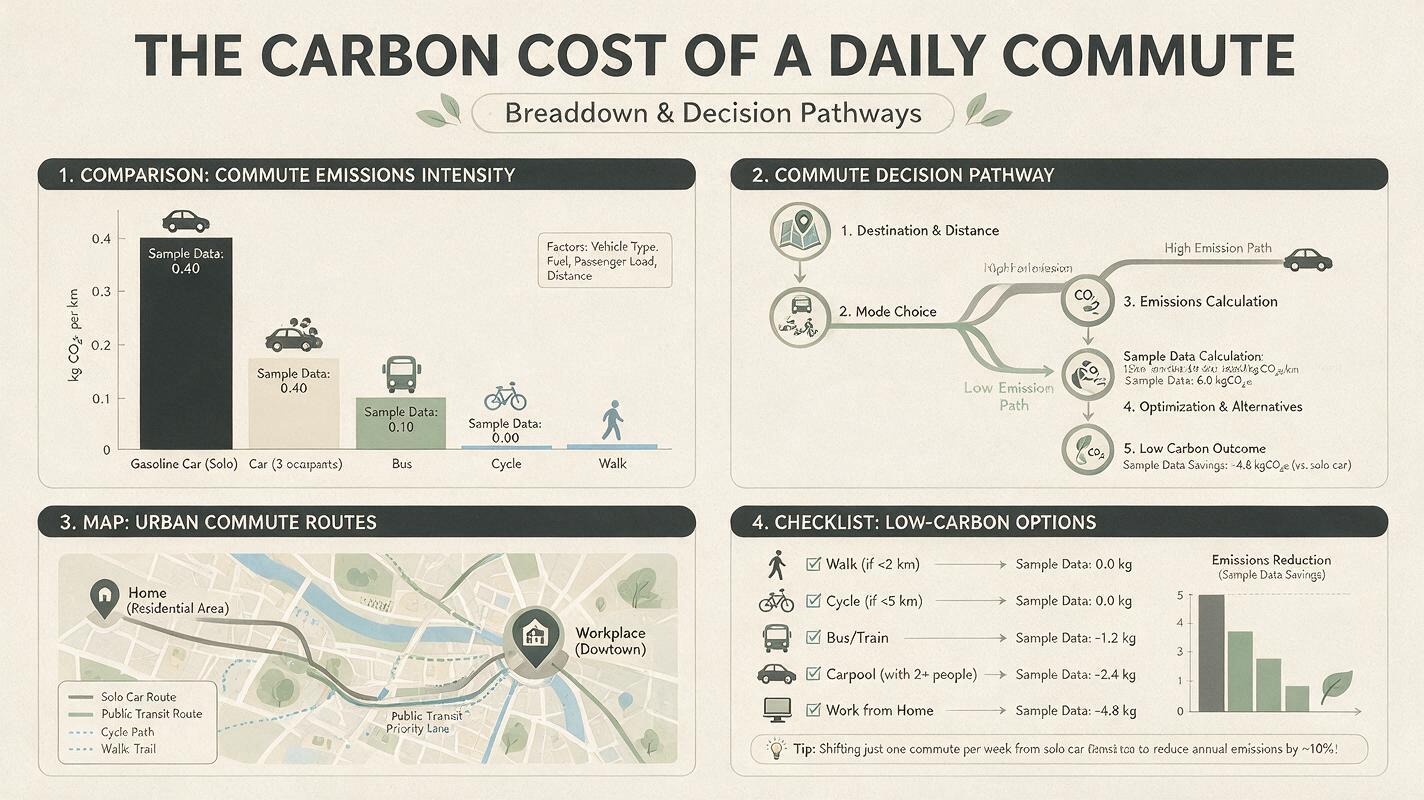 | 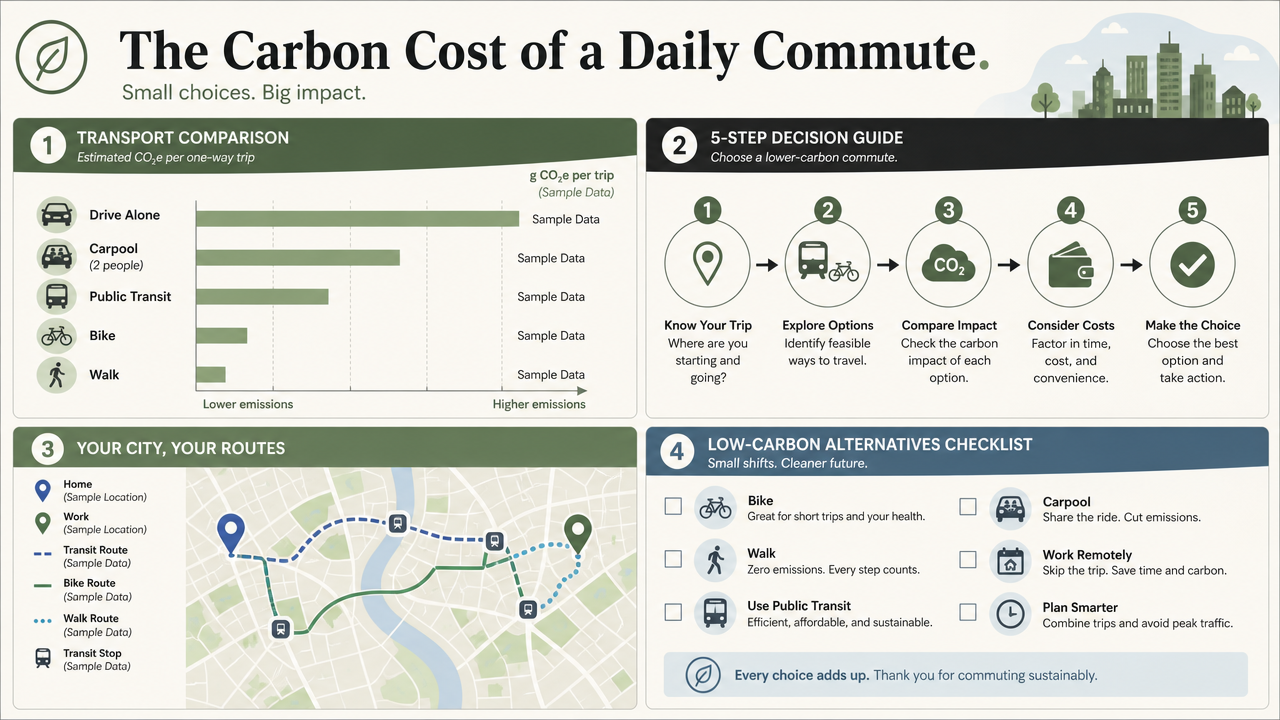 |
“Create a 16:9 professional infographic titled ‘The Carbon Cost of a Daily Commute.’ Divide the layout into four clearly separated sections: a transport comparison bar chart, a five-step decision flowchart, a small city map, and a checklist of low-carbon alternatives. Use readable English labels, accurate visual hierarchy, muted sage green, charcoal, cream, and soft blue. Keep generous margins and a consistent icon style. Do not invent statistics; use placeholder values marked ‘Sample Data.’”
What to inspect:
The four-zone structure
Text accuracy across all labels
Chart organization and alignment
Whether “Sample Data” stays visible
How cleanly one wrong zone can be revised without disturbing the rest
Judge Seedream 5.0 Pro on information structure; judge GPT Image 2 on typography, polish, and revision quality.
Because Seedream 5.0 Pro only shipped this month, treat any specific accuracy percentage you see online as one reviewer’s early impression rather than a settled industry benchmark.
Seedream 5.0 Pro vs GPT Image 2 for Editing
This is where the two models diverge most in actual workflow, not just in scores.
Seedream 5.0 Pro is built around targeted region editing: point, box, lasso, or sketch directly on the image to mark exactly what should change, then describe the edit in a prompt. Everything outside the marked region is meant to stay untouched, including lighting, shadows, and composition — a typical use case is swapping one element on a finished asset without regenerating the whole frame.
GPT Image 2 takes a conversational approach instead. Because it runs inside a chat session, you can generate an image, then issue follow-up instructions in plain language — change a background, remove an object, enlarge a text element — and the model applies the change while preserving the rest of the scene across turns. OpenAI calls this context-aware multi-turn editing, and masks can guide edits, though OpenAI notes a mask works as guidance rather than a guarantee of exact shape matching.
Comparison Prompt: Ecommerce Product Recolor
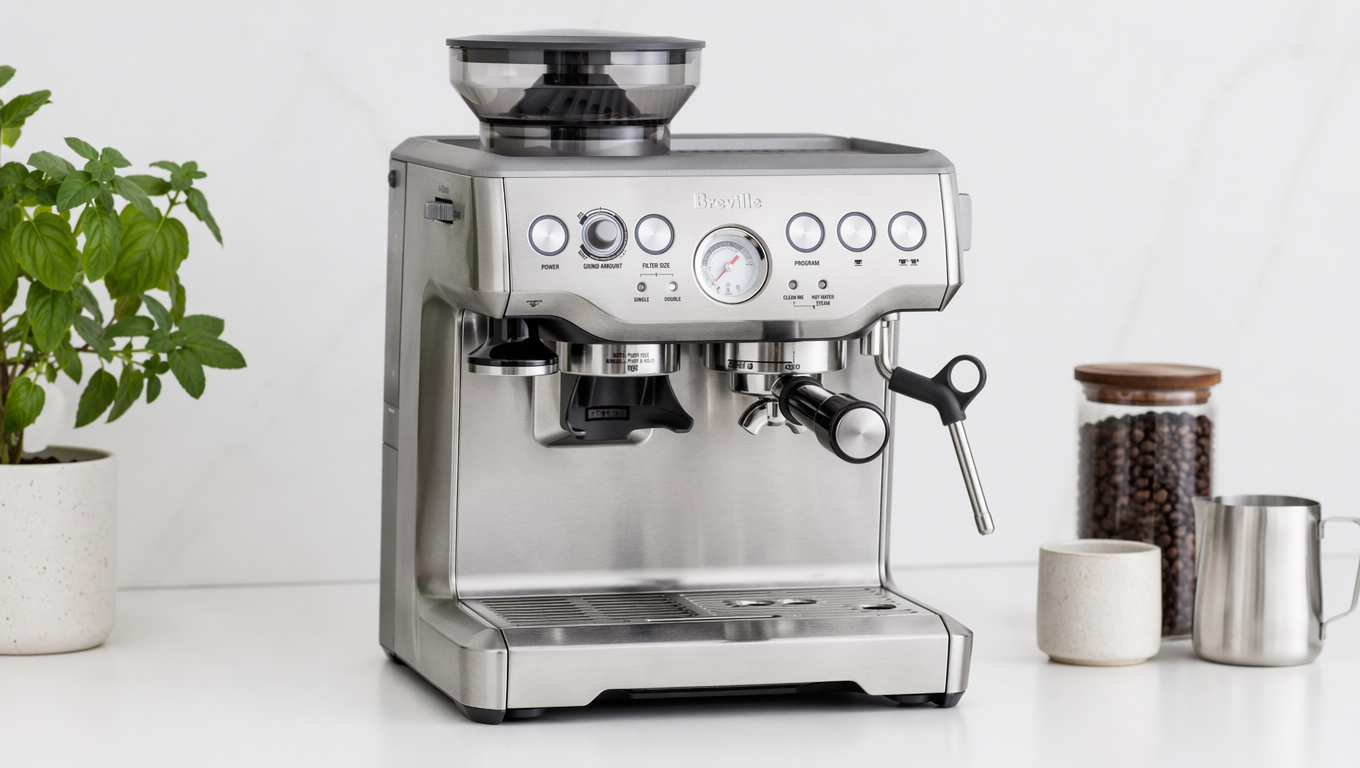
Source image: a studio photograph of a silver espresso machine on a white counter.
Seedream 5.0 Pro | GPT Image 2 |
|---|---|
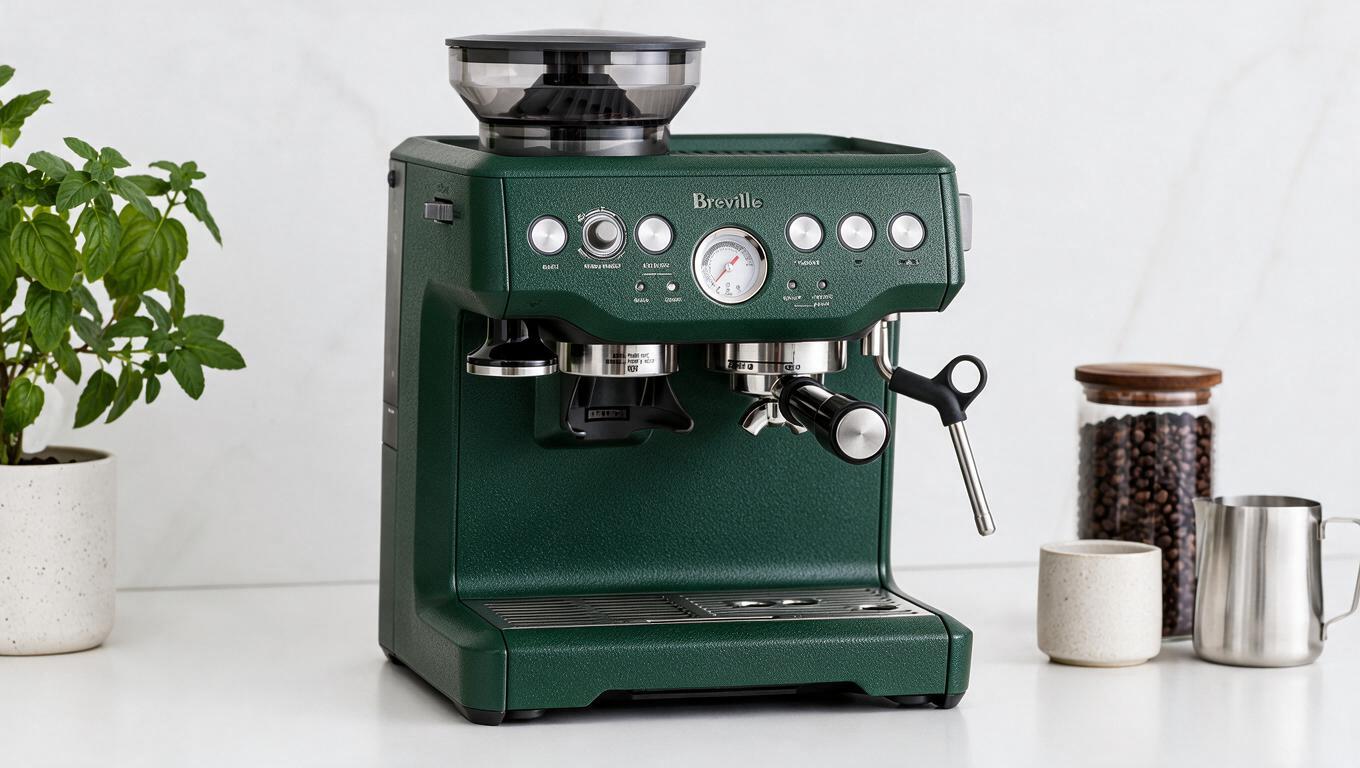 | 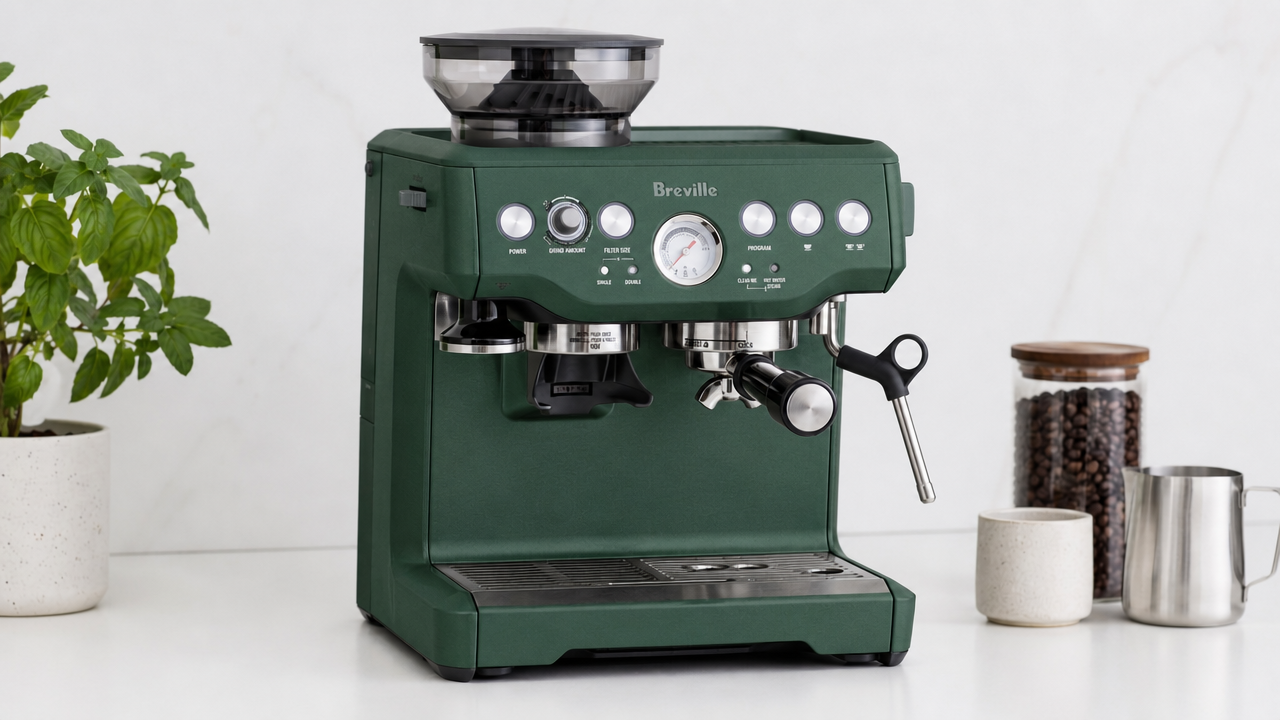 |
“Change only the espresso machine body from brushed silver to matte forest green #234B3A. Preserve the logo, buttons, steam wand, reflections, counter, shadows, camera angle, and background. Replace the metal side panel with a subtle powder-coated texture. Do not alter the product proportions or add accessories.”
What to inspect:
Logo preservation
Edge accuracy on the recolored panel
Reflection and shadow consistency
Color match against the requested hex
Whether untouched areas stayed stable
Feed Seedream 5.0 Pro a selected region plus a color reference; feed OpenAI’s model the original image with a mask and explicit preservation instructions.
A designer marking up a static comp will likely prefer Seedream 5.0 Pro’s point-and-sketch controls. Someone iterating through conversation will likely prefer GPT Image 2’s chat-native flow.
Layer Separation and Reference Fidelity
Layer separation is Seedream 5.0 Pro’s most distinctive feature in this comparison. On request, it splits a finished image into independent layers — a headline, a subject, a background — and exports each as a transparent PNG, effectively turning a generated image into an editable design file. OpenAI’s model has no equivalent native layer export; edits happen in place inside the same flattened image, and as noted above, it cannot output a transparent background at all.
Reference fidelity runs the other way. GPT Image 2 processes image inputs at high fidelity by default and supports one or more reference images, which is useful for combining products into a new composition or preserving details during editing. ByteDance’s model supports multi-image fusion too, adding design-oriented controls such as region placement, material transfer, and color references on top.
Comparison Prompt: Consistent Character Campaign
Reference inputs: one front portrait, one side portrait, one full-body outfit image, one brand color card.
“Create a three-panel horizontal fashion campaign featuring the same person from the references. Panel one: close portrait in soft window light. Panel two: full-body street scene with the same outfit. Panel three: waist-up product endorsement pose holding a plain reusable bottle. Preserve facial structure, hairstyle, skin tone, outfit details, and body proportions. Use the supplied brand colors only in the background graphics. Add no logos or text.”
What to inspect:
Facial identity across all three panels
Hairstyle and skin tone consistency
Outfit and clothing details
Body proportions and hands
Whether the brand colors stayed confined to the background
GPT Image 2 may be easier to integrate when repeatable reference preservation is the priority. The ByteDance model may be more production-friendly when specific placement and later layer manipulation are required.
Seedream 5.0 Pro vs GPT Image 2 for Photorealism and Multilingual Generation
Photorealism is competitive in both models. Seedream 5.0 Pro’s official materials emphasize physical lighting, materials, skin texture, and shadows, positioned for advertising as well as documentary-style imagery. OpenAI’s model offers broad stylistic range, with examples spanning candid photography, editorial fashion, cinematic portraits, and surreal but realistic compositions. Neither can be declared a universal winner without controlled testing using identical prompts, inputs, dimensions, and quality settings.
Comparison Prompt: Luxury Skincare Advertisement
Seedream 5.0 Pro | GPT Image 2 |
|---|---|
 |  |
“Create a photorealistic luxury skincare campaign image in 4:5 format. A frosted glass serum bottle stands on pale limestone beside a shallow pool of water. Late-afternoon sunlight enters from the left, producing soft caustic reflections and a long natural shadow. Include tiny condensation droplets, realistic glass thickness, a brushed aluminum cap, and a restrained beige-and-sage palette. Leave clean negative space in the upper right for later copy placement. Do not generate text.”
What to inspect:
Glass thickness and refraction
Condensation detail
Shadow direction and cap material
Whether the negative space stayed clean for later copy
On multilingual output, Seedream 5.0 Pro supports more than ten commonly used languages including Arabic and Thai, while GPT Image 2’s examples highlight typography across Japanese, Arabic, Korean, Devanagari, Cyrillic, Bengali, Greek, and Chinese scripts. Always proofread generated copy in either model — an image can look polished while containing a subtle spelling or translation error.
Comparison Prompt: Localized Café Poster
Seedream 5.0 Pro | GPT Image 2 |
|---|---|
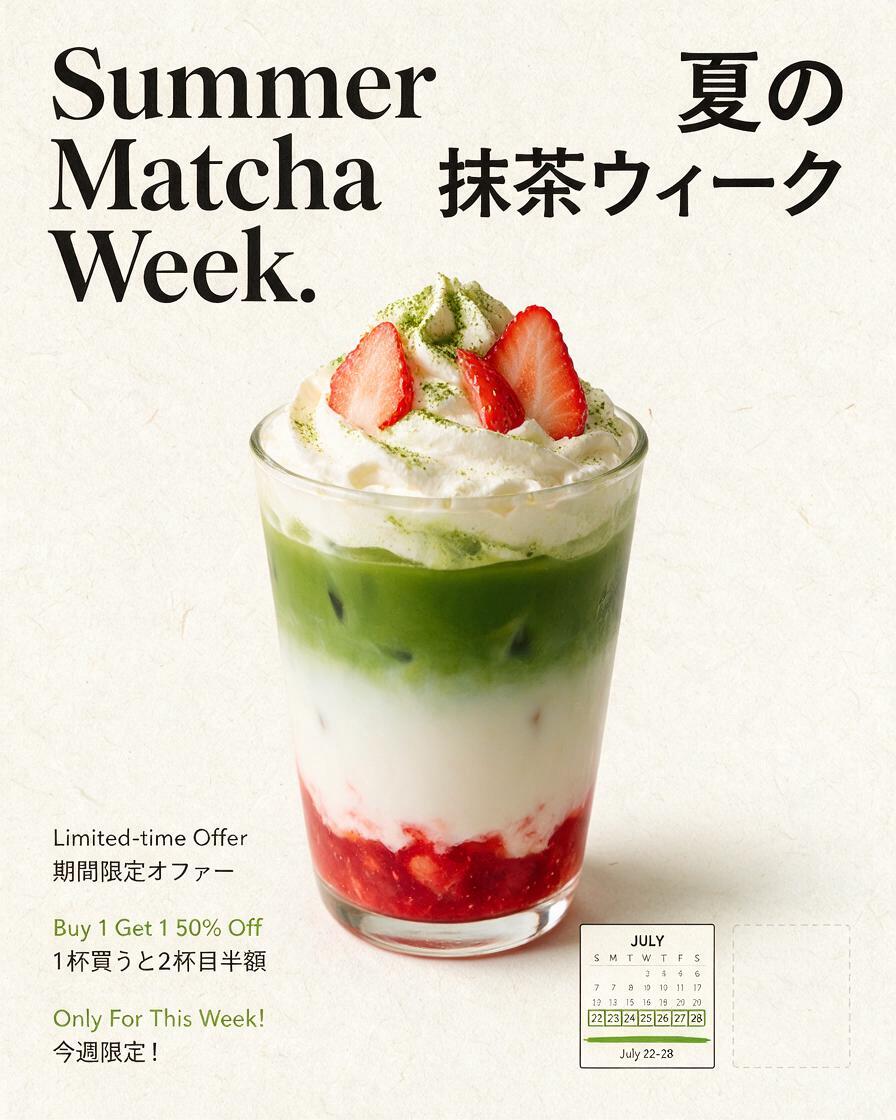 |  |
“Design a vertical 4:5 café launch poster with a clean editorial grid. English headline: ‘Summer Matcha Week.’ Add a matching Japanese headline and three short offer lines in English and Japanese, aligned as translation pairs. Use cream, matcha green, strawberry pink, and black. Include one iced strawberry matcha photograph, a small calendar block, and an empty area for a QR code. Keep all text readable and do not add extra words.”
What to inspect:
Spelling and script accuracy in both languages
Whether the translation pairs line up
Text hierarchy and reading order
Any unrequested extra characters
Seedream 5.0 Pro vs GPT Image 2: Pricing and Access
Seedream 5.0 Pro’s pricing and credit allowances depend on which platform you access it through — Dreamina, Volcano Engine, BytePlus ModelArk, or a third-party host such as JXP. Check the current terms on whichever platform you plan to use before budgeting a production workflow.
GPT Image 2 uses token-based API pricing that varies by input content, output dimensions, quality setting, and reference-image usage, so check OpenAI’s current pricing page rather than relying on a fixed number. Inside ChatGPT, generation is included in Plus, Team, and Enterprise subscriptions rather than billed per image, with enterprise deployment also available through Microsoft Foundry and Azure AI.
Seedream 5.0 Pro vs GPT Image 2: Which Model Should You Choose?
Choose Seedream 5.0 Pro for Graphic Design
The stronger starting point for structured posters, high-density infographics, educational diagrams, point-and-edit workflows, and layer-separated design elements.
Choose Seedream 5.0 Pro for Ecommerce Editing
A better fit when a product photo is already mostly correct and only one element needs to change — recoloring a product, updating packaging, correcting a label, or localizing promotional text.
Choose GPT Image 2 for Reference-Heavy Generation
Better suited to high-fidelity image inputs, character or product references, multiple supplied assets, and broad style exploration.
Choose GPT Image 2 for Developer Workflows
The clearer advantage here, since OpenAI documents dedicated generation and editing endpoints plus multi-turn conversational workflows through the Responses API.
Prompting Tips
Seedream 5.0 Pro formula: Create or edit [asset] for [audience]. Place [elements] in [positions]. Change only [target]. Preserve [protected details]. Use [palette/material/lighting]. Include exactly [text]. Do not add [unwanted elements].
GPT Image 2 formula: Using the supplied references, create [scene] in [format]. Preserve [identity or product details] at high fidelity. Use [lighting, lens, style, palette]. Place [elements] in [composition]. Include exactly [text] or leave [area] blank. Do not change [protected details].
Limitations and Quality Checks
Neither model is perfectly deterministic, and neither is a finished product. ByteDance’s own launch materials acknowledge room for improvement in fine text rendering and pixel-level editing consistency. OpenAI’s documentation notes imperfect mask-shape adherence, and high-fidelity reference processing can increase API input token usage.
Before publishing commercial work from either model, review:
Spelling, dates, numbers, and translations
Product labels and brand details
Hands, faces, and reflections
Areas that were supposed to stay untouched
Whether charts reflect the data you actually supplied
Current platform pricing and terms
Create and refine your next campaign visual on JXP
Frequently Asked Questions
Is Seedream 5.0 Pro better than GPT Image 2?
Seedream 5.0 Pro is better for annotation-based local editing, layer separation, transparent-background exports, and structured infographics. GPT Image 2 is better for high-fidelity references, flexible sizes, and API integration. Because Seedream 5.0 Pro launched only weeks ago, large-scale independent benchmarks comparing the two are still limited.
Which model is better for text in images?
Both support text-rich, multilingual images. Seedream 5.0 Pro specializes in dense layouts and structured information across more than ten languages; GPT Image 2 demonstrates strong typography across editorial and educational examples. Proofread every final asset regardless of which model you use.
Which model is better for editing product photos?
Choose Seedream 5.0 Pro when you need to select a precise region, replace a material, or apply an exact color while preserving the rest of the composition. Choose GPT Image 2 when high-fidelity preservation of the source image and reference details is the main priority.
Does GPT Image 2 support transparent backgrounds?
No. OpenAI’s official API documentation states that gpt-image-2 does not support transparent backgrounds, and requests with background: "transparent" return an error. OpenAI recommends gpt-image-1.5 for native transparent PNG output.
Can Seedream 5.0 Pro separate image layers?
Yes. Seedream 5.0 Pro can split a generated image into independent layers — text, subject, background — and export each as a transparent PNG, which GPT Image 2 does not currently offer as a native feature.
Which model is cheaper?
There’s no fixed answer. GPT Image 2 uses token-based API pricing that varies by input, output size, and quality, and ChatGPT subscribers get generation included in their plan. Seedream 5.0 Pro’s cost depends on which platform you access it through. Check current terms on your chosen platform before comparing costs directly.