
AI video moves fast. A model tops the charts one month and gets passed the next. Happy Horse 1.1 is the latest name making noise, and for good reason. It's Alibaba's upgraded video model, built to fix the rough edges of its predecessor and go head to head with the biggest names in the space. If you make short videos, ads, or social clips, this one is worth your attention.
This is a full, plain-English guide to the Happy Horse 1.1 AI Video Generator. We'll cover what it is, what changed from version 1.0, the full specs, the price, how to use it, and how it stacks up against the other hot models. No hype, no filler. By the end you'll know if it fits your work.
What Is Happy Horse 1.1?
Let's start simple. Happy Horse 1.1 is an AI video model from Alibaba's ATH innovation team. You give it a text prompt or an image, and it makes a short video clip with sound built in. The "1.1" means it's the second release in the family — an upgrade over the original Happy Horse 1.0.
The model first got famous in a strange way. Back in April 2026, an unnamed video model showed up on the Artificial Analysis Video Arena, a site that ranks AI video tools through blind human voting. People didn't know who made it. It shot to the top of the charts fast, beating well-known closed models. Only later did Alibaba confirm it was theirs. That model was Happy Horse. Version 1.1 builds on that same foundation.
What makes it stand out is one big trick: it makes the video and the audio together, in one pass. Most tools make a silent clip first, then add sound after. Happy Horse builds both at the same time, so the dialogue, ambient noise, and sound effects line up with the picture naturally. It also handles lip-sync in seven languages, which is rare.
In short, Happy Horse 1.1 is a fast, audio-aware video generator aimed at people who need polished short clips without a film crew. It's also marketed as open-source, which sets it apart from most closed rivals.
Happy Horse 1.1 vs 1.0: What Got Upgraded
If you used version 1.0, you'll want to know what's actually new. The Happy Horse 1.1 vs 1.0 jump isn't a full rebuild — it's a focused tune-up on the things that broke in real use. Here's what changed, grouped by what you'll notice.
Smoother motion. This is the headline. Version 1.1 handles fast action much better — explosions, particle effects, quick movement, and dramatic weather all look more grounded. Where 1.0 sometimes felt sluggish or stuttery, 1.1 keeps motion steady and natural.
Better camera understanding. The new version reads shot types better. Tracking shots, close-ups, and shot-reverse-shot (the back-and-forth you see in dialogue scenes) come out more cleanly. This matters a lot if you're making anything story-driven.
Cleaner multi-shot flow. Cuts between shots feel more natural and connected. That makes 1.1 better suited for short dramas, trailers, and ads that need more than one angle.
Stronger audio. Dialogue pacing sounds more natural, background sound and music match the scene better, and lip-sync drifts less. Fewer random audio glitches, too.
Steadier subjects. Characters and objects hold their look better across the clip, so faces and products don't morph halfway through.
Put simply: 1.0 proved the idea worked, and 1.1 makes it usable for real projects. If you tested 1.0 and found the motion or audio shaky, the upgrade is worth another look.
Get Early Access — Happy Horse 1.1 Free
Core Specs
Here's the quick spec sheet so you can see what you're working with at a glance.
Spec | Detail |
|---|---|
Maker | Alibaba ATH |
Generation modes | Text-to-video, image-to-video, reference-to-video |
Resolution | 720p and 1080p |
Aspect ratios | 16:9, 9:16, 4:3, 21:9, 1:1 |
Clip length | Up to 15 seconds |
Audio | Joint audio-video in one pass |
Lip-sync languages | 7 (English, Mandarin, Cantonese, Japanese, Korean, German, French) |
Model base | 15-billion-parameter unified Transformer |
Open source | Yes (billed as open-source) |
The standout numbers here are the joint audio and the seven-language lip-sync. Most rivals make you add sound separately. Happy Horse bakes it in.
Main Features of Happy Horse 1.1
Let's break down what the model actually does, feature by feature.
Text-to-video. Type a scene and get a clip. This is the fastest way to test an idea from scratch. Good for concepts, hooks, and quick drafts.
Image-to-video. Upload a still and the model animates it. Great when you already have a product shot or a character look you want to keep. It moves the image while holding the subject steady.
Reference-to-video. Feed in reference material to guide the output more tightly. Useful when you need the result to match a specific style, character, or look.
Built-in audio. Every clip comes with sound generated alongside the picture — dialogue, ambient noise, and effects, all synced. This is the feature people talk about most.
Multi-language lip-sync. If your clip has someone talking, the mouth movements match the words in any of seven languages. This is a big deal for anyone making content for more than one market.
Flexible output. Pick your resolution and aspect ratio to match where the video will go — vertical for TikTok and Reels, wide for YouTube, square for feed posts.
Happy Horse 1.1 Pricing and Credits
Now for the part everyone asks about. On JXP, Happy Horse 1.1 pricing runs on a credit system tied to how long and how sharp your clip is. The rates are simple:
Output | Cost |
|---|---|
720p | 3 credits per second |
1080p | 4 credits per second |
So a 5-second clip at 720p costs about 15 credits, and the same clip at 1080p costs about 20 credits. You pay for what you make, by the second. That makes it easy to budget — draft at 720p to save credits, then render your final pick at 1080p.
If you want to try Happy Horse 1.1 free first, JXP gives new users free credits to test the model before paying. That's the smart way to start: run a few clips, see if the quality fits your work, and only buy more credits once you know it's worth it.
How to Use Happy Horse 1.1
Here's the full workflow. It's simpler than you'd think. If you're wondering how to use Happy Horse 1.1, follow these steps.
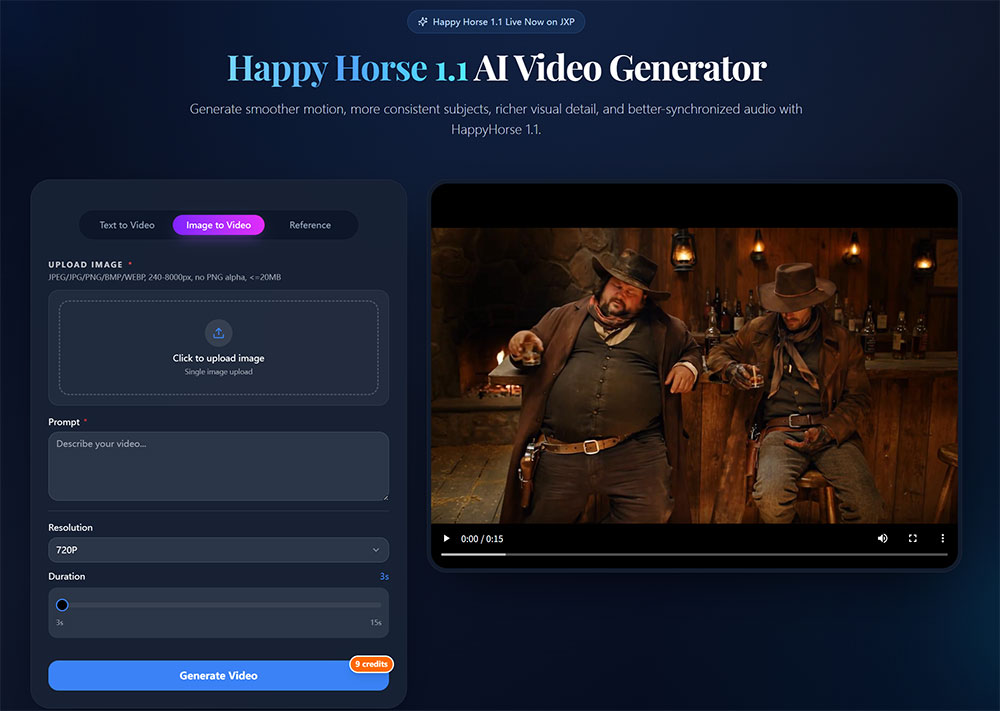
Step 1: Open the generator. Go to the Happy Horse 1.1 page on JXP. The workspace has everything on one screen — a mode picker, a prompt box, an upload area, and the output settings.
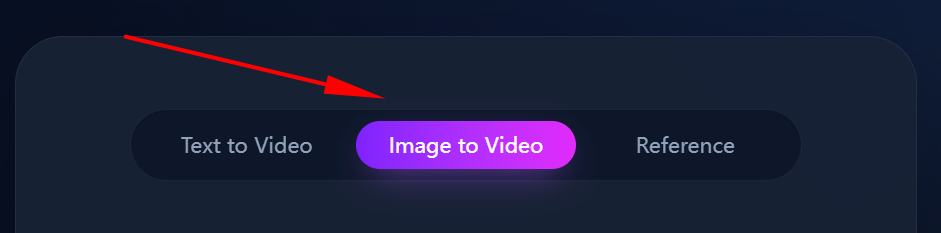
Step 2: Pick your mode. Choose text-to-video to start from words, image-to-video to start from a picture, or reference-to-video to match a specific style.
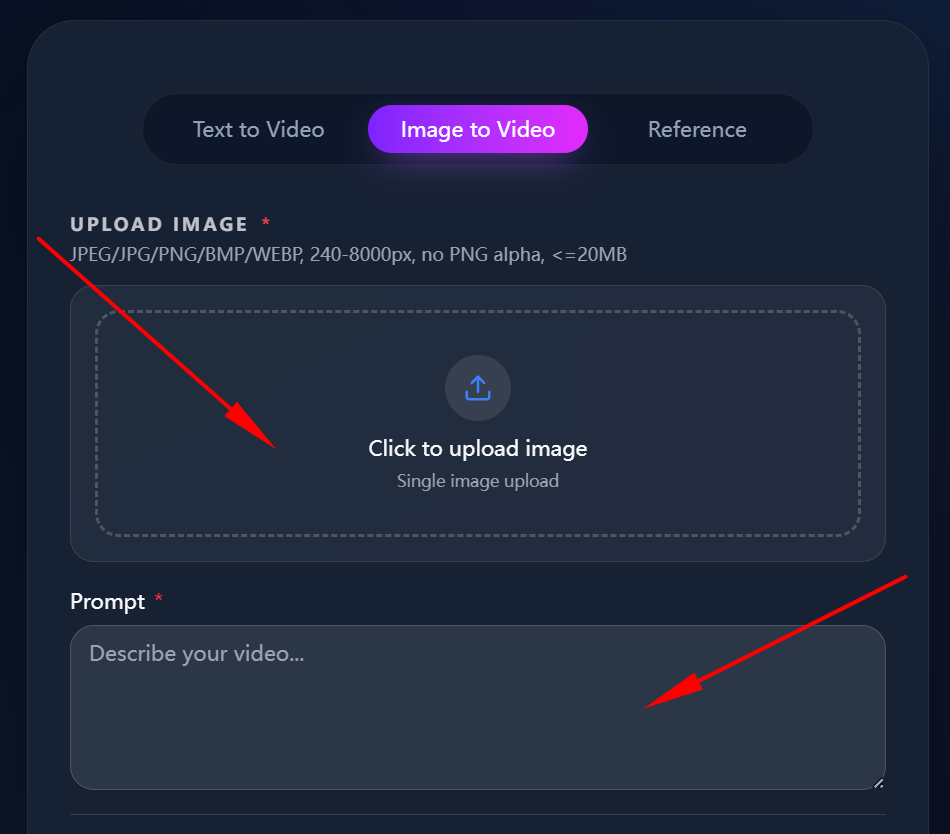
Step 3: Add your input. Type your prompt, or upload your image or reference files. If you're starting from text, describe the subject, the action, the camera move, and the mood. Specific prompts give better clips.
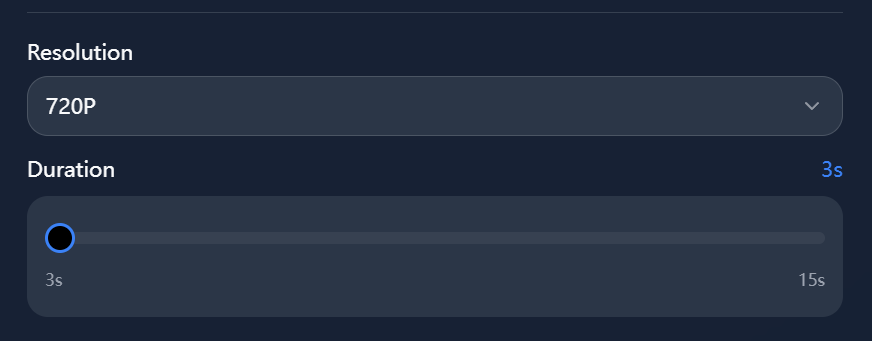
Step 4: Set your output. Choose resolution (720p for drafts, 1080p for finals) and aspect ratio (vertical, wide, or square, depending on where it's going).
Step 5: Generate. Hit the button and wait. The model builds the video and audio together, so you get a finished clip with sound, not a silent draft.
Step 6: Review and refine. Watch the result. Check the motion, the subject, and the audio sync. If something's off, tweak one thing — a camera note, a detail, a pacing change — and run it again.
The same steps work whether you're on 1.0 or 1.1, so if you've used the older version, you already know the flow. The difference is in the output quality, not the process.
Happy Horse 1.1 vs the Hottest Models
This is where it gets interesting. Happy Horse 1.1 doesn't exist in a vacuum — it's fighting for the same users as the biggest names. Here's an honest comparison against three of them, including the Happy Horse 1.1 vs Seedance 2.0 matchup people ask about most.
Feature | Happy Horse 1.1 | Seedance 2.0 | Kling | Google Veo 3 |
|---|---|---|---|---|
Maker | Alibaba | ByteDance | Kuaishou | |
Built-in audio | Yes, joint in one pass | Limited | Limited | Yes |
Max resolution | 1080p | Up to 2K | 1080p+ | 1080p+ |
Open source | Yes | No | No | No |
Lip-sync languages | 7 | Fewer | Fewer | Strong |
Best at | Motion + synced audio | Polished high-res | Realistic motion | Audio + realism |
Price model | Credits per second | Credits per video | Credits/subscription | Subscription/credits |
A few takeaways. Against Seedance 2.0, Happy Horse's pitch is motion quality and built-in audio at a lower, open-source-friendly cost. Seedance still leads on top-end resolution and polish, but it hit copyright snags that paused its rollout, which opened a door for rivals. Against Kling, Happy Horse trades blows on motion but wins on synced audio. Against Veo 3, Google has deep audio and realism, but it's closed and pricier. Happy Horse's edge across the board is the same: audio built in, open-source access, and a per-second price that's easy to plan around.
If you want a deeper side-by-side on the rival model, you can read the full Seedance 2.0 review before you pick a tool.
Strengths and Weaknesses
No model is perfect. Here's the honest rundown.
Strengths:
Audio is built in. You get synced sound in one pass, no separate dubbing step.
Motion looks directed. Especially after the 1.1 upgrade, action and camera moves feel intentional.
Seven-language lip-sync. Rare, and great for multi-market content.
Open-source access. More flexible than closed rivals for teams that want to build on it.
Simple per-second pricing. Easy to budget and predict.
Weaknesses:
Short clips only. Up to 15 seconds per generation. For longer videos you'll stitch clips together.
Resolution caps at 1080p. Some rivals push to 2K. Fine for social, less ideal for big-screen masters.
Still new. As a fresh release, it's less battle-tested than older tools, and the open-source pieces are still rolling out.
Quality varies by prompt. Like all these models, a vague prompt gives a weak clip.
Use Cases for Happy Horse 1.1
Where does this model actually fit? Here are the jobs it's built for.
Short dramas. The better multi-shot flow and audio sync make 1.1 a good fit for short story-driven content. This is a real growth area, especially in Asia.
E-commerce and product ads. Turn a product photo into a short ad with motion and sound. No studio needed.
Social media content. Vertical clips for TikTok, Reels, and Shorts. Fast hooks, cinematic B-roll, trend-style videos.
Brand and marketing campaigns. Launch trailers, teasers, and ad creatives that look directed rather than auto-generated.
Multi-market content. The seven-language lip-sync makes it easy to make the same clip feel native in different regions.
Concept and pitch videos. Show a client or team a visual draft in minutes instead of describing it in words.
Who Is Happy Horse 1.1 For?
Let's match the model to the right people.
Great fit for: social media creators who post often, small marketing teams without a video budget, e-commerce sellers who need product clips, short-drama makers, and developers who want an open-source model to build on. If you make a high volume of short videos and care about sound, this is your tool.
Less ideal for: anyone needing long, single-take videos, or broadcast masters above 1080p. For those, a higher-res closed model may suit you better. But for fast, sound-rich short content, Happy Horse 1.1 is hard to beat on value.
Real-World Experience
So how does it actually feel to use? Based on the model's design and early feedback, here's the honest picture.
The first thing you notice is the audio. Getting a clip back with sound already synced saves a real step — no jumping into an editor to add a soundtrack. For social content, that alone speeds things up a lot.
The motion upgrade in 1.1 is real, too. Fast scenes that used to stutter now hold together. Early testers noted that subjects stay calmer and camera moves feel steadier on short clips, which matches what the upgrade promised.
The honest catch is the clip length. At up to 15 seconds, you're working in fairly short bursts. For a longer piece you'll generate several clips and stitch them. That's normal for this class of tool, but worth knowing going in. The smart workflow is the same as any credit-based model: draft cheap at 720p, lock your best ideas, then render finals at 1080p.
For a balanced Happy Horse 1.1 review in one line: it's a fast, audio-first video generator that punches above its price, best for short-form work, with the usual short-clip limits of the category.
Frequently Asked Questions
Is Happy Horse 1.1 free to use? You can try Happy Horse 1.1 free on JXP — new users get free credits to test it. After that, you buy credits and pay per second of video you make.
What's the difference between Happy Horse 1.1 and 1.0? Version 1.1 has smoother motion, better camera and multi-shot handling, stronger audio sync, and steadier subjects. The core model is the same, but 1.1 fixes the rough spots that showed up in real use.
How much does Happy Horse 1.1 cost? On JXP it's 3 credits per second at 720p and 4 credits per second at 1080p. So a 5-second 720p clip is about 15 credits. You pay by the second, based on length and resolution.
How is Happy Horse 1.1 different from Seedance 2.0? Happy Horse builds audio and video together in one pass and is open-source, with simple per-second pricing. Seedance 2.0 leads on top-end resolution and polish but is closed and had copyright issues that paused its rollout.
Can Happy Horse 1.1 turn an image into a video? Yes. Pick image-to-video mode, upload your still, and the model animates it while keeping your subject consistent. It's good for product shots and character clips.
What languages does the lip-sync support? Seven: English, Mandarin, Cantonese, Japanese, Korean, German, and French. That makes it strong for content aimed at more than one market.
How long are the videos? About 5 to 8 seconds per clip. For longer videos, generate several clips and edit them together.
Final Thoughts
Happy Horse 1.1 is a clear step up from 1.0... but for fast, sound-rich short videos, it's one of the best values out there. Grab your free credits and make your first clip — the quickest way to judge a model is to try it.