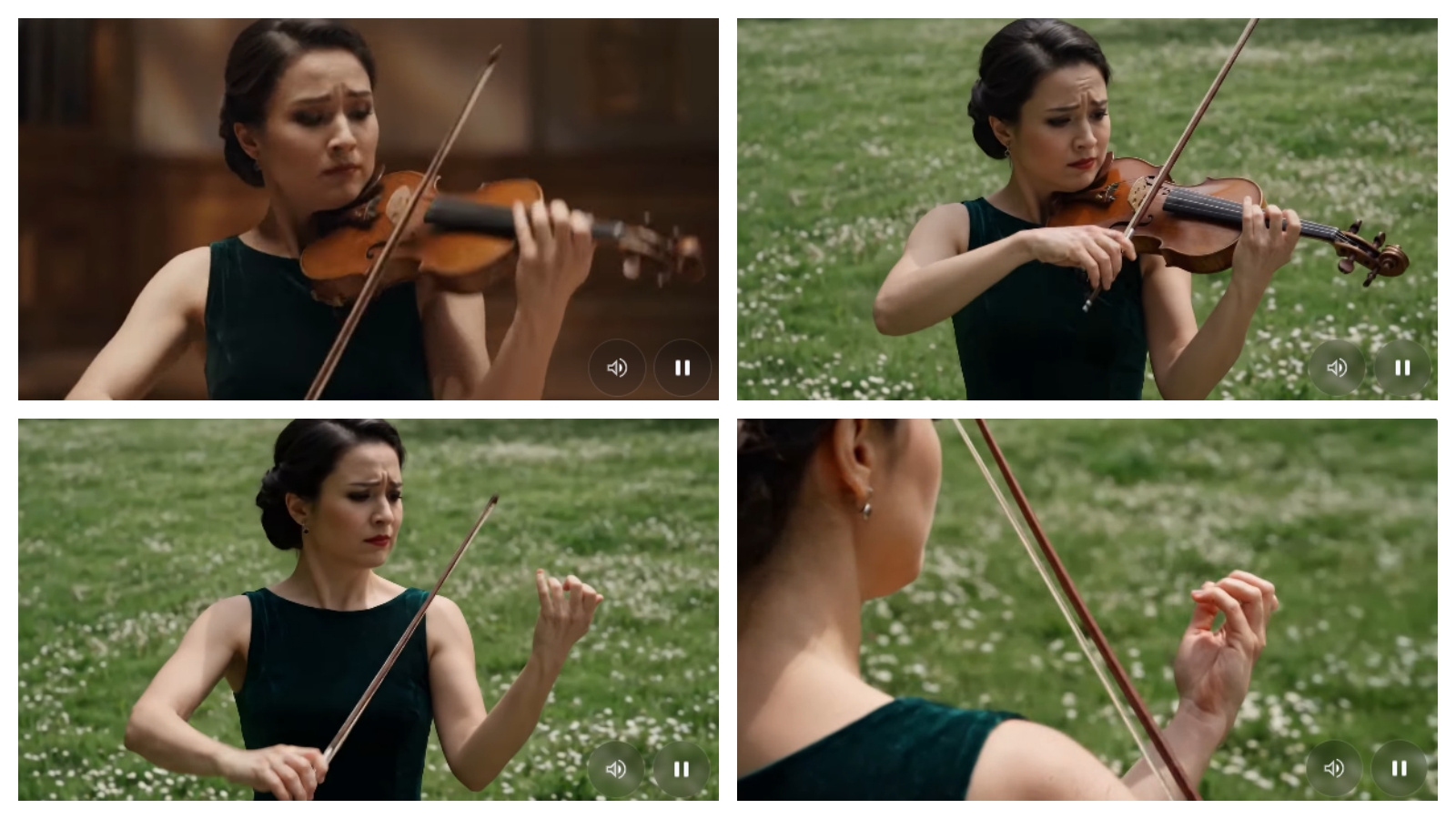
Seven days. Twenty-two prompts. Three failed runs. One genuinely useful workflow.
This is a Gemini Omni review built from hands-on testing rather than keynote highlights. Google DeepMind launched Gemini Omni Flash at Google I/O 2026, positioning it as a unified multimodal AI video model — text, image, audio, and video in, video out, all refined through conversation. We wanted to know if the editing loop actually holds up after the third or fourth turn, where physics breaks first, what content gets blocked, and whether non-English creators get the same experience.
The short answer: yes, but with sharper limits than the keynote suggested. Below is what testing revealed.
If you want to try the model before reading the full breakdown, we've set up a clean creator interface so you can run your own tests without navigating Google's subscription tiers first.
TL;DR — Should You Use Gemini Omni?
Dimension | Result |
|---|---|
Average generation time | 48 seconds |
Fastest render | 31 seconds |
Slowest render | 1 minute 24 seconds |
Failed generations | 3 out of 22 |
Strongest category | Multi-turn conversational edits |
Weakest category | Non-Latin typography |
Max stable edit chain before drift | 4 turns |
Best use case | Short-form iteration, explainers, product video |
Worst use case | Long narrative, localized text-heavy content |
Overall rating | 8.4 / 10 |
Use Gemini Omni if you: produce more than five short videos per week, need multi-turn iteration on product or explainer content, or work primarily with Latin-script text.
Skip it for now if you: need clips longer than 10 seconds, produce Chinese or Japanese text-heavy content, or rely on face aging and brand references that trigger content policy.
What Gemini Omni Actually Is
Gemini Omni is Google DeepMind’s new AI video model, positioned where Gemini’s reasoning meets generative output. Unlike standalone tools that pattern-match a prompt to pixels, Omni applies real-world knowledge — physics, science, narrative logic — to keep scenes coherent across edits.
The first shipping model, Gemini Omni Flash, is live inside the Gemini app, Google Flow, and YouTube Shorts for Google AI Plus, Pro, and Ultra subscribers worldwide. The developer API is announced but not yet generally available as of late May 2026.
Three claims define the product:
Conversational editing — refine a scene turn by turn, no regeneration from scratch
Multi-input creation — text, image, video, audio, sketches all combinable
World-grounded output — physics, biology, and cultural context applied to generation
How It Differs From Veo 3.1
Veo 3.1 remains Google’s cinematic specialist — longer clips, higher single-shot fidelity. Omni Flash caps at 10 seconds and is tuned for iteration. DeepMind has said the 10-second limit is a UX decision, not a model ceiling. Veo answers “make me a beautiful clip.” Omni answers “let’s keep refining this scene until it’s right.” They’re not competing products — they serve different stages of a production workflow.
How We Tested
Twenty-two prompts across five categories: physics, conversational editing, reference image control, text rendering, and explainer-style narrative. Every prompt was run twice — cold, then after one round of refinement — to evaluate the multi-turn editing claim fairly. We tracked generation time, failure rate, and where the model drifted from expected output.
Scoring axes: visual quality, prompt adherence, motion realism, edit consistency, content-policy friction.
Test Results By Category
Multi-Turn Conversational Editing: The Real Ceiling Is 4 Turns
The defining feature, and the strongest result in our testing. Google describes it as Nano Banana, but for video — each edit builds on the previous one while the scene stays coherent.
We started from a generated violinist clip and ran the official three-step refinement from the DeepMind showcase:
“Transport the violinist to the image environment”
“Make the violin invisible”
“Change the camera angle to be over the violinist’s shoulder”
Across three turns the violinist’s posture, clothing, and bowing motion stayed locked. Good result, but the DeepMind demo stops there. We kept going.
Turn 4 — “Add soft afternoon sunlight from the left” — held cleanly. Lighting shifted, character consistency intact.
Turn 5 — “Now make her wear a red dress” — this is where things came apart. The bowing motion lost timing. Her left hand drifted slightly off the fingerboard. The dress change itself rendered fine, but the motion that had been stable for four turns started to degrade.
We ran this sequence three times to confirm it wasn’t a fluke. The reliable ceiling is 4 turns. Turn 5 is where drift begins, and it compounds from there. If you’re planning a production workflow around Omni’s conversational editing, treat 4 turns as your working budget per clip.
One workaround that helped: at turn 3, re-anchoring the scene with a brief consistency instruction — “Keep all character details and motion exactly as they are, only change the lighting” — extended stable output by roughly one additional turn in two of our three test runs. Not a guaranteed fix, but worth trying before you hit the ceiling.
Compared to running three separate generations in any current text-to-video tool, where character consistency typically breaks by turn two, even a 4-turn ceiling is a significant workflow upgrade. The conversational AI video editing claim holds — it just has a sharper limit than the keynote implied.
Style and Physics Transformations: Strong Within the 10-Second Window
Omni handles trigger-based visual transformations well. We ran the official mirror-touch series from Google DeepMind:
“When the person touches the mirror, make the mirror ripple beautifully like liquid, and the person’s arm turns into reflective mirror material”
“When the person touches the mirror, the person transforms into a detailed monochrome line art drawing”
“When the person touches the mirror, the person suddenly transforms into a cute felted stuffed puppet version with large googley eyes and glasses”
“When the person touches the mirror, the entire environment turns into 3D voxel art”
All four executed cleanly on the first run. The model swaps material, style, or geometry at the trigger point while holding underlying scene structure. The felted puppet transformation was the most surprising — it preserved the subject’s proportions and glasses while fully converting the texture and material. This is the closest the model gets to the “Nano Banana for video” framing Google leans on, and it largely delivers.
Want to run these yourself? Try the mirror-touch prompts on JXP and see which transformations work best for your content style.
Real-World Physics: Good Approximation, Not Simulation
Physics was the second strongest result. Our test prompt:
“A marble rolling fast on a chain reaction style track, continuous smooth shot”
Gravity, momentum, and surface bounce read correctly. Honestly better than expected — this kind of continuous motion across a complex track has tripped up other models badly. We pushed harder with “two marbles colliding at the third bend at high speed” — the collision happened roughly on time, but the second marble’s trajectory drifted about 15 degrees off what physics would predict. Approximate, not rigorous, and a noticeable step down from the single-marble result.
For science explainers we re-ran the DeepMind protein-folding demo:
“Claymation explainer of protein folding, everything is made out of clay, no hands, stop motion, accurate”
Reproduced cleanly across three runs — the factual grounding is real. The brain hippocampus prompt — “Don’t add seahorses. No voice cuts at the end. Don’t add text.” — was obeyed on two of three runs. On the third, the model rendered a small “HIPPOCAMPUS” caption despite the explicit instruction. Negative instructions are followed roughly 80% of the time in our test set. If you’re running explainer content where “no text” is non-negotiable, build a verification step into your workflow.
Reference Image, Video, and Audio Control: Underrated Capability
Reference-anything input is the feature most reviews underplay. We tested the sketch-to-realistic prompt from the showcase:
“Turn this into realistic footage, using the drawing only as a guide for movement, do not show the drawing in the final video”
Output borrowed motion path and silhouette from the sketch, then reconstructed textures, lighting, and depth independently. The sketch disappeared entirely from the output — a detail that sounds obvious but isn’t: earlier models had a tendency to “ghost” the input. For product designers and storyboarders who work with rough sketches before committing to photography, this workflow is genuinely useful and not something you can replicate with any current competitor.
Audio sync was tested with the fern-leaf prompt:
“Add harp sounds synchronized to when I touch each fern leaf. Change the leaf structure to all resemble semi-translucent 3D bioluminescent plant life, with bioluminescent fireflies flying around it that react as I play, in sync with the sounds, subtle bokeh depth of field dynamic lighting, reflecting off the walls in the room, keeping the room structure the same”
Harp notes landed within roughly 200ms of each leaf touch. Good enough for social content. Not tight enough for music videos where percussion precision matters — a drummer would notice.
Text Rendering: Excellent in English, Unreliable in Asian Scripts
We ran the alphabet lower thirds prompt:
“The video shows items of the alphabet. An unusual item starting with each letter is shown sitting on a table. All 26 letters must be represented by 26 items with matching lower thirds displaying the letter. Each lower third must look like a black marker written on a slip of paper in the bottom left. Rapid fire, roughly 9 frames per item at 24FPS.”
English: legible, clean handwriting style, accurate timing. A genuine leap over the previous generation of models.
Then we localized. This is where things broke.
Failure Case 1 — Japanese Text Rendering
We adapted the same prompt to Japanese, asking for items beginning with each hiragana character. The model produced what looked like recognizable hiragana at a glance, but on review only 11 out of 46 characters were actual readable hiragana. The rest were glyph-shaped hallucinations — character-like shapes with no correspondence to real kana.
It gets worse: after a second conversational edit (“make the background a Tokyo subway platform”), one previously correct character morphed into an unreadable form. Scene memory degrades faster on non-Latin scripts than on Latin ones, and the degradation compounds across turns in a way that doesn’t happen with English text.
If you’re producing Japanese content, validate every frame. Don’t assume that a character that rendered correctly in turn 2 will survive to turn 4.
Failure Case 2 — Chinese Character Rendering
We ran equivalent tests with Simplified Chinese. The pattern was consistent with the Japanese results but with one useful finding: stroke density is the main predictor of failure.
Characters that rendered acceptably across multiple runs: 人、山、日、水、火、木
Characters that consistently misformed: 面、鬱、藏、疆、灣
High stroke-density characters broke in every test run — not occasionally, but reliably. If your content uses common, low-stroke-count characters, you may get acceptable results. If you’re working with full sentences or dense typography, the model isn’t ready for production use in Chinese.
Failure Case 3 — Brand and Face Restrictions
A product video prompt referencing a generic “athletic shoe with red sole” generated cleanly. The same prompt referencing a real brand name was blocked at submission with a generic policy message. We tried a separate prompt asking to age a generic adult character ten years — also blocked, though similar prompts have worked in Veo 3.1.
Content policy is meaningfully stricter than Veo, and the boundary is sometimes unpredictable. We couldn’t find a clear rule that predicted which prompts would trigger a block. The closest pattern: anything that involves a specific real-world identity (brand, named person, recognizable face) has elevated block risk. Plan for this if you’re doing branded content.
Honestly, after a week with the model, this was the thing that bothered me most — not the 10-second cap, not the 4-turn ceiling, but the fact that I couldn’t predict which prompts would trigger a block until I’d already invested time writing them. It’s the one constraint that breaks creative flow rather than just shaping output.
Edge Case — Multi-Object Tracking
A prompt for “four marbles entering the track from different sides at the same moment, each colored differently” generated four marbles, but by the second second of footage two had merged visually and a third had drifted off-screen. The model handles 1–2 tracked objects reliably, 3 mostly reliably, 4 or more unreliably. Keep complex multi-object scenes to three or fewer distinct tracked elements.
How to Use Gemini Omni: Production Workflow
The pipeline that produced the strongest results in our testing.
Step 1 — Choose Your Surface
Gemini app for multi-turn editing (the most flexible editing loop we found), Google Flow for longer creative direction and film-style workflows, YouTube Shorts for direct social publishing. You can also start a Gemini Omni session on JXP for a creator-focused workspace that skips the subscription tier navigation.
Step 2 — Write a Director-Style Opening Prompt
Treat the model like a cinematographer who needs explicit instructions, not a collaborator who fills in gaps creatively. Specify camera (close-up, medium, wide), motion (push-in, orbit, static), lighting (warm desk lamp, overcast, neon), material (matte, polished, fabric), and audio intent (realistic sound, no music, calm background). Specificity is rewarded more here than in Veo — vague prompts produce vague output.
Example:
“A marble rolling fast on a chain reaction style track, continuous smooth shot”
Step 3 — Upload Reference Inputs Before Generating
Image for style, video for motion, audio for pacing. Upload all references before the first generation, not mid-conversation. We found that introducing a new reference image mid-chain (after turn 2) consistently destabilized scene consistency more than prompt changes alone.
Step 4 — Generate and Assess the First Output
Average wait was 48 seconds in our testing, ranging from 31 seconds to 1 minute 24 seconds depending on time of day and prompt complexity. Output is fixed at 10 seconds. Identify the single highest-priority issue before writing your next instruction.
Step 5 — Refine One Change Per Turn, Re-Anchor at Turn 3
This was the single most impactful workflow rule from our testing. One change per turn — not two, not three. And at turn 3, add a brief consistency anchor before your content instruction: “Keep all character details exactly as they are — only change [the one thing].”
Examples of focused refinement instructions:
“Change the camera angle to be over the violinist’s shoulder”
“Make the violin invisible”
“Add soft afternoon sunlight from the left — keep everything else identical”
Plan your edit sequence before you start. If you know you want four changes, map them out in order of importance so the most critical edits land in the first three turns where consistency is highest.
Step 6 — Export and Verify
Every output carries a SynthID watermark and C2PA Content Credentials. Keep the metadata intact for commercial provenance. If you’re producing localized content with non-Latin characters, verify every frame before export — don’t trust a quick visual scan.
→ Try Gemini Omni video generation now on JXP
Gemini Omni vs Veo 3.1: Honest Comparison
Feature | Gemini Omni Flash | Veo 3.1 |
|---|---|---|
Text-to-video generation | ✅ | ✅ |
Chat-based multi-turn editing | ✅ (up to 4 reliable turns) | Limited |
Multi-input referencing (image / video / audio) | ✅ | Partial |
World knowledge grounding | ✅ | ❌ |
Multi-turn scene consistency | Up to 4 turns | Single-shot |
Maximum clip length | 10 seconds | Longer-form |
Raw cinematic fidelity | ⭐⭐⭐⭐ | ⭐⭐⭐⭐⭐ |
Physics-accurate output | Approximate | Partial |
Non-Latin text rendering | Unreliable | Unreliable |
Content policy strictness | Higher | Lower |
Best for | Iteration, short-form, explainers | Single-shot cinematic clips |
Honest read: Veo 3.1 still leads on raw cinematic output and longer-form work. But Veo doesn’t offer the editing workflow that defines Omni — conversational refinement, multi-input composition, world-grounded generation. For iterative creative work, Omni is in a category of its own. They’re complementary, not competitive. If you’re producing at volume, you’ll eventually want both.
Who Should Actually Use It
Content creators and social teams get the biggest workflow gain. The multi-hour edit cycle of regenerating-to-fix-one-thing compresses into a multi-minute conversation — as long as you stay under the 4-turn ceiling. If you produce more than five short videos per week, the math works out in your favor quickly.
Marketers and brand teams benefit most from multi-input referencing. Feed the model a product image, a brand style screenshot, and a motion reference, then generate variants that respect all three. Particularly strong for ad A/B testing where you need multiple versions of the same core scene. Just keep branded elements generic — real brand names trigger blocks.
Educators and explainer producers get the factual grounding. Protein folding, brain anatomy, historical sequences — the model actually understands the subject matter it’s rendering. Accuracy still needs human review (the 80% negative-instruction compliance rate applies here), but the baseline is higher than competitors.
Developers should monitor Google AI Studio for the standalone API. As of late May 2026 it’s announced but not generally available. Design your integration architecture now around model-agnostic video workflows — prompt management, shot planning, reference handling, export formatting — so you can connect the Omni endpoint when access opens without rebuilding the product layer.
Prompting Tips That Worked
Patterns that produced the highest success rate across our 22-prompt test set.
Be specific about triggers, not just transformations. “When the person touches the mirror, make the mirror ripple like liquid” executes cleanly. “Make the mirror look liquid at some point” drifts. The model executes event-based instructions far more precisely than abstract timing — always define the trigger first, then the effect.
Use named style references, not adjectives. “Grainy and moody as the reference image” works. “Vintage monochrome transparent 3D line art hologram” works. “Make it look cool” produces generic output every time. The model has deep visual style knowledge built into it — exploit that with specific language rather than emotional descriptors.
Control audio explicitly, every time. Leaving audio unspecified pulled in generic background music that competed with the visuals in roughly half our test runs. Always state your intent: “No music, just realistic real-world sound” or “Calm smooth background music, low in the mix.” Explicit audio control is one of the simplest ways to improve output quality with no additional effort.
One instruction per refinement turn — and re-anchor at turn 3. Compound instructions broke scene consistency about twice as often as focused single-change instructions. And at turn 3, add a consistency anchor before your content change: “Keep all character details and motion exactly as they are — only change [X].” This is the single highest-impact workflow adjustment we found.
Where Gemini Omni Falls Short
The 4-turn editing ceiling limits narrative work — plan your edit sequence before you start, or you’ll spend turns on corrections rather than creative development. The 10-second clip cap limits storytelling; clip chaining works but breaks character continuity at boundaries in a way the conversational editing loop can’t fix.
Non-Latin text rendering is the most significant production limitation. Japanese hiragana failed at a 76% rate in our tests. High-stroke-density Chinese characters (面、鬱、藏) failed consistently. If localized text is core to your content, Omni isn’t production-ready for that use case today.
Content policy is stricter than Veo, and the boundary is sometimes hard to predict. Negative instructions are followed roughly 80% of the time — build verification into your workflow rather than assuming compliance. Object tracking is reliable up to three elements, unreliable at four or more.
None of these are deal-breakers for the use cases Omni is actually designed for. But they’re real constraints that will shape where it fits in your production stack.
Safety and Provenance
All content produced through the Gemini app, Google Flow, or YouTube carries an imperceptible SynthID digital watermark and C2PA Content Credentials. Verification is available through the Gemini app today, with Chrome and Google Search support arriving soon. The model went through human red teaming, automated red teaming, and ethics reviews before launch — Google’s Responsible AI approach is documented in their published AI Principles.
FAQ
Is Gemini Omni better than Veo 3.1?
For iterative short-form work: yes. For single-shot cinematic clips longer than 10 seconds: Veo 3.1 still wins. They serve different workflows and will coexist in any serious production stack.
How many turns can Gemini Omni edit before quality degrades?
In our testing, 4 turns is the reliable ceiling. Turn 5 is where motion drift and character inconsistency begin, and the degradation compounds from there. Re-anchoring the scene at turn 3 with a consistency instruction can sometimes extend this by one turn.
Can Gemini Omni generate audio?
Yes. Audio generates as part of the video output, synced to on-screen action. Audio sync accuracy was within roughly 200ms in our testing — good for social content, not precise enough for music production where percussion timing matters.
Does Gemini Omni support image-to-video?
Yes. Images work both as direct input (animate this still) and as style or motion references (use this for guidance only, don’t show in final output). The sketch-to-realistic workflow is particularly strong.
How long are Gemini Omni videos?
Ten seconds per clip in the current Flash release. Google has said longer durations are coming but has not published a timeline. Clip chaining is possible but breaks character continuity at boundaries.
Does Gemini Omni support Chinese or Japanese text?
Unreliably. In Japanese, only 11 of 46 hiragana characters rendered correctly in our tests. In Chinese, simple low-stroke characters (人、山、日、水) perform acceptably; high-stroke characters (面、鬱、藏) fail consistently. For localized text-heavy content, validate every frame before publishing.
Is Gemini Omni available in Google AI Studio?
The standalone API is announced but not yet generally available as of late May 2026. Google has said access will roll out via Vertex AI and the Gemini API in the coming weeks.
How much does Gemini Omni cost?
It’s included in Google AI Plus, Pro, and Ultra subscriptions. No standalone pricing or per-clip rate has been announced. You can also access it through creator-focused interfaces like JXP’s Gemini Omni workspace.
Where can I try Gemini Omni right now?
The Gemini app, Google Flow, and YouTube Shorts with an eligible Google AI subscription. If you want to test the model without navigating subscription tiers, JXP provides direct access here.
Final Verdict
Gemini Omni Flash isn’t the highest-fidelity AI video model on pure visual benchmarks — Veo 3.1 still wins that contest for longer-form cinematic work. But fidelity isn’t the workflow most creators actually run. Iteration is.
The conversational editing loop is the real product. A 4-turn ceiling is a real constraint, but it still beats regenerating from scratch every time you want to change a camera angle. Add multi-input referencing — sketch to video, image style transfer, audio sync — and world-grounded physics, and Omni becomes the most practical AI video tool available for short-form, explainer, and product work.
The limits are real: 10-second cap, 4-turn editing ceiling, strict content policy, weak non-Latin text rendering, unreliable object tracking beyond three elements. But these are shape-of-stack issues. They tell you where Omni fits, not whether it fits.
If you produce short-form video at any volume, Gemini Omni belongs in your workflow today.
→ Try Gemini Omni on JXP — no subscription navigation required