This Seedream 5.0 Pro review breaks down what ByteDance’s new professional-tier image model does, how it compares to Seedream 5.0 Lite and other leading generators, and whether it earns a spot in a real creative workflow. Seedream 5.0 Pro launched on July 8, 2026, positioned as the top tier of the Seedream 5.0 family, sitting above Seedream 5.0 and Seedream 5.0 Lite. Where Lite is built for fast, everyday generation, Pro is aimed at commercial work: product photography, ad creatives, branding, and any project where text, layout, and editability matter.
The short version of this Seedream 5.0 Pro review: Seedream 5.0 Pro’s headline upgrades are not about prettier pictures, they are about control. Region-precise editing, layer separation, native multilingual text, and high-density infographic generation are the four pillars ByteDance built this release around, and each one solves a real production problem rather than a demo-reel flex.
Want to test grounded editing, layer separation, and multilingual text rendering directly?
Try Seedream 5.0 Pro on JXP and compare your own prompts side by side.
What Is Seedream 5.0 Pro?
Seedream 5.0 Pro is ByteDance’s multimodal image generation and editing model, built on a unified diffusion transformer trained jointly for generation and editing tasks. Instead of shipping generation and editing as separate tools, one architecture handles text-to-image, image-to-image, and multi-image editing in a single pipeline, which is part of why this Seedream 5.0 Pro review keeps returning to “control” as the defining word for the release.
The model is available on day one through two paths:
Consumer access: live inside Dreamina, ByteDance’s consumer creative app, with free daily credits for new accounts.
Developer access: through Volcano Engine for the China market, and through BytePlus ModelArk internationally, both exposing an image-generation API.
Seedream 5.0 Pro also plugs into ByteDance’s wider creative stack. It is described as a still-frame generator for Seedance 2.5, the company’s video model — Pro produces stable, well-composed stills that Seedance 2.5 can then animate, which matters if your workflow moves from image to video rather than stopping at a single frame.
Key Features in This Seedream 5.0 Pro Review
Grounded, Region-Precise Editing
The single biggest workflow change in Seedream 5.0 Pro is grounding: Seedream 5.0 Pro understands where each element sits in the frame and what it means, not just what the whole image looks like as a composition. That lets you point, box, or sketch a specific target — a label, a prop, a color, a piece of on-image text — and change only that element while everything else in the frame stays untouched.
Example prompt to try:
Change only the label on the center bottle to read "PASIÓN" in bold red serif type. Keep the lighting, shadows, and background completely unchanged.
Beyond point-and-box targeting, Seedream 5.0 Pro also handles grid-style anchor moves — nudging one specific object to a new position relative to a grid or layout, such as shifting a single item one cell to the left, while every other element in the frame holds still. This kind of anchor-based repositioning is a different task from a full re-roll, and it is where the model’s grounding shows up most clearly.
This kind of targeted instruction is where Seedream 5.0 Pro separates itself from a typical text-to-image model: it is built to preserve everything you did not ask it to change, instead of re-rolling the whole scene for a one-line edit.
Multi-Layer Separation
Seedream 5.0 Pro can split a finished image into independent, editable layers on request — a line of text, a character, an object, or the full background — each one exportable with transparency. That turns a single generated image into something closer to a design file: you can drag, scale, or swap a layer without touching the rest of the composition.
Example prompt to try:
Separate this poster into individual layers: the headline text, the central subject, and the background. Export each layer with a transparent background.
For teams that iterate on the same creative across formats and languages, this is arguably the most practical upgrade in this Seedream 5.0 Pro review, since it removes the “regenerate and hope it matches” step that plagues most AI image tools.
Native Multilingual Text Rendering
Text-in-image has always been the weak point of diffusion models, and Seedream 5.0 Pro pushes hard on this front. It natively supports prompting and text generation in roughly fourteen languages, including English, Chinese, Japanese, Korean, French, German, Russian, Spanish, and Arabic — with correct letterforms, accurate accent marks, and proper right-to-left handling for Arabic script.
Example prompt to try:
Design a vertical 4:5 travel poster for Kyoto. Overlay the title in Japanese at the top and an English subtitle at the bottom, both in clean, legible typography.
For any brand producing localized creative at scale, this single capability can replace a chunk of manual typesetting work that used to happen after the AI-generated image, not inside it.
High-Density Infographics and Layout Reasoning
Seedream 5.0 Pro is tuned to handle information-dense visuals in a single pass: data charts, flowcharts, comparison tables, and diagrams with small text that stays legible rather than garbled. The model reasons through layout, hierarchy, and content density before rendering, which is a different job than illustrating a single subject.
Example prompt to try:
Create a 16:9 infographic comparing three subscription tiers. Include a comparison table, a small bar chart for pricing, and icon-based feature callouts. Use a clean, modern layout with generous white space.
Native Resolution and Deep Reasoning
Seedream 5.0 Pro generates at native 2K resolution with the option to upscale to 4K for print and large-format use, backed by a high-compression VAE that keeps inference practical at that resolution. It also runs a reasoning pass before rendering — parsing multi-step, multi-constraint prompts and resolving spatial, physical, and temporal logic ahead of time — plus built-in web search that can pull in current references for prompts about real products, brands, or events.
Multi-Image Fusion
Seedream 5.0 Pro can also combine several reference images into a single coherent composition in one pass — up to 10 references at a time — which is useful for turning a set of product cutouts or mood-board pieces into one finished scene rather than compositing them manually afterward.
Example prompt to try:
Cut out the objects from these reference photos and arrange them into a single realistic still-life composition. Keep the perspective, lighting, and spatial relationships consistent, and preserve each material's texture faithfully.
Want to see grounded editing and layer separation work on your own image?
Try Seedream 5.0 Pro’s Editing Tools on JXP →
Seedream 5.0 Pro Specs at a Glance
Before going deeper into this Seedream 5.0 Pro review, it helps to see the raw specifications in one place:
Spec | Detail |
|---|---|
Developer | ByteDance |
Release date | July 8, 2026 |
Architecture | Unified diffusion transformer (generation + editing) |
Max resolution | 2K native, upscalable to 4K |
Text languages supported | ~14, including Arabic, English, Japanese, Korean, Spanish, French |
Max reference images | Up to 10 in a single multi-image edit |
Editing style | Grounded, region-precise (point / box / sketch) |
Layer export | Yes, transparent PNG layers |
Web search | Built in |
Consumer access | Dreamina |
API access (China) | Volcano Engine, model ID doubao-seedream-5-0-pro-260628 |
API access (international) | BytePlus ModelArk, model ID dola-seedream-5-0-pro-260628 |
Companion video model | Seedance 2.5 |
Real-World Use Cases for Seedream 5.0 Pro
A feature list only matters if it maps to actual work. Here is where this Seedream 5.0 Pro review sees Seedream 5.0 Pro earning its “Pro” label in practice.
E-Commerce Catalog and Packaging Shots
Product teams frequently need the same shot in five colorways, or the same packaging photographed with three different label variants. Seedream 5.0 Pro’s grounded editing means you can lock the lighting, angle, and background of an approved hero shot and swap only the color or label, instead of regenerating the whole scene and hoping the lighting still matches.
Multilingual Marketing Campaigns
Because Seedream 5.0 Pro natively renders accurate text in roughly fourteen languages, a single creative brief can produce localized versions for multiple markets without a separate typesetting or translation-overlay step. This is one of the more underrated wins in this Seedream 5.0 Pro review, since typesetting is usually where AI-generated creative falls apart.
Editorial Infographics and Data Visuals
Newsrooms, educational publishers, and internal comms teams can use Seedream 5.0 Pro to generate charts, timelines, and diagrams with legible small text in a single pass, cutting out a design-software round trip for simple explainer graphics.
Pre-Production Stills for Video
Because Seedream 5.0 Pro is built to hand off clean, stable stills to Seedance 2.5, video teams can use it to lock down composition, lighting, and character consistency before committing to a video generation run — a meaningfully cheaper way to iterate than regenerating full video clips.
Prompting Tips for Better Seedream 5.0 Pro Results
Getting the most out of Seedream 5.0 Pro comes down to a few habits, based on how Seedream 5.0 Pro’s grounding and layout reasoning actually work:
Name the subject, light, and layout, not just an adjective. “Beautiful poster” tells Seedream 5.0 Pro nothing useful; describing the subject, the light source, and the arrangement gives it something to reason through.
Quote any on-image text exactly. Seedream 5.0 Pro renders text with high fidelity, but only if the exact words are marked clearly in the prompt rather than implied.
Edit in place instead of re-rolling. If only one element is wrong, describe that element and its location rather than regenerating the entire image from scratch.
Ask for layers up front if you plan to edit later. Requesting a layered export at generation time saves a separate layer-splitting step down the line.
Specify the exact aspect ratio and resolution you need, especially for print or large-format use, since Seedream 5.0 Pro’s native 4K output is most useful when the canvas size is defined from the start.
Seedream 5.0 Pro Prompts: 8 Copy-Ready Examples
Beyond the individual examples above, here is a consolidated set of Seedream 5.0 Pro prompts covering the editing, localization, layout, and video-prep use cases most teams actually need. Copy, adjust the specifics, and run.
1. Product label edit prompt
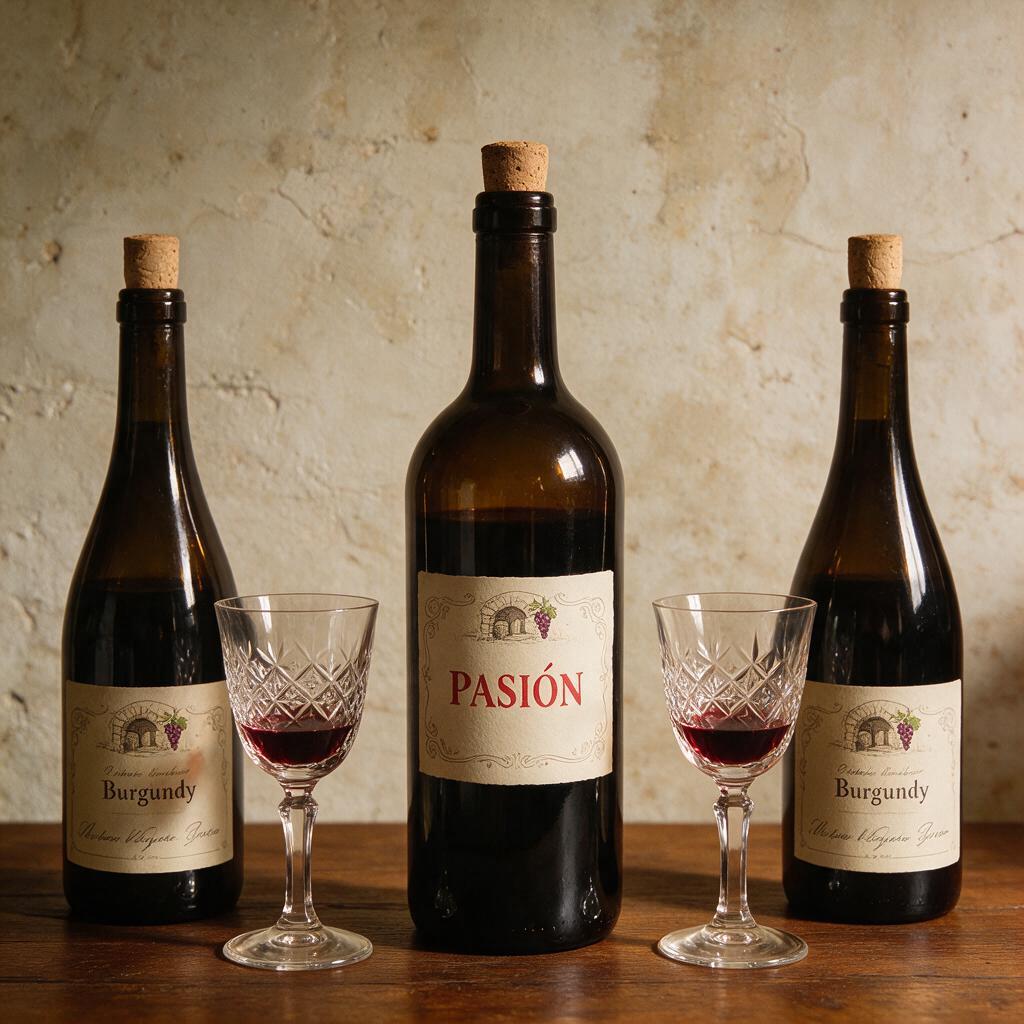
Change only the label on the center bottle to read "PASIÓN" in bold red serif type. Keep the lighting, shadows, and background completely unchanged.
2. E-commerce hero image prompt

Generate a clean e-commerce hero shot of a ceramic mug on a white seamless background, soft studio lighting from the upper left, subtle shadow beneath the product, centered composition, 1:1 aspect ratio.
3. Multilingual poster prompt
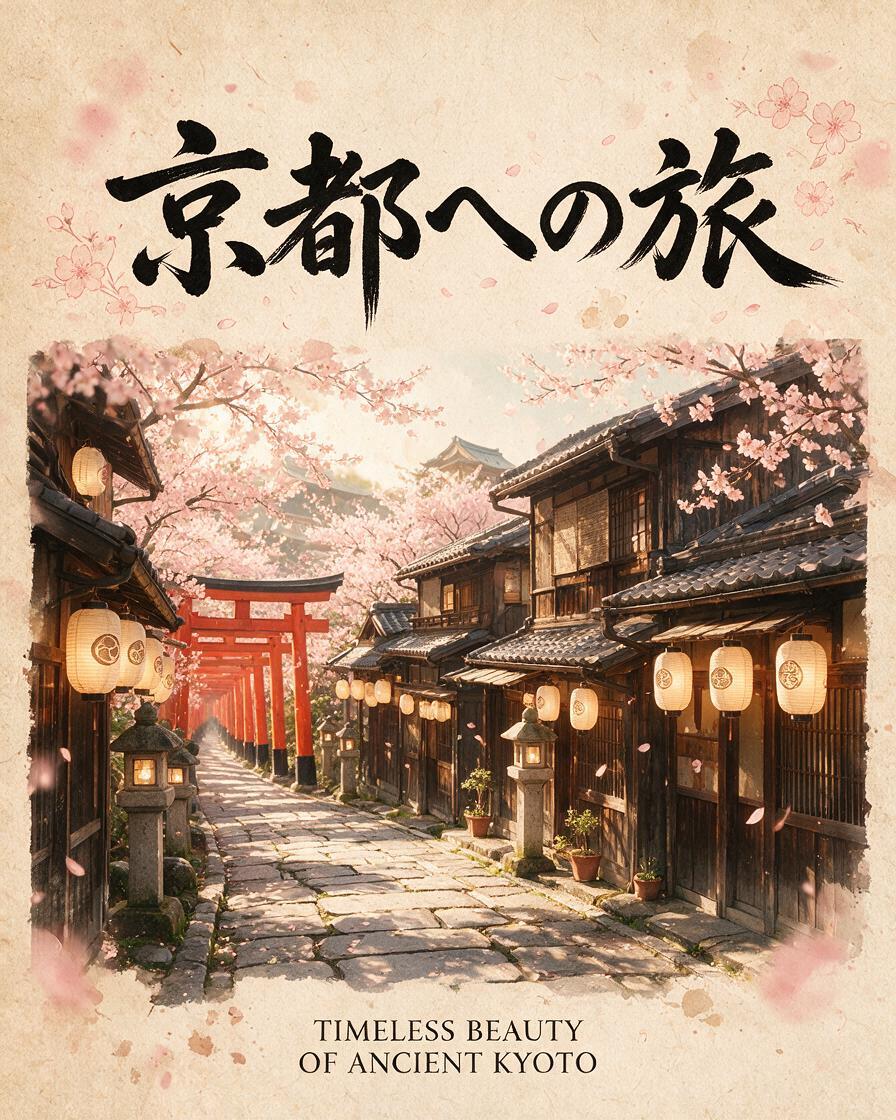
Design a vertical 4:5 travel poster for Kyoto. Overlay the title in Japanese at the top and an English subtitle at the bottom, both in clean, legible typography.
4. Layer separation prompt
Separate this poster into individual layers: the headline text, the central subject, and the background. Export each layer with a transparent background.
5. Infographic prompt
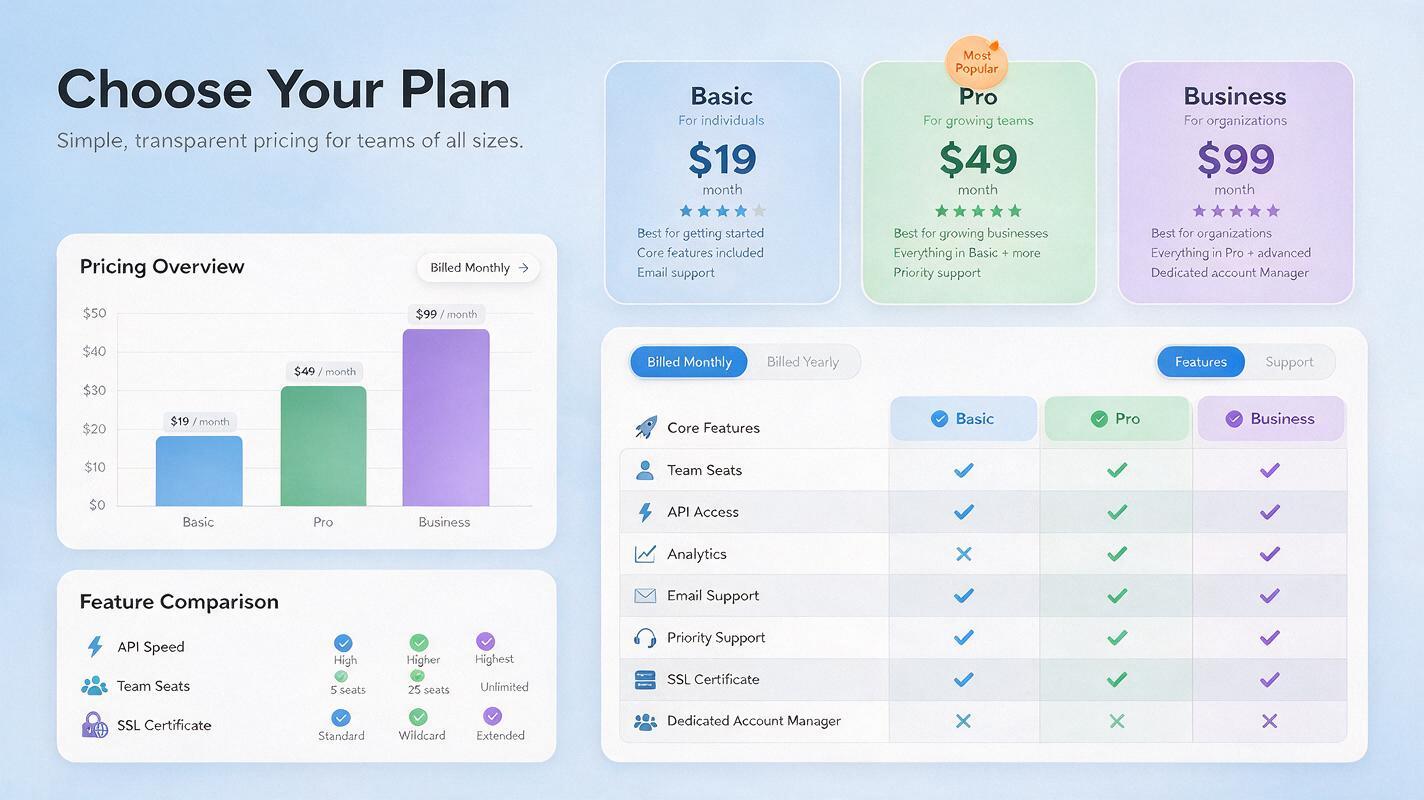
Create a 16:9 infographic comparing three subscription tiers. Include a comparison table, a small bar chart for pricing, and icon-based feature callouts. Use a clean, modern layout with generous white space.
6. Brand campaign prompt

Generate a horizontal banner ad for a summer skincare line: soft pastel background, product bottle centered-right, bold headline space on the left reserved for overlay text, warm natural lighting.
7. Multi-image fusion prompt
Cut out the objects from these reference photos and arrange them into a single realistic still-life composition. Keep the perspective, lighting, and spatial relationships consistent, and preserve each material's texture faithfully.
8. Seedance starting-frame prompt
Generate a stable, well-lit establishing shot of a coffee shop interior at golden hour, camera at eye level, composition leaving open space in the upper third for a title card, suitable as a starting frame for video animation.
Ready to run these prompts yourself?
Test These Prompts on Seedream 5.0 Pro →
Seedream 5.0 Pro vs Competitors
No Seedream 5.0 Pro review is complete without placing it next to the models teams are actually choosing between today. Here is how the publicly available specifications stack up:
Feature | Seedream 5.0 Pro | Seedream 5.0 Lite | Nano Banana Pro | GPT Image 2 |
|---|---|---|---|---|
Native resolution | 2K, upscalable to 4K | Standard/fast generation | High-resolution, fast | High-resolution |
Region-precise editing | Yes, grounded point/box/sketch selection | Limited | Prompt-based editing | Prompt-based editing |
Layer separation export | Yes, transparent PNG layers | No | No | No |
Native multilingual text | ~14 languages | Basic | Strong text rendering | Strong text rendering |
Built-in web search | Yes | No | No | No |
Best for | Layered editing, localized marketing, product revisions | Fast everyday generation | Fast, polished, vibrant one-shot visuals | General-purpose creative generation, text-aware editing |
The takeaway for anyone weighing Seedream 5.0 Pro against Nano Banana Pro or GPT Image 2: Pro’s differentiators are editing control and layer output, not raw aesthetic style. If your workflow is “generate one good image and ship it,” a faster, cheaper model may still be the better fit. If your workflow is “generate, then iterate on details, then hand off editable assets,” Seedream 5.0 Pro is built for that scenario.
Seedream 5.0 Pro vs Nano Banana Pro
On paper, the two models solve different problems. Nano Banana Pro is built around fast, vibrant, one-shot generation — a strong pick for a polished single image with minimal back-and-forth. Seedream 5.0 Pro instead front-loads editing infrastructure: region-precise targeting and layer export mean a generated asset can be revised and repurposed without regenerating from scratch. Teams doing high-volume creative variation — colorways, localized copy, seasonal swaps — feel the difference most; teams needing one great image per brief may not notice much gap.
Seedream 5.0 Pro vs GPT Image 2
GPT Image 2 is a strong general-purpose option with solid text-aware editing, and it benefits from broad ecosystem integration. Seedream 5.0 Pro’s edge is narrower but more specific: native transparent layer export and a wider native-language set for on-image text. If a project lives inside a broader OpenAI-based tool stack, GPT Image 2’s integration advantage may outweigh Seedream 5.0 Pro’s editing-specific features. If the deliverable is a layered, multilingual creative asset headed for further design work, Seedream 5.0 Pro is the more purpose-built choice.
Who Should Use Seedream 5.0 Pro
E-commerce and product teams needing catalog shots where a color or label swap should not disturb the rest of the frame.
Marketing and localization teams producing the same creative across multiple languages without a separate typesetting pass.
Designers who want an editable, layered starting point rather than a flattened final image.
Video teams using Seedance 2.5, since Pro is explicitly positioned as a still-frame source for that pipeline.
If none of the above describes your workflow, Seedream 5.0 Lite or a faster general-purpose model will get you to a finished image with less setup.
Ready to see the region editing and layer separation in action for yourself?
Experience Seedream 5.0 Pro on JXP →
Early Verdict
Seedream 5.0 Pro’s stated feature set directly targets the gap between “pretty AI image” and “usable production asset.” Grounded editing, layer separation, and native multilingual text are upgrades that show up in day-to-day output, not just in demo screenshots. Since the model only launched on July 8, 2026, independent, apples-to-apples benchmarking against Nano Banana Pro and GPT Image 2 is still in progress — treat early superiority claims, including this one, as directional rather than final until more hands-on testing accumulates. What is already clear is that ByteDance built Seedream 5.0 Pro around control and editability rather than chasing a single “best image” leaderboard, and that positioning is distinct enough to matter for real creative teams.
Seedream 5.0 Pro Review FAQ
Is Seedream 5.0 Pro free to use?
Seedream 5.0 Pro is accessible through Dreamina with free daily credits for new accounts. Developer access through Volcano Engine or BytePlus ModelArk is API-based and billed per use.
What languages does Seedream 5.0 Pro support for text rendering?
Seedream 5.0 Pro natively renders text in roughly fourteen languages, including English, Chinese, Japanese, Korean, French, German, Russian, Spanish, and Arabic, with correct typography and letterforms for each.
How is Seedream 5.0 Pro different from Seedream 5.0 Lite?
Seedream 5.0 Pro adds grounded region editing, multi-layer separation with transparent exports, native 4K output, and built-in web search — capabilities Seedream 5.0 Lite does not include. Lite remains the faster, simpler option for everyday generation.
Can Seedream 5.0 Pro edit an existing image, not just generate new ones?
Yes. Seedream 5.0 Pro supports point, box, and sketch-based selection so you can target a specific object, label, or area in an existing image and edit only that region while the rest of the frame stays unchanged.
Is Seedream 5.0 Pro better than Nano Banana Pro?
It depends on the task. Seedream 5.0 Pro’s advantages are region-precise editing, layer separation, and multilingual text; Nano Banana Pro remains strong for fast, vibrant one-shot generation. Full independent benchmarks are still emerging.
Does Seedream 5.0 Pro work with Seedance for video?
Yes. Seedream 5.0 Pro is positioned as a still-frame generator for Seedance 2.5, producing stable, well-composed images that can be used as a starting frame for video generation.
What resolution does Seedream 5.0 Pro support?
Seedream 5.0 Pro generates natively at 2K resolution and supports upscaling to 4K, making it suitable for print and large-format design work in addition to digital use.
Where can I try Seedream 5.0 Pro for myself?
Seedream 5.0 Pro is available through Dreamina for consumer use, and through Volcano Engine or BytePlus ModelArk for API access. You can also explore its region editing and layer separation features directly on JXP.