
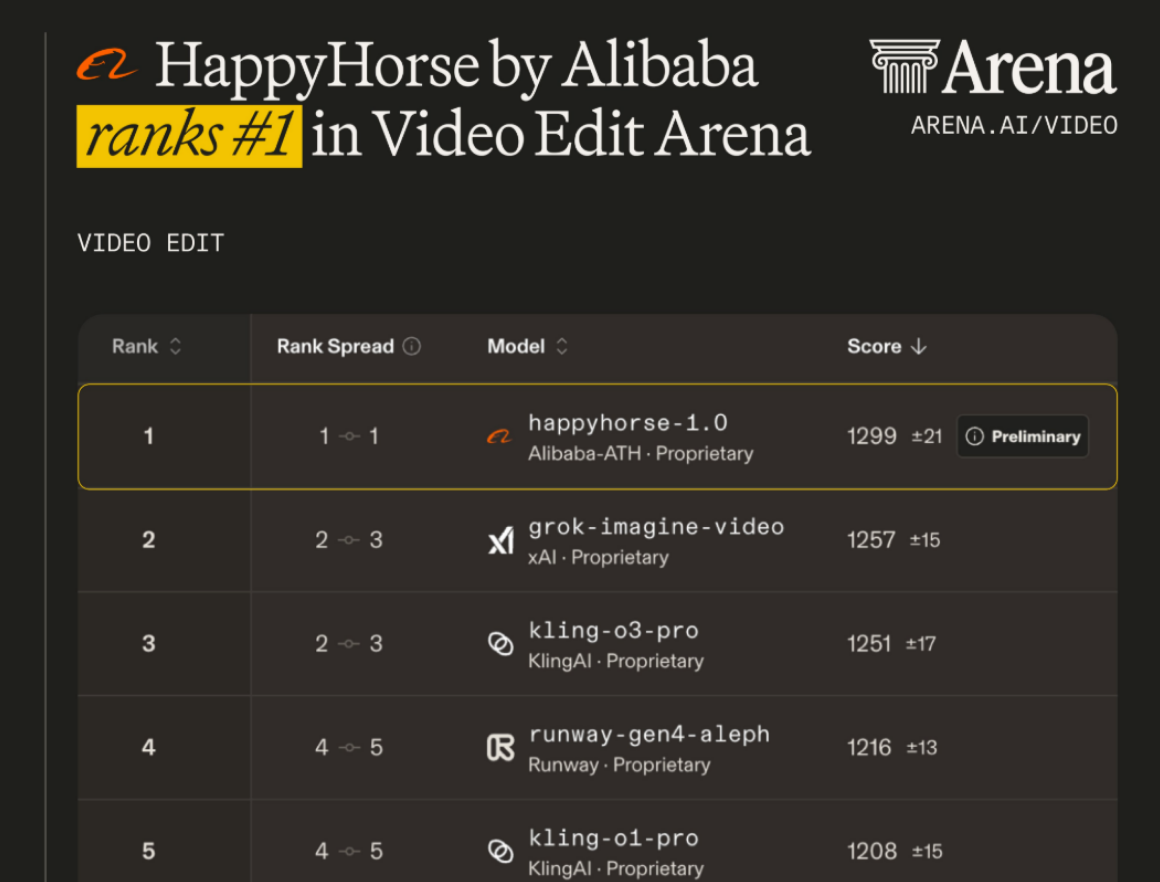
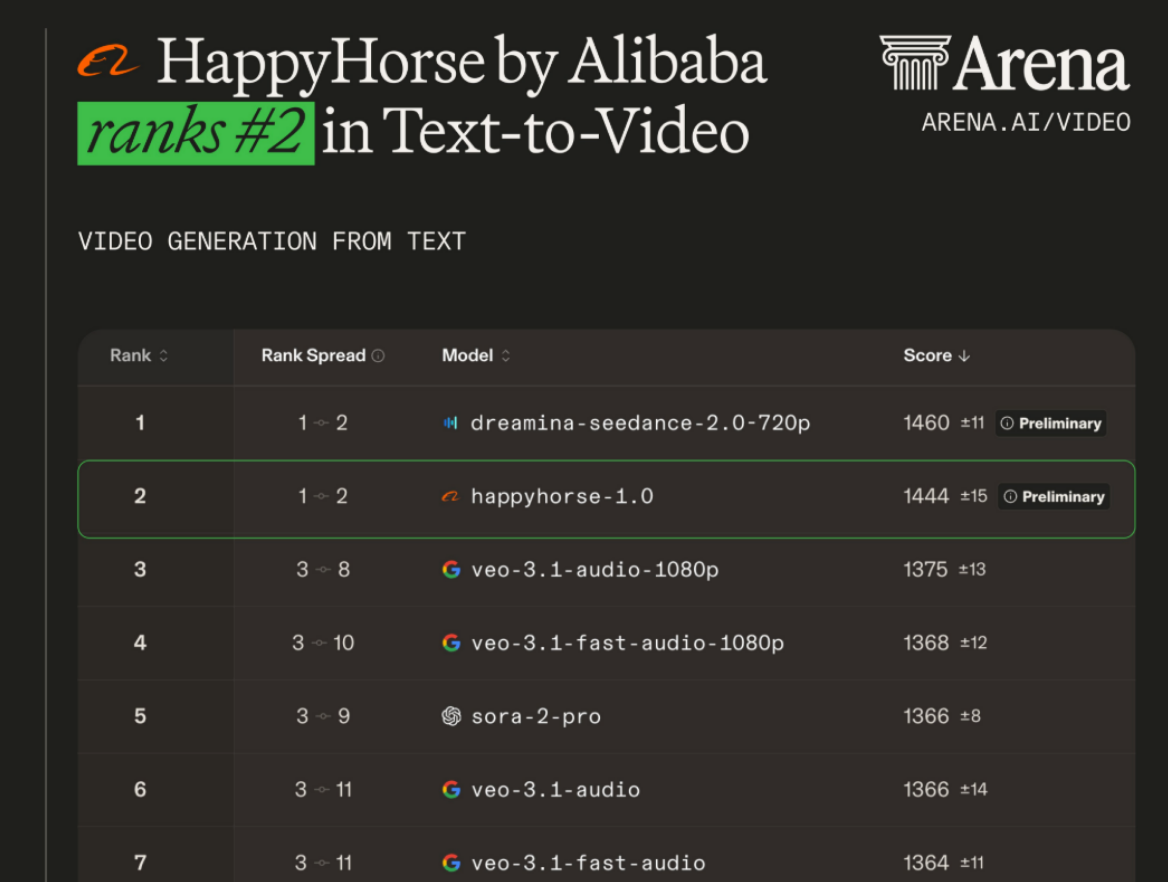
HappyHorse 1.0 appeared on the Artificial Analysis Video Arena leaderboard in April 2026 with no company name, no press release, and no public team — and within days knocked every competitor off the top spot, including ByteDance’s Seedance 2.0 and Google’s Veo 3.1. Officially confirmed as a product of Alibaba’s ATH AI Innovation Unit on April 10, 2026, this 15-billion-parameter multimodal video generation model became the first to simultaneously hold the #1 ranking for both text-to-video (T2V) and image-to-video (I2V).
Feature | Detail |
|---|---|
Parameters | 15 Billion |
Architecture | Unified Transfusion Transformer |
Native Audio | Joint generation — video + audio in one pass |
Max Resolution | 1080p @ 30 FPS |
Lip Sync Languages | English, Mandarin, Cantonese, Japanese, Korean, German, French |
Clip Duration | 3–15 seconds |
Inference Speed | ~38 seconds per 1080p clip |
Watermark | None — all exports watermark-free |
Commercial Use | Included on all plans |
It supports four generation modes: Text-to-Video, Image-to-Video, Reference-guided generation, and Video Editing — all from a single studio on JXP.
Quick Verdict
⚡ Bottom Line
HappyHorse 1.0 is the highest-ranked AI video generator of 2026 — #1 in both text-to-video and image-to-video on the Artificial Analysis leaderboard.
Best for | Cinematic AI video · Multilingual lip sync · Image animation · E-commerce demos |
Limitations | Liquid physics · Clips over 15 seconds · Complex motion editing |
Closest rival | Seedance 2.0 (closes within 1 Elo pt on audio-enabled I2V) |
Access | JXP — free credits, no credit card, no watermark, commercial use included |
▶ Try It Yourself
Generate cinematic AI video with native multilingual lip sync — no credit card needed.
→ Try HappyHorse 1.0 Free on JXP
Benchmark Summary
HappyHorse 1.0 was submitted anonymously to the Artificial Analysis Video Arena in early April 2026. The Arena uses a blind Elo system — real users vote on video quality without knowing which model produced which output.
A 74-point Elo lead means HappyHorse wins roughly 60–65% of blind head-to-head matchups against the previous #1 — the largest margin ever recorded on the Artificial Analysis platform.
Category | HappyHorse 1.0 | Seedance 2.0 | Gap |
|---|---|---|---|
Text-to-Video (no audio) | #1 — 1,357 | ~1,283 | +74 pts — record margin |
Image-to-Video (no audio) | #1 — 1,415 | ~1,378 | +37 pts |
Text-to-Video (with audio) | 1,238 | ~1,227 | +11 pts |
Image-to-Video (with audio) | ~tied | ~tied | <1 pt |
The lead is clearest in silent video categories. With audio enabled, Seedance 2.0 closes the gap to within a single Elo point in image-to-video. Veo 3.1 sits around #3 in T2V rankings but does not offer a dedicated image-to-video workflow or native joint audio-video generation at comparable quality — and access remains limited to Google Labs.
 |  |
|---|
Core Features
1. Unified Single-Stream Transformer Architecture
What separates HappyHorse 1.0 from every other AI video generator is its unified single-stream Transformer design, based on the Transfusion framework.
Most AI video pipelines work in two stages: generate silent video, then run a separate audio model and synchronize. HappyHorse 1.0 processes video frames and audio tokens simultaneously in a single forward pass. The practical consequence is that ambient sound, dialogue, and lip movement are generated together — not matched in post-processing. This is the core reason the model’s lip sync and audio coherence consistently outperform two-stage pipelines in blind user tests on the Artificial Analysis Video Arena.
2. ~87% Multi-Shot Narrative Consistency
The architecture drives the model’s ~87% multi-shot narrative consistency — the highest of any publicly available AI video generator in 2026. Characters look the same from shot to shot, lighting stays coherent, and visual style does not drift between cuts.
3. Native Multilingual Lip Sync
7-language native lip sync: Mandarin Chinese, Cantonese Chinese, English, Japanese, Korean, German, and French. Audio and video are generated simultaneously in a single inference pass — no third-party dubbing tool required.
4. Four-in-One Studio
Mode | Description |
|---|---|
Text-to-Video | Generate cinematic video directly from text prompts |
Image-to-Video | Animate still images while preserving reference detail |
Reference-Guided | Constrain character appearance and style consistency via reference image |
Video Editing | AI-powered scene swap, time-of-day replacement, and style transfer |
5. Real Workflow Efficiency
Efficiency Factor | Detail |
|---|---|
Inference speed | ~38 seconds for a 10-second 1080p clip |
No post-processing | No separate audio render or manual sync check required |
Single interface | All workflows in one JXP studio — no format conversion between steps |
Estimated time savings | Up to 50% reduction in per-clip production time vs. two-stage pipelines |
▶ Try It Yourself
Generate cinematic AI video with native multilingual lip sync — no credit card needed.
→ Try HappyHorse 1.0 Free on JXP
Real Tests
Text-to-Video
Test 1 — Rainy Street Portrait
Prompt:
Photorealistic style. A young woman in a dark green trench coat stands at a rain-soaked Tokyo crosswalk at night. Neon signs reflect on the wet pavement. She slowly turns her head to look directly into the camera, raindrops catching the light on her face. Shallow depth of field. Cinematic color grade.
Parameters: 1080p · 8 seconds · 16:9
Result: Wet-surface light reflections were handled accurately — neon colors pooled correctly on the pavement without bleeding into unrealistic shapes. The character’s hair moved with the rainfall weight, and the turn-to-camera motion was smooth with no interpolation artifacts mid-turn. Skin texture held under shallow focus without the waxy look common in lower-tier models.
Test 2 — Wildlife Documentary
Prompt:
Wildlife documentary style. A red fox trots through a snowy pine forest at dawn. Its breath forms visible puffs in the cold air. It pauses, ears pricked forward, then resumes walking. Soft morning light filters through the trees. Camera follows at medium distance.
Parameters: 1080p · 10 seconds · 16:9
Result: Fur texture and layering were rendered with high fidelity — individual guard hairs caught the directional morning light differently from the underfur beneath. The breath puff timing matched the animal’s gait. Minor issue: The shadow cast by the fox on the snow surface occasionally detached slightly from the paw contact points — a small physics inconsistency, not distracting at normal playback speed.
Test 3 — Multilingual Lip Sync
Prompt:
A professional female news anchor in her 30s, neutral studio background, looking directly at camera. She speaks clearly in English: “The results were announced this morning, and the numbers are unprecedented.” Broadcast lighting. Tight mid-shot.
Parameters: 1080p · 7 seconds · 16:9
Result: Lip sync was frame-accurate across the full sentence. The same character with the same sentence translated into Mandarin and Japanese both maintained identical sync accuracy. Because audio is generated natively within the same inference pass, there was no drift between mouth movement and sound across all three language tests.
Key Insight: HappyHorse 1.0’s native joint audio generation is the only current model to achieve frame-accurate lip sync across 7 languages without any post-processing step.
→ Generate Cinematic AI Video from Text — Start Free
Image-to-Video
Test 4 — Anime Shrine Maiden

Reference image: A still illustration of a shrine maiden in traditional white and red robes, standing in a forest clearing, holding a paper lantern, looking downward.
Prompt:
The shrine maiden slowly raises her head, eyes opening to look at the sky. The paper lantern in her hand begins to glow with soft golden light. Cherry blossom petals drift down around her. The camera gently pushes in from a medium shot to a close-up on her face. Painterly animation style consistent with the source image.
Parameters: 720p · 8 seconds · 9:16
Result: The transition from still image to motion preserved the character’s costume details — collar pattern, sleeve width, and hair accessory position all matched the reference. The lantern glow was rendered as volumetric light affecting the surrounding petals naturally. Minor limitation: Fine fabric texture on the outer robe became slightly softer in motion compared to the sharp line art of the reference image — visible on close inspection at 720p, less so at 1080p.
Test 5 — E-Commerce Product Shot
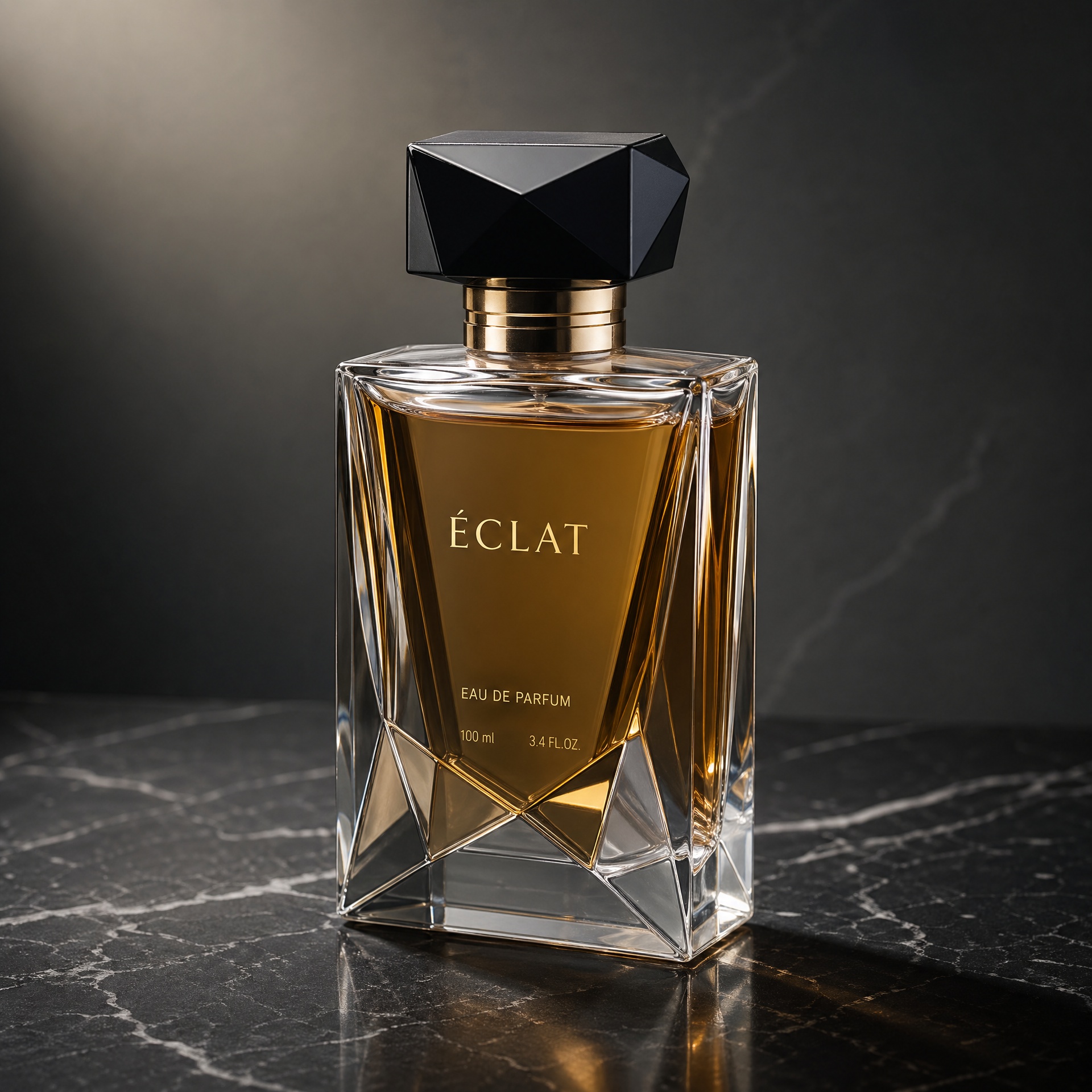
Reference image: A clean product photograph of a geometric glass perfume bottle on a dark marble surface, studio lighting from the upper left.
Prompt:
The camera orbits slowly around the perfume bottle in a 270-degree arc. Light refracts through the glass facets as the angle changes. A single drop of perfume falls from the bottle neck and splashes in slow motion into a pool of liquid below. The background remains dark with subtle light gradients. Ultra high-definition product commercial style.
Parameters: 1080p · 10 seconds · 1:1
Result: The orbital camera movement and glass refraction were handled well — light bent correctly through the facets as the viewing angle changed. However, the liquid drop impact produced droplets that were too spherical, lacking the elongated tails and asymmetric splash crown that real slow-motion liquid photography shows. For general product showcase, the result is commercially usable. For precision beauty brands requiring physically accurate liquid behavior, further prompt refinement or multiple generation attempts would be needed.
→ Turn Any Product Image into a Demo Video — Try Free
AI Video Editing
Test 6 — Time-of-Day Scene Swap
Source: A 10-second clip of a man walking through a city park in bright midday sunlight.
Prompt:
Change the time of day to late evening golden hour. The sky should shift to deep orange and pink tones. Add long shadows cast by the trees. Streetlights in the background should begin to turn on. Keep the person and their movement completely unchanged.
Result: The background lighting shift was convincing — sky color, shadow direction, and ambient fill on the subject all updated consistently. The person’s clothing picked up warm orange bounce light from the simulated golden hour correctly. Edges around the subject’s hair showed slight softening where the model blended the foreground against the re-lit background, but this was only visible on still frames, not during playback.
Test 7 — Watercolor Style Transfer
Source: An 8-second clip of a woman pouring tea at a wooden table, natural indoor lighting.
Reference image: A still from a hand-painted watercolor animation with visible brush strokes and soft color bleeding.
Prompt:
Rerender the entire video in watercolor animation style, matching the brush stroke texture and color palette of the reference image. Maintain all original movement and timing. Apply soft edge diffusion consistent with traditional watercolor media.
Result: The style transfer applied convincingly to background elements — the table, cup, and room became painterly with visible stroke texture. The human subject’s skin and face retained more photorealistic quality than the background, creating a slight style inconsistency between subject and environment. This is a known limitation in current video style transfer: models tend to preserve human face realism over stylistic transformation. Uploading the reference image into the reference slot (rather than describing the style in the prompt alone) noticeably improved overall style consistency.
→ Edit Videos with AI — No Editing Skills Needed
Pricing
All plans include commercial use rights. New users receive free experience credits on registration — no credit card required. A 7-day money-back guarantee applies to all paid plans.
One-Time Credit Packages (credits never expire)
Plan | Price | Credits | Best For |
|---|---|---|---|
Starter | $10 one-time | 100 credits | First-time testing |
Premium | $30 one-time | 330 credits | Regular creators |
Ultimate | $99 one-time | 1,211 credits | Agencies & power users |
Monthly Subscriptions (~20% more credits per dollar)
Plan | Price | Credits/Month | Best For |
|---|---|---|---|
Starter | $10/month | 120 credits | Solo creators |
Premium | $30/month | 396 credits | Growing teams |
Ultimate | $99/month | 1,453 credits | Agencies & studios |
Credit reference: A 5-second 720p clip consumes ~8 credits; a 10-second 1080p clip consumes ~20 credits. The JXP interface shows the exact credit cost before you confirm — no surprise deductions.
Competitor Comparison
Metric | HappyHorse 1.0 | Seedance 2.0 | Veo 3.1 |
|---|---|---|---|
T2V Elo Rank | #1 — 1,357 | ~1,283 | ~#3 |
I2V Elo Rank | #1 — 1,415 | ~1,378 | — |
Audio Pipeline | Native joint generation | Separate model | Separate model |
Multilingual Lip Sync | Native, 7 languages | Post-processed | Limited |
Max Clip Length | 15 seconds | 10 seconds | 10 seconds |
Video Editing | Yes — scene swap + style transfer | Limited | No |
Watermark-Free Export | Yes — all plans | Varies by plan | Varies by plan |
Public Access | JXP — free credits | Varies | Google Labs only |
The lead is clearest in silent video categories. With audio enabled, Seedance 2.0 closes the gap to within a single Elo point in image-to-video. Veo 3.1 sits around #3 in T2V rankings but does not offer a dedicated image-to-video workflow or native joint audio-video generation at comparable quality — and access remains limited to Google Labs, whereas HappyHorse 1.0 is fully accessible through JXP with free credits available on registration.
FAQ
Is HappyHorse 1.0 the best AI video generator in 2026?
Based on the Artificial Analysis Video Arena leaderboard as of April 2026, HappyHorse 1.0 holds the #1 position for both text-to-video AI (Elo: 1,357) and image-to-video AI (Elo: 1,415) — the only model to top both categories simultaneously.
Is it free to use?
Yes. New users on JXP receive free experience credits upon registration with no credit card required. Free credits are sufficient to generate several videos and evaluate output quality before purchasing any plan.
Does it add watermarks?
No. All exports are watermark-free MP4 files across all plans, including free credits. There is no hidden upgrade required to remove a watermark.
What languages does lip sync support?
7 languages: Mandarin Chinese, Cantonese Chinese, English, Japanese, Korean, German, and French. Audio and video are generated simultaneously in a single forward pass — no third-party dubbing tool required.
How many credits does one video cost?
A 5-second 720p clip consumes approximately 8 credits; a 10-second 1080p clip consumes approximately 20 credits. The JXP interface displays the exact credit cost before you confirm — no surprise deductions.
How does it compare to Veo 3.1?
HappyHorse 1.0 ranks above Veo 3.1 in Artificial Analysis T2V rankings (#1 vs. Veo 3.1’s approximate #3 as of April 2026). HappyHorse 1.0 also offers a dedicated image-to-video workflow and native joint audio-video generation — capabilities Veo 3.1 does not match at comparable quality. HappyHorse 1.0 is publicly accessible via JXP with free credits; Veo 3.1 access remains limited to Google Labs.
What is the maximum resolution and duration?
Up to 1080p at 30 FPS. Clip duration configurable from 3 to 15 seconds. Supported aspect ratios: 16:9, 9:16, 1:1, 4:3, and 3:4.
Is commercial use included?
Yes. Commercial use rights are included across all plans — free credits, one-time purchases, and monthly subscriptions — with no additional licensing fee.
What file formats does JXP accept?
Images: JPEG, JPG, PNG, BMP, WEBP (240–8000px, max 20MB, no PNG alpha). Video: MP4 and MOV (3–60 seconds, max 100MB).
Final Verdict
HappyHorse 1.0 earned its leaderboard position through blind pairwise voting by real users — not developer-curated demos. A 74-point Elo lead over the previous #1 in text-to-video AI is the largest margin ever recorded on the Artificial Analysis platform, and it holds up across all four generation modes in hands-on testing.
The unified audio-video architecture is a genuine differentiator for any workflow involving synchronized dialogue or multilingual output — it removes an entire processing stage that competing AI video generators still require. The image-to-video AI and scene-replacement features are production-ready for most commercial use cases.
Documented gaps to know before committing:
Liquid physics accuracy in precision product advertising
Motion-level video editing in complex transitions
Single-pass clip ceiling of 15 seconds
Strong Fit | Not Yet the Best Choice |
|---|---|
Multilingual content creators (native 7-language lip sync) | Precision product advertising requiring accurate liquid/material physics |
Social media creators (native 9:16 and 1:1 support) | Complex motion-level video editing |
E-commerce brands (product photo → demo video in under a minute) | Clips longer than 15 seconds per generation |
Brand agencies (~87% multi-shot consistency for professional brand film) | |
Animators (I2V reference art detail preservation) |
For creators focused on character performance, cinematic text-to-video AI, multilingual content, or image animation — HappyHorse 1.0 is the best AI video generator available today.
Generate Your First AI Video Free
No credit card. No watermark. Commercial use included.